
We’ve Rescued 15+ Codebases That AI Tools Helped Break. Here’s the Pattern
Huzefa Motiwala March 14, 2026
AI coding tools can speed up development but often introduce hidden problems that surface months later. AlterSquare has fixed over 15 codebases impacted by these tools, identifying four recurring issues:
- Lack of System Context: AI-generated code often ignores the broader architecture, causing duplication, mismatched logic, and compatibility issues.
- Outdated APIs: AI tools rely on old datasets, leading to recommendations for deprecated libraries and unsafe dependencies.
- Poor Error Handling: Generated code frequently skips error checks and edge cases, increasing bugs in production.
- Inconsistent Refactoring: AI tools create fragmented designs and duplicate logic, making maintenance harder.
These problems can lead to skyrocketing maintenance costs, with some projects requiring 10× the time initially saved. To fix AI-disrupted systems, AlterSquare recommends strategies like enforcing architectural boundaries, consolidating duplicate logic, and phased rollouts of updates. Safeguards like automated tests, dependency checks, and staged deployments can help teams use AI tools without destabilizing their systems. Without these measures, AI tools can amplify technical debt instead of solving it.
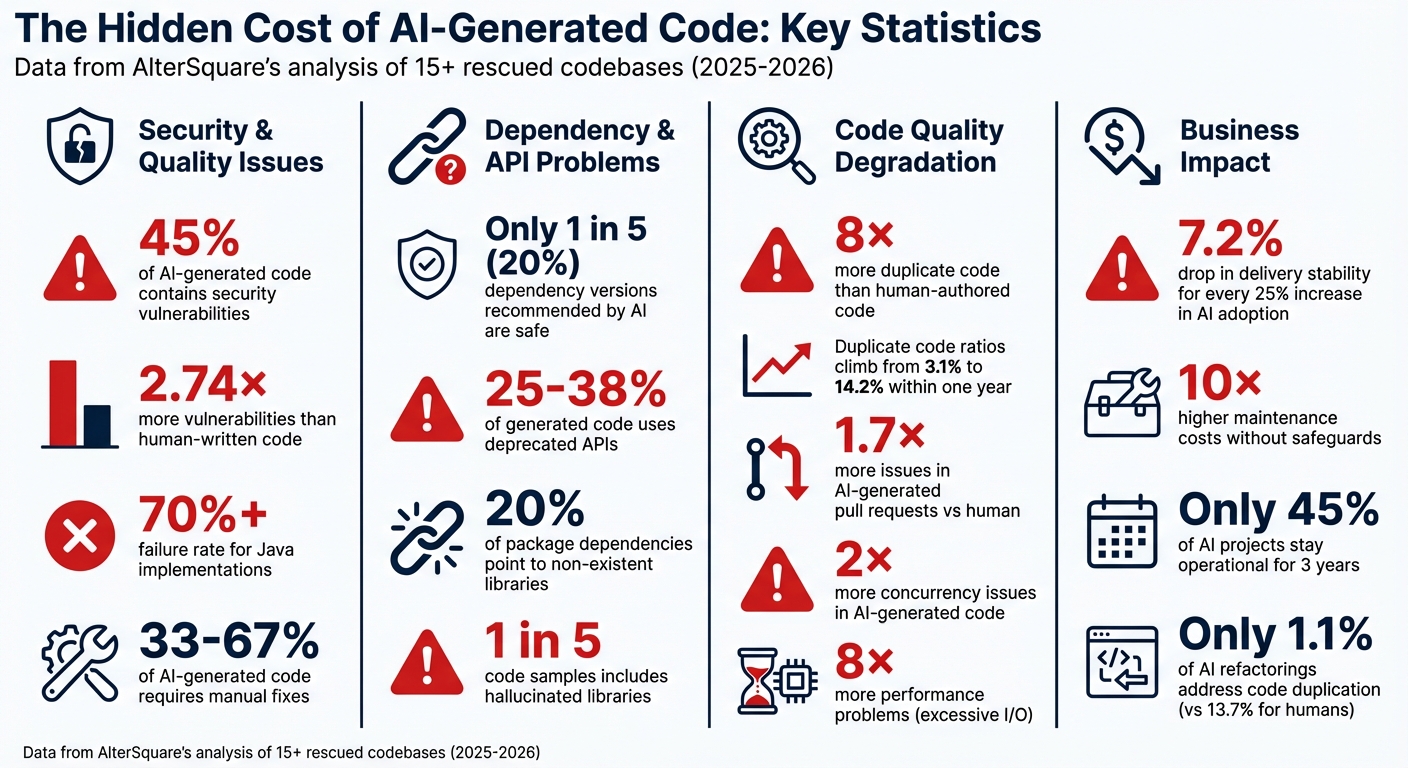
AI Code Generation: Key Statistics on Vulnerabilities, Duplicates, and Failures
AI-Generated Code Is Creating a New Kind of Technical Debt
sbb-itb-51b9a02
4 Common Ways AI Tools Break Production Code
AlterSquare, drawing from its experience in salvaging production systems, has identified recurring patterns that destabilize production environments when AI tools are used to generate code. These aren’t just random bugs – they’re recurring issues that crop up across projects.
1. Code Generated Without System Context
AI tools often suffer from "tunnel vision", focusing on a single file or snippet without understanding the broader codebase. This narrow perspective can lead to problems like logic duplication. For instance, an AI tool might create a new payment validation function, unaware that an equivalent one already exists in a shared utilities folder. In one notable case from February 2026, a developer used an AI assistant to rename a domain object across multiple files. The result? A mix of mismatched identifiers like userProfile, user_profile, and profileUser, which caused 500 errors in production when unmapped code paths were triggered [7].
Between 33% and 67% of AI-generated code requires manual fixes. Worse, these tools often ignore architectural conventions, recommending shortcuts like directly instantiating databases instead of following established dependency injection frameworks [5][6].
"The AI code assistant only saw the 50 lines that changed, not the 50,000 lines that depended on them."
- Alex Mercer, cubic.dev [6]
Such lack of context also contributes to compatibility issues, especially when generated code uses outdated APIs.
2. Outdated APIs and Library Versions
AI models are trained on static datasets, which means their knowledge is frozen at a specific point. For example, GPT-4o‘s training cutoff is June 2024, and Claude Opus 4.6’s is August 2025. This lag becomes a problem when generating code in 2026, as these models may not account for the latest library updates, security patches, or breaking changes.
Take this example from February 2026: while working on a new SaaS project, developers found that AI tools were recommending Node 18, a version that reached End of Life in April 2025, instead of the current Node.js 24 LTS. Only one tool suggested Node 20 [8]. Alarmingly, only 1 in 5 dependency versions recommended by AI coding assistants is considered safe. Additionally, between 25% and 38% of the code generated relies on deprecated APIs, and nearly 20% of suggested package dependencies point to libraries that no longer exist [8].
"The most sophisticated AI on the planet writes code like a senior developer who stopped reading release notes two years ago. Except that developer would at least feel guilty about it."
- Dragosacorex, Full-stack Developer [8]
Beyond outdated dependencies, AI-generated code also tends to overlook critical aspects like error handling and edge case coverage.
3. Missing Error Handling and Edge Cases
AI models are primarily trained on idealized scenarios where everything works as expected. This means they often fail to account for real-world issues like network timeouts, malformed JSON, or database connection failures [9]. The result? AI-generated pull requests contain about 1.7 times more issues compared to those written by human developers [10]. Common mistakes include missing null checks that lead to null pointer exceptions, race conditions caused by concurrent operations, and overly generic try/catch blocks that fail to log or recover from errors properly.
In one AlterSquare rescue case, AI-generated code introduced race conditions in the caching layer. These issues only appeared when multiple users accessed the system simultaneously, a flaw that unit tests – designed for single-threaded environments – failed to detect [3].
"AI coding tools are trained on public code. They have never seen your production traffic, your real API contracts, or your operational quirks. That gap will always exist."
- Ken Ahrens, Speedscale [10]
4 Methods for Fixing AI-Broken Systems
When AI tools disrupt your codebase, fixing the damage takes more than just rolling back changes. AlterSquare has created targeted strategies to address these issues without causing further problems or impacting live production environments. Here are four methods to repair AI-induced system failures.
1. Fixing Broken Dependencies from File-by-File Changes
AI tools often focus on solving immediate problems, overlooking how their changes might ripple through the system. This can lead to architecture drift, where design principles are violated, and circular dependencies form [11][13]. Modules that should operate independently become tangled, making future updates a nightmare.
AlterSquare’s AI-Agent Assessment scans the dependency graph to identify structural issues like "The Hairball" (overly coupled modules) and "The Butterflies" (bottlenecks with high fan-in/fan-out connections) [14]. These patterns confuse AI dependency resolution and create messy architectures.
The solution? Boundary enforcement. This ensures each module sticks to its domain, with dependencies flowing in one direction [13]. Tools like npx madge --circular can help spot circular dependency chains. If you find more than three, the structure may need serious intervention [13]. AlterSquare uses a multi-agent system to plan and apply fixes across the dependency graph, cutting manual refactoring time from 40 hours to 16–32 hours and reducing labor costs by 15–20% [12].
2. Removing Duplicate Logic and Code Drift
AI-generated code often introduces duplication – sometimes as much as 8× more than human-authored code [16]. Instead of reusing existing functions, AI tools create new ones, leading to inconsistencies in how the same business rules are applied across the codebase.
Interestingly, only 1.1% of AI-driven refactorings address code duplication, compared to 13.7% for human developers [17]. AlterSquare’s approach starts with mapping the architecture to identify core business logic and patterns before allowing AI-driven changes [16].
The process involves consolidating duplicate functions into a single, shared solution. AlterSquare doesn’t aim for external "perfection" but instead evolves the system based on the best existing patterns [16]. Using the Strangler Fig Pattern, small pieces of logic are gradually extracted into new methods while the original functions are phased out [16].
To prevent future drift, automated tests (like ArchUnit for Java or dependency-cruiser for JavaScript) enforce architectural boundaries at build time [15]. Refactoring changes are also submitted separately from feature work to avoid hidden review burdens, a common issue in 53.9% of AI refactorings [17].
3. Resolving Race Conditions and Performance Issues
AI tools often miss concurrency issues, which occur twice as often in AI-generated code compared to human-authored code. Performance problems, especially those caused by excessive I/O, are also 8× more frequent [20].
The problem lies in how AI analyzes code – it treats it as text, without modeling how operations interleave when multiple users interact with the system [18]. AlterSquare’s Variable-Velocity Engine prioritizes fixes in critical areas like checkout flows and key API endpoints [4].
Concurrency issues can be detected using vector clocks and lockset methods [18]. For asynchronous systems, linting tools like Ruff’s ASYNC100 (flags blocking HTTP calls) and ASYNC102 (flags blocking sleep functions) catch problems before they hit production [20].
A real-world example: In May 2025, Marten Seemann fixed a race condition in the quic-go library by refactoring its test suite to use environment variables (t.Setenv) for isolation instead of modifying global state [19]. This approach echoes AlterSquare’s focus on solving root causes rather than applying quick patches.
4. Restoring Consistent UI and Design Systems
AI tools often create UI components in isolation, ignoring the established design system. The result? A fragmented interface where buttons, forms, and modals look inconsistent, confusing users and leaving a poor impression.
AlterSquare addresses this by starting with a visual audit to identify variations in components. These are then consolidated into a unified design system, with updates made incrementally to maintain backward compatibility.
The goal isn’t instant perfection but gradual alignment. By setting clear design standards and using AI to evolve the system step by step, AlterSquare ensures a cohesive interface without a total overhaul [16]. This phased approach mirrors backend refactoring: focus on critical areas first, then expand improvements systematically.
How to Use AI Tools Without Breaking Your System
AI tools can speed up development – but only if you use them carefully. AlterSquare’s experience in fixing broken codebases highlights three key steps to avoid AI-related failures before they even reach production.
1. Test AI Tools Against Your Business Needs
Generic demos won’t show you how well a tool works with your unique setup. Focus on testing the tool with the most complex parts of your codebase, like legacy code or areas filled with undocumented dependencies and quick fixes. These tricky sections will reveal whether the AI can handle your patterns – or if it falls short [21][22].
Look for tools with strong contextual understanding. Those with large context windows (200k+ tokens) or repository-level indexing can track dependencies across multiple files and services [21][23]. Tools that struggle here might break imports or misinterpret dependencies, while better ones maintain your architecture and simplify workflows [22]. Also, ensure the AI respects your team’s specific error-handling and validation methods [21][24].
"The question isn’t whether AI tools work in general. The question is whether they work with your specific code, your team’s patterns, and your actual development challenges." – Molisha Shah, GTM and Customer Champion [21]
For smooth integration, keep AI response times under 400ms. Anything slower can disrupt developer focus [23]. It’s worth noting that only 45% of AI projects stay operational for three years, often due to poor evaluations early on [21].
Proper testing lays the foundation for effective safety measures.
2. Set Up Safety Rules for AI-Generated Code
AI-generated code often comes with more security risks – 2.74× more vulnerabilities than human-written code [20]. Veracode’s 2025 research found that 45% of AI-generated code had security flaws, with Java implementations exceeding a 70% failure rate [2]. To combat this, automate a quick three-minute check using tools like linters, type checks, and tests to catch duplicate logic and insecure patterns [2]. For example, pre-commit hooks can block unnecessary duplicates, like creating a new rate limiter class when a shared utility already exists [20].
Use tiered reviews based on risk. Low-risk changes, like documentation updates, can rely on automated checks. But high-risk areas, such as authentication or billing, should always require human review by an AppSec specialist [25]. Implement "evidence gates" that demand concrete proof, such as pasted test results, instead of vague claims like "tests passed" [27]. Automated scanners should also flag AI-generated code containing markers like TODO, FIXME, or HACK, preventing incomplete work from slipping into production [27].
"The model is not unreliable. The system that deploys it without verification infrastructure is unreliable." – Blake Crosley [27]
With these safeguards, you can confidently roll out updates in stages.
3. Phase System Updates Using Staged Approaches
The 2024 DORA Report shows that as AI adoption increases, delivery stability often takes a hit – dropping 7.2% for every 25% increase in AI use [27]. The problem isn’t AI itself but deploying its changes without a plan.
To avoid chaos, use a staged rollout strategy. For example, the Expand/Contract Migration Pattern lets you introduce new methods, migrate call sites gradually, and then remove outdated code [26]. Begin with low-traffic or internal systems, then move to medium-risk areas, and finally tackle high-traffic, customer-facing systems [26].
AlterSquare’s Variable-Velocity Engine tailors the approach to your business stage:
- For MVPs: Use Disposable Architecture to test ideas quickly without creating long-term issues [4].
- For scaling businesses: Managed Refactoring wraps AI models in strict engineering practices, using Abstract Syntax Tree (AST) transformations and CI-gated merge queues to ensure syntactic accuracy [26].
- For mature systems: Enforce idempotence, ensuring that running an AI-generated codemod twice produces the same result, which prevents inconsistencies during multi-repo rollouts [26].
Keep pull request (PR) changes manageable – between 100 and 300 files – to simplify reviews and allow for easy debugging if something goes wrong [26]. Use merge queues to ensure AI-generated PRs land in the main branch one at a time, avoiding conflicts [26]. Before a full rollout, test AI-generated changes on a “gold-set” of examples to measure how accurately they transform code and how many patterns they catch [26].
"AI agents are force multipliers, not cleanup crews. If your existing codebase is full of drift, duplication, and legacy shortcuts, agents will scale those patterns into your next release." – Dakic [24]
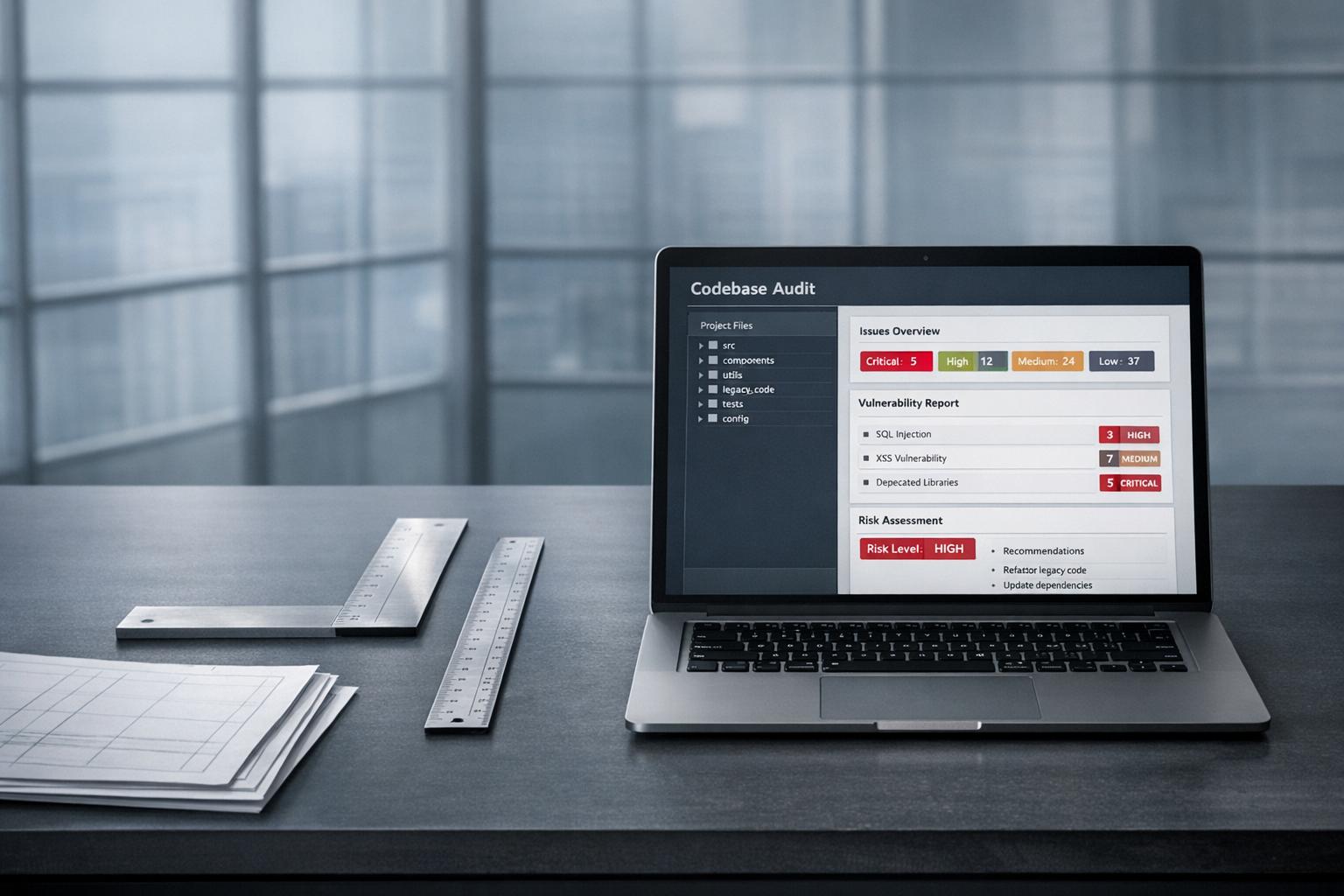
AlterSquare’s AI-Agent Assessment provides an in-depth System Health Report, identifying architectural issues, security risks, and areas of tech debt. This helps their Principal Council create a Traffic Light Roadmap (Critical / Managed / Scale-Ready), ensuring AI-driven changes are rolled out based on actual risks and priorities.
Conclusion
AI tools can disrupt production systems in predictable ways – such as lacking system context, relying on outdated APIs, skipping error handling, and creating inconsistencies during refactoring. Research shows that one in five AI-generated code samples includes hallucinated libraries, and 45% contain security vulnerabilities[2]. Over time, these issues compound, with duplicate code ratios climbing from 3.1% to 14.2% within a year[1].
However, these challenges aren’t insurmountable. Drawing from experience in stabilizing over 15 production systems, it’s clear that structured safeguards can allow AI tools to speed up development without compromising stability. Start by using linters, type checks, and tests for rapid issue detection. Next, address duplicate code, performance bottlenecks, and UI inconsistencies. Finally, secure your system by aligning AI tools with business needs, enforcing automated safety rules, and rolling out updates in controlled stages. These steps are critical to maintaining stability in AI-enhanced codebases.
The risks of skipping verification are substantial. Delivery stability drops by 7.2% for every 25% increase in AI adoption if safeguards aren’t in place[27].
AlterSquare’s AI-Agent Assessment offers a System Health Report to identify architectural flaws, security vulnerabilities, and tech debt before major decisions are made. Their Principal Council adds business context to create a Traffic Light Roadmap – classifying issues as Critical, Managed, or Scale-Ready – ensuring AI-driven changes are implemented based on actual risk and priority.
AI tools are powerful accelerators, but they’re not designed to clean up after themselves. Without proper safeguards, maintenance costs could skyrocket – up to ten times higher[3]. With the right infrastructure, however, they can genuinely enhance development without destabilizing your systems.
FAQs
How can we tell if AI-generated code is actually safe to merge?
When working with AI-generated code, it’s crucial to carefully review it to avoid potential issues. Start by looking for hallucinated APIs – these are fake or non-existent APIs that the AI might have included. Also, check for security vulnerabilities, as the AI might miss critical safeguards, and ensure that edge cases are accounted for to prevent unexpected failures.
Pay attention to coding standards. AI can sometimes produce inconsistent styles or duplicate logic, which can make the code harder to maintain. To address this, verify that the code aligns with your team’s conventions and best practices.
Testing is another key step. Conduct targeted testing to identify edge cases and evaluate performance. This ensures the code behaves as expected under various conditions. Additionally, use static analysis tools alongside manual code reviews to catch errors that might slip through automated checks.
By combining these steps – thorough reviews, testing, and analysis – you can feel more confident that the AI-generated code is ready for production.
What’s the fastest way to find AI-caused architecture drift and duplication?
To quickly identify issues, rely on systematic detection methods to uncover pattern divergence and structural inconsistencies. Some effective strategies include:
- Monitoring for conflicting patterns: For example, look out for mixed data access methods that can indicate inconsistencies.
- Using static analysis tools: These tools are great for spotting duplicated logic or other anomalies in the codebase.
- Comparing code to architectural guidelines: Ensure the code aligns with the established design principles and rules.
Additionally, conducting regular audits and targeted manual reviews can help catch AI-related drift early, preventing it from spreading throughout the system.
How do we roll out AI-driven refactors without breaking production?
To ensure the safe implementation of AI-driven code refactors, it’s crucial to thoroughly test the AI-generated code during development. Start by verifying that it successfully passes linting, compilation, and unit tests. When deploying, adopt incremental strategies – such as using feature toggles – to monitor changes closely and enable quick rollbacks if issues arise.
For critical updates, detailed code reviews are essential. This step helps catch potential errors or oversights that AI might miss, especially in complex systems. While AI can be a powerful tool, avoid depending on it entirely for intricate tasks. By combining rigorous testing, gradual rollouts, and continuous monitoring, you can maintain stability in production environments.
Related Blog Posts
- Why AI-Generated Code Costs More to Maintain Than Human-Written Code
- GitHub Copilot Saved Us 200 Hours: Then Cost Us 2000 Hours in Bug Fixes
- AI-Generated Code Looks Clean. Here’s Why Your Next Refactor Will Prove It Isn’t
- The AI Productivity Paradox: Your Team Ships More Code but Moves Slower. Here’s Why






Leave a Reply