

Trust in AI systems is fragile. Users need to feel confident in the system’s abilities while understanding its limitations. Missteps can lead to "algorithm aversion" (users losing trust after errors) or "automation bias" (blindly trusting flawed outputs). The goal is calibrated trust, where users balance confidence with caution.
Key takeaways for designing trustworthy AI interfaces:
- Transparency: Explain decisions clearly, show confidence levels, and display data sources.
- User Control: Allow users to override outputs, adjust preferences, and flag errors.
- Feedback Loops: Collect and act on user feedback to improve system accuracy and user confidence.
- Ethical Design: Address biases, protect privacy, and ensure accountability.
The UX of AI: Research-Backed Best Practices for Designing AI Interfaces
sbb-itb-51b9a02
Making AI Decisions Transparent to Users
Trust is the foundation of any successful AI system, and transparency plays a key role in maintaining that trust. By clearly explaining how decisions are made, users can better evaluate and understand the system’s outputs. For instance, a plant identification app might explain its decision-making process with a global statement like, "This app uses leaf shape to identify plants", and then provide a specific justification for a result: "This is poison oak because of the three-lobed leaves and serrated edges" [2][6]. Below, we explore strategies to make AI decisions clearer and more accessible.
Using Clear Explanations and Chains of Thought
AI explanations should go beyond simply identifying results – they should also clarify what was ruled out and why. For example, instead of just stating, "This is poison oak", the system could add, "This is not a maple because it lacks five points" [2][6]. This contrastive reasoning helps users see the logic behind the decision.
However, avoid overly detailed reasoning chains that claim to show step-by-step AI thought processes. Research indicates that these are often post-hoc justifications, meaning they sound logical but don’t accurately reflect how the AI reached its conclusion [5]. Megan Chan, a UX Researcher at Nielsen Norman Group, highlights this issue:
"Explanation text in AI chat interfaces is intended to help users understand AI outputs, but current practices fall short of that goal" [5].
Citations should be easy to spot and interact with. Instead of burying references in the text, use clickable elements or previews placed right next to the claim they support [5]. Similarly, disclaimers should be actionable and clear. Replace vague warnings like "for reference only" with direct guidance such as "Double-check AI outputs", and place these messages near input areas where users are likely to notice them [5].
Showing Confidence Levels and Disclaimers
Displaying confidence levels can help users gauge when to trust AI outputs and when to rely on their own judgment. This could involve numerical scores, like "Poison oak (80%)", or a list of top alternatives considered by the system, often called "N-best" classifications [2]. A study involving 108 participants found that including confidence levels and performance visualizations improved collaboration between humans and AI systems [4].
Acknowledging uncertainty may reduce immediate trust in specific predictions, but it fosters long-term reliability. As the Google PAIR Guidebook explains:
"Indicating that a prediction could be wrong may cause the user to trust that particular prediction less. However, in the long term, users may come to use or rely on your product or company more, because they’re less likely to over-trust your system and be disappointed" [2][7].
Avoid using first-person language like "I think this is…" as it can make the AI seem more human than it is, potentially leading to an overestimation of its abilities [5]. Instead, use neutral phrasing such as "This answer is based on…" and experiment with different ways to present confidence visually. Since statistical information like probabilities can be hard to interpret for many users, testing prototypes is essential [2][8].
Displaying Data Sources and Performance Metrics
Transparency about data and performance builds a balanced sense of trust. Users need to know what data the AI relies on and how well it performs. Two key aspects to explain are "Scope" (the specific data used) and "Reach" (whether the data is personalized or aggregated) [2]. For example, a music recommendation system might say, "This suggestion is based on your listening history from the past 30 days" (scope) and "We also analyzed patterns from 50,000 similar users" (reach).
Providing users with control over their data is another way to build trust. Allow them to view what information is being used and offer options to remove or reset it [2]. This aligns with what researchers call "benevolence" trust – the belief that the system has the user’s best interests at heart [2]. As the Google PAIR Guidebook advises:
"Whenever possible, the AI system should explain the following aspects about data use: Scope, Reach, and Removal" [2].
To avoid overwhelming users, focus on sharing only the most relevant data sources and metrics [2][8][9]. In high-stakes applications like healthcare or travel booking, being transparent about performance metrics is especially important. Users need to understand the system’s track record to make informed decisions [2].
Giving Users Control and Customization Options
Letting users tweak AI outputs can go a long way in building trust. Studies show that people are more likely to embrace imperfect algorithms if they have the ability to adjust the results. This sense of control helps ease anxiety and encourages users to engage with the system [7][10]. A good strategy is to start with more human control during early interactions and gradually introduce more automation as users gain confidence in the system’s reliability [2]. This gradual shift allows users to feel secure while the AI proves its dependability over time.
When users need to step in, the interface should make that process intuitive. Systems that adapt to user trust levels – known as trust-adaptive interventions – can make a big difference. For example, offering counter-explanations during high-trust moments can reduce over-reliance on AI by 38%. Meanwhile, providing supportive explanations during low-trust periods can improve decision accuracy by 20% [11]. Researchers Monika Westphal and Michael Vössing highlight this dynamic:
"Decision control improved user outcomes (i.e., user perceptions and compliance) in human-AI collaboration" [10].
However, keep explanations simple and to the point. Overloading users with too much detail can make tasks feel unnecessarily complex and reduce efficiency [10].
Setting Realistic Expectations During Onboarding
Once users have control options, the onboarding process should clearly set expectations for how the AI works. One effective method is to offer "sandbox" environments where users can explore the system’s capabilities without significant commitment [2]. This hands-on experience helps users understand both the strengths and limitations of the AI before they rely on it for important tasks.
Be transparent about where the AI gets its data and give users in-context options to opt out or disconnect sources [2]. For instance, if your AI pulls data from a linked calendar, make this clear during setup and provide an easy way to turn off that connection. This transparency fosters a sense of control right from the start.
Tailor the level of detail you provide based on the situation. For routine tasks like daily commutes, a brief explanation might be enough. But for high-stakes scenarios, such as catching a flight, users need more specifics – like how often data updates or what the system’s limits are [2]. As the Google PAIR Guidebook notes:
"Trust is the willingness to take a risk based on the expectation of a benefit" [2].
It’s also helpful to remind users of their preferences and permissions periodically, especially when the AI shifts to a new task or context [2].
Adding Override and Error-Flagging Options
In high-stakes areas like healthcare or finance, it’s crucial to include manual override options. Even if users rarely use them, just knowing they exist can boost confidence and reduce resistance to automation [7].
Always provide a way for users to complete a task manually if the AI falls short [7][12]. For example, if an AI suggests the wrong appointment time, let users easily enter the correct one themselves. This kind of failsafe can prevent frustration and maintain trust.
For reporting errors, simple tools like thumbs-up/down buttons or "show less" options work well [12]. When users flag an issue, acknowledge it and, if possible, demonstrate the adjustment – for example, "We’ve updated your recommendations" [12].
In high-stakes situations, consider adding "forced pauses" to encourage users to think carefully before accepting AI suggestions [11]. These deliberate interruptions help prevent over-reliance without disrupting the overall user experience. As the People + AI Guidebook advises:
"Even in cases where users may not frequently exercise the option to take back control, it can be helpful to let them know that they have that option, and to help them build confidence in the system" [7].
Allowing Users to Customize AI Behavior
Customization takes user confidence a step further by tailoring the AI to individual needs and preferences. To achieve this, identify which tasks should remain under user control and which can be automated. Tasks that users enjoy, feel responsible for, or involve high stakes – like financial decisions or creative projects – should prioritize manual control. On the other hand, automate tasks that are tedious, unsafe, or require skills the user may lack [12]. For example, a music app could automate casual playlist creation while letting users fully curate playlists for special events.
Give users the flexibility to update or reset their previous choices [12]. This ensures they aren’t stuck with outdated preferences that no longer suit their needs.
Keep customization requests simple and well-timed. For instance, in a navigation app, only suggest alternate routes when it’s safe for the driver to interact with the screen [12]. Thoughtful timing like this respects user focus and avoids unnecessary distractions. Ultimately, the balance between automation and manual control should always prioritize what benefits the user most, rather than just optimizing system performance.
Creating Feedback Loops for Continuous Improvement
To refine AI performance, feedback loops play a crucial role. These mechanisms gather user input and validate system behavior, creating a two-way exchange. Instead of a one-sided interaction, this approach fosters a partnership where users shape AI behavior while the system provides progress indicators and confidence scores.
Feedback can be collected in two main ways: explicit feedback, like ratings or direct comments, and implicit feedback, such as how long users engage with an output or whether they copy it. Explicit feedback provides clear signals about user satisfaction, while implicit feedback offers broader insights without disrupting the user experience. For instance, if a user repeatedly retries a query or quickly dismisses a suggestion, these behaviors can signal potential issues even without formal feedback.
Using Binary and Structured Feedback Tools
Simple tools like thumbs up/down buttons are effective because they’re easy to use and deliver clear signals. When users give a thumbs down, following up with structured options – like "low quality", "incorrect style", or "inaccurate" – helps pinpoint specific issues, making the feedback actionable for improving the model.
Generic questions like "Was this helpful?" can be too vague. Instead, targeted prompts such as "Did this response fully answer your question?" or "Could you act on this information immediately?" yield more focused insights. For new users, starting with straightforward binary ratings is ideal, gradually introducing advanced tools like inline editing or contextual annotations as they become more familiar.
| Feedback Type | Examples | Best Use Case |
|---|---|---|
| Binary | Thumbs up/down, Yay/Nay | High-volume data collection with clear signals |
| Structured | Star ratings, Multiple choice | Detailed evaluation of specific categories |
| Free-Text | Open text fields, "Report a problem" | Identifying nuanced or unexpected issues |
| Implicit | Click-throughs, dwell time | Insights without disrupting user experience |
These tools form the foundation for deeper feedback mechanisms.
Adding Free-Text Feedback for Deeper Insights
While binary and structured feedback provide measurable data, free-text comments reveal the underlying reasons for user dissatisfaction. These open-ended responses often uncover unexpected issues or clarify nuances that structured options might miss. Although this type of feedback requires more effort to process, it provides valuable insights into edge cases and unique patterns.
Timing is key. Requesting feedback immediately after significant user actions – like saving a generated design – makes it easier for users to share relevant thoughts. Aligning feedback requests with the user’s workflow increases the likelihood of meaningful responses.
Explicit feedback, however, often suffers from low response rates, with dissatisfied users being more likely to participate. To address this, developers can link feedback scores to specific AI outputs using trace IDs, enabling precise debugging. Additionally, techniques like "LLM-as-a-Judge" can help analyze sentiment automatically when feedback is scarce.
Showing Users How Their Feedback Creates Change
Closing the loop is critical – users need to see that their input matters. Simply saying "Thanks for your feedback" isn’t enough. Instead, show tangible results. For example, after feedback, you might display messages like "Your next recommendation won’t include [Category]" or "We’ve updated your recommendations. Take a look." This transparency builds trust and encourages users to continue providing input.
Set clear expectations for how long changes might take. If improvements require a version update or gradual adjustments, let users know to avoid frustration. Additionally, offer tools for users to view, modify, or delete their previous feedback, as well as reset options to return to a non-personalized version of the model. These controls reinforce the idea that users are active participants in shaping the AI’s behavior.
As the Google PAIR Guidebook states:
"Ideally, users will understand the value of their feedback and will see it manifest in the product in a recognizable way."
- Google PAIR Guidebook
Ethical Design Principles for AI Interfaces
Ethical design strengthens user trust by focusing on fairness, privacy, and accountability. AI systems should respect user autonomy, protect privacy, and aim for equitable outcomes. According to ethical guidelines, principles like human agency, fairness, and accountability are essential safeguards to prevent harm and foster trust [15]. Here’s how to address bias, privacy, and accountability in AI systems.
Reducing Bias and Ensuring Fair Outcomes
Bias in AI often stems from unbalanced training data or flawed algorithms. To counteract this, start with research that includes diverse user groups spanning age, gender, abilities, and backgrounds [13]. Use techniques like counterfactual fairness testing, where protected characteristics (e.g., race or gender) are adjusted to ensure decisions remain consistent [16]. For instance, if a hiring tool favors candidates based on gender, it highlights an issue of bias.
Avoid creating systems that assume a one-size-fits-all approach. Instead, adopt Universal Design principles to make interfaces accessible to users of all abilities. This can include features like alternative input methods, adjustable text sizes, and compatibility with screen readers. Regular algorithm audits can help catch bias early, and involving diverse stakeholders during development ensures a broader range of perspectives is considered. These efforts help maintain ethical standards throughout the design process.
Protecting Privacy and Data Security
Users deserve clarity about what data is collected and why. Always collect personal data with explicit opt-in consent [3]. Be transparent about the scope of data collection and offer users options to delete or reset their data [2][8]. For example, if an AI uses calendar data to send reminders, the notifications should make this connection clear.
A "sandbox" mode can let users explore an AI system’s features without immediately sharing personal data [7]. This trial approach can build confidence before deeper access is requested. Additionally, periodic reminders about privacy settings, especially when users try new features or switch contexts, can reinforce trust.
Testing and Accountability for Safe AI
Thorough testing is critical to avoid unintended consequences. Adversarial testing can uncover vulnerabilities like data poisoning [15]. Establish fallback protocols that activate human intervention or safe modes when the AI encounters uncertainty.
Oversight is key. For high-stakes decisions, use human-in-the-loop reviews, while for lower-risk scenarios, implement human-on-the-loop monitoring [15]. As the European Commission emphasizes:
"Whenever an AI system has a significant impact on people’s lives, it should be possible to demand a suitable explanation of the AI system’s decision-making process" [15].
Accountability goes beyond apologies – users should have access to concrete remedies when problems occur. This ensures that ethical principles are not just theoretical but actively upheld in practice.
Prototyping and Building Trustworthy AI with AlterSquare
Using Prototyping Tools for AI Transparency
Today’s prototyping tools make it possible to create transparent AI experiences before they go live. Tools like Figma plugins and Framer allow designers to simulate elements such as confidence scores, progressive disclosure, and uncertainty signals directly within mockups. These simulations help visualize how users will interact with trust-building features like labeled data sources, numeric confidence scores, and fallback options when the AI reaches its limits.
A key focus is designing graceful failure paths as central features [1]. By having the system acknowledge uncertainty and offer quality fallback options instead of breaking down, designers can gauge whether users feel more at ease trusting the AI. This approach addresses the problem of over-trust, where users initially believe the system is infallible but lose confidence after encountering a single mistake [2][7].
Using AlterSquare’s MVP Development Framework
AlterSquare’s 90-day MVP program is designed to prioritize trust-building from the early stages of development through launch. The framework focuses on calibrating trust – helping users understand not just what the AI excels at but also its limitations [2]. During the discovery phase, AlterSquare works with founders to identify the stakes involved. For example, high-risk situations like healthcare advice require detailed explanations, whereas low-risk scenarios like music recommendations demand less justification [2][7].
In the agile development phase, the framework incorporates reasoning tools that allow users to question the AI’s decisions [17]. AlterSquare’s engineers translate complex machine logic into user-friendly signals – such as goals, constraints, and data sources – so users can better understand and verify the system’s decision-making process. This transparency strengthens the three pillars of trust: ability (competence), reliability (consistency), and benevolence (acting in the user’s best interest) [2].
Once this foundation of transparency is set, the next step involves integrating feedback loops into the MVP design.
Adding Feedback Loops in Startup MVPs
AlterSquare helps startups incorporate both implicit and explicit feedback mechanisms early in the MVP stage [12]. These tools are designed to gather user input throughout development. Explicit mechanisms like thumbs up/down buttons and open-text fields empower users to directly influence AI behavior.
"Simply acknowledging that you received a user’s feedback can build trust, but ideally the product will also let them know what the system will do next." – Google PAIR Guidebook [12]
Post-launch, AlterSquare ensures that user feedback visibly improves the AI’s performance. This continuous feedback loop reinforces trust by showing users the direct impact of their input. When users see their suggestions lead to immediate improvements, they feel more confident that the system values their input. Pairing this with sandbox onboarding – where users can explore features without sharing personal data – helps turn early adopters into loyal advocates [7].
Measuring Success: Trust Metrics and Iterative Improvement
Trust Metrics Across AI Product Development Stages
Building on the ideas of transparency and user control, tracking measurable trust metrics is essential for refining and improving AI systems.
Key Metrics for Measuring Trust
Trust isn’t abstract – it can be measured. The most effective metrics focus on two areas: what users say and what users do. For example, the Correction Rate tracks how often users manually edit or override the AI’s outputs. A high Correction Rate suggests users may not trust the system’s competence [1]. Similarly, Verification Behavior measures how often users double-check AI results against external sources, like search engines. This behavior often signals that users find the AI unreliable on its own [1].
Another key metric is the Net Promoter Score (NPS), which reveals users’ likelihood of recommending your AI to others. Combine this with the Feedback Completion Rate, which measures how often users engage with feedback tools. If completion rates are low, it’s often because users don’t believe their input will lead to meaningful changes. The TOAST scale, a nine-item assessment, evaluates whether users understand how the AI operates and how well they think it performs [1].
"Trust is not determined by the absence of errors, but by how those errors are handled." – Victor Yocco, PhD, UX Researcher [1]
In high-stakes scenarios, metrics like the Hallucination Rate (how often the AI provides false information) and the Successful Fallback Rate (how often the AI identifies its own limitations and redirects users to reliable alternatives) become vital [2]. These metrics help assess whether users have calibrated trust – a balanced understanding of the AI’s strengths and weaknesses – rather than blindly trusting or doubting the system [1].
These insights should guide targeted improvements to your AI interface.
Improving AI Interfaces Based on Trust Metrics
To close trust gaps, focus on enhancing transparency. For instance, a high Correction Rate might mean users don’t understand why the AI made certain decisions. AlterSquare’s 90-day MVP program addresses this by embedding transparency features – like confidence scores and data source labels – directly into the development process. Their agile approach transforms complex machine logic into user-friendly signals that explain the system’s reasoning, goals, and constraints [2].
If Verification Behavior spikes, it may indicate users need more context. This is where progressive automation becomes useful: starting with minimal automation and gradually increasing it as trust metrics improve and error rates decline [2][7]. AlterSquare helps startups implement this step-by-step approach, ensuring users aren’t overwhelmed by an overly ambitious AI early on.
After launch, tools like VizTrust allow real-time monitoring of trust during human-AI interactions [14]. These tools help identify which interface elements cause distrust, enabling quick fixes. When users see their feedback leading to visible changes, they’re more likely to engage again. AlterSquare ensures this feedback loop is closed by showing users how their input has directly influenced the system’s behavior [12].
This iterative process ensures trust-building continues throughout the AI’s lifecycle.
Comparison Table for Trust Metrics Across Development Stages
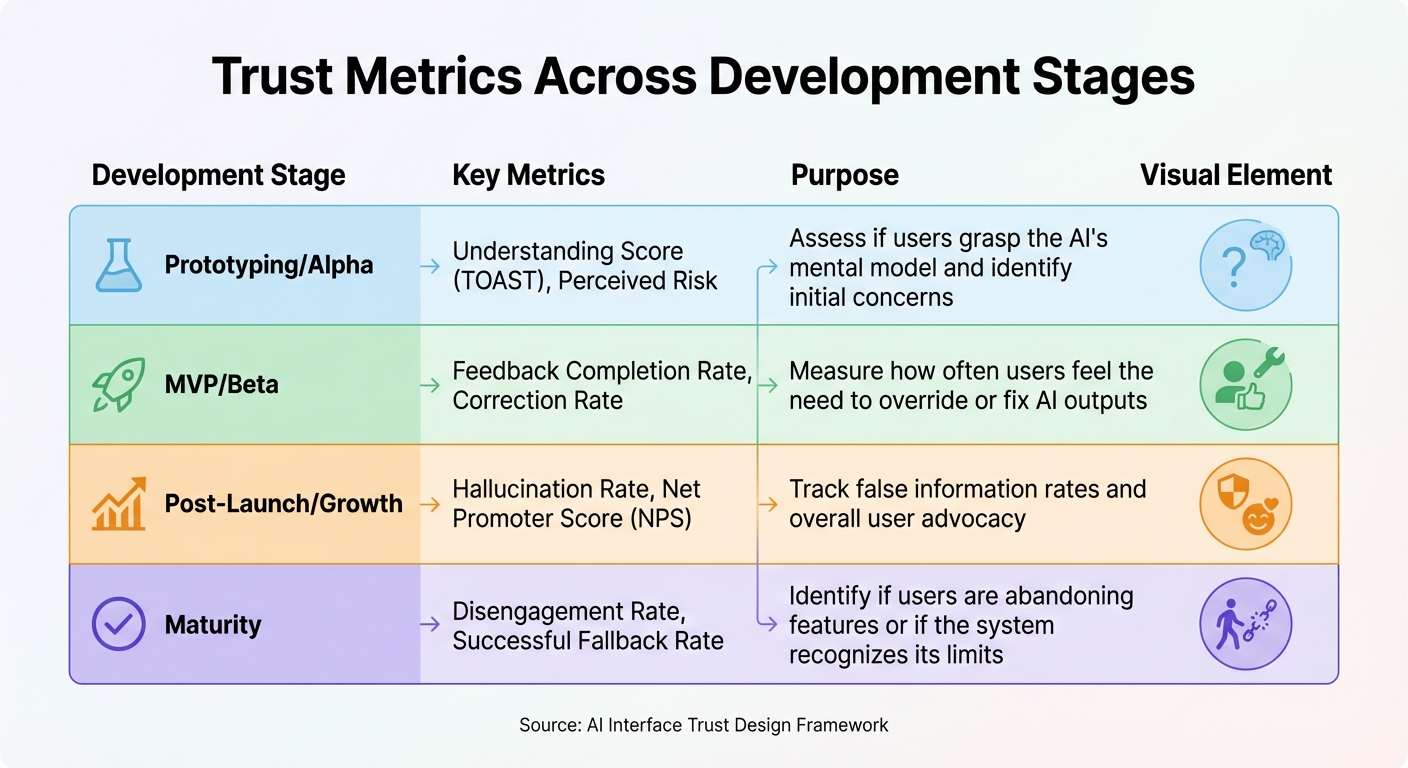
Different stages of product development demand different trust metrics. Early efforts focus on helping users understand the AI’s mental model, while later stages shift to behavioral metrics and long-term advocacy.
| Development Stage | Key Metrics | Purpose |
|---|---|---|
| Prototyping/Alpha | Understanding Score (TOAST), Perceived Risk | Assess if users grasp the AI’s mental model and identify initial concerns. |
| MVP/Beta | Feedback Completion Rate, Correction Rate | Measure how often users feel the need to override or fix AI outputs. |
| Post-Launch/Growth | Hallucination Rate, Net Promoter Score (NPS) | Track false information rates and overall user advocacy. |
| Maturity | Disengagement Rate, Successful Fallback Rate | Identify if users are abandoning features or if the system recognizes its limits. |
Conclusion: Designing AI Interfaces Users Can Trust
Building trust in AI isn’t about striving for perfection – it’s about prioritizing honesty, transparency, and responsiveness. The aim is to create calibrated trust [1][2], where users know when they can rely on the AI and when they should apply their own judgment. This can be achieved through features like transparent confidence indicators, clear explanations of data, effective error handling, and giving users the ability to override AI decisions when needed.
The key principles outlined earlier – transparency, user control, ethical design, and iterative improvement – work together to establish a foundation for trust. By incorporating mechanisms that openly acknowledge uncertainty and carefully automate tasks over time, AI interfaces can become reliable tools that users feel confident working with.
For startups, adopting these principles is especially important. AlterSquare’s 90-day MVP program exemplifies this by embedding trust-building practices – such as clear onboarding processes and transparent features – into every stage of development. Their agile approach ensures that feedback loops, error management, and ethical considerations are baked into the design from the very beginning.
These thoughtful design choices play a crucial role in completing the feedback loop mentioned earlier. Trust is not static – it evolves over time. Through continuous iteration and data-driven improvements, you can create AI interfaces that users not only engage with but also depend on, recommend to others, and keep coming back to.
FAQs
How can AI-driven interfaces build user trust through transparency?
AI-driven interfaces can build trust by providing clear, straightforward explanations of how they make decisions. This means sharing important details, like how predictions or recommendations are generated and what confidence levels are associated with them. When users have a better grasp of the system’s strengths and limitations, they can make informed choices about when to trust the AI and when to rely on their own judgment.
To promote transparency, it’s crucial to present information in a way that’s relevant to the situation and easy to understand. For instance, incorporating trust signals such as confidence scores or explanations behind decisions can help users feel more confident in their interactions – provided this information is shared ethically and without creating confusion. By designing interfaces that meet user expectations while staying clear and accountable, AI systems can build trust and encourage responsible adoption.
How does user feedback help improve AI systems?
User feedback plays a key role in refining AI systems, acting as a crucial link between users and developers. Whether it comes in the form of direct comments or observed behavior patterns, feedback helps fine-tune AI, making it more aligned with user needs and improving the overall experience.
In addition, incorporating feedback helps build trust by demonstrating that user input directly influences the system’s development. When developers communicate openly about how feedback shapes the AI, it helps users understand both its strengths and limitations, creating more realistic expectations. Well-designed feedback loops also give users a sense of involvement, boosting confidence and encouraging broader adoption.
How do ethical design principles build trust in AI user interfaces?
Ethical design principles play a crucial role in establishing trust in AI-driven interfaces by emphasizing transparency, accountability, and responsible communication. When users have insight into how an AI system operates – whether it’s understanding its decision-making process or the confidence levels behind its predictions – they can form a more accurate and reliable mental model of the technology. This clarity helps reduce confusion and builds trust.
Ethical design also works to eliminate deceptive practices, ensuring that AI systems prioritize user needs and deliver straightforward, accessible explanations. This allows users to gauge their trust appropriately, avoiding blind reliance or excessive doubt. By centering design around user needs and promoting responsible AI practices, designers can create interfaces that not only perform well but also cultivate a sense of trust, paving the way for wider acceptance and confidence in AI technology.








Leave a Reply