

When you rush to add features without proper planning, your frontend system becomes harder to maintain, slower, and more prone to bugs. Over time, this leads to technical debt, frustrated users, and costly rewrites. Key issues include:
- Feature creep: Constantly adding features without addressing complexity makes future updates slower and riskier.
- Frontend performance problems: Poor load times, unresponsive interfaces, and visual glitches drive users away.
- Codebase instability: Messy, tightly coupled code structures make small changes break unrelated parts of the app.
Key Takeaways:
- Performance matters: Metrics like Largest Contentful Paint (LCP) over 2.5s or Total Blocking Time (TBT) above 200ms can hurt user experience and revenue.
- Automation helps: Use automated testing and CI/CD pipelines to catch bugs early and enforce performance budgets.
- Refactoring is critical: Regularly clean up your code to prevent it from becoming unmanageable.
To avoid these pitfalls, focus on modular design, reusable components, and a clear strategy for balancing new features with system health.
Managing Frontend Tech Debt with Niya Panamdanam
sbb-itb-51b9a02
How to Spot Frontend Problems Early
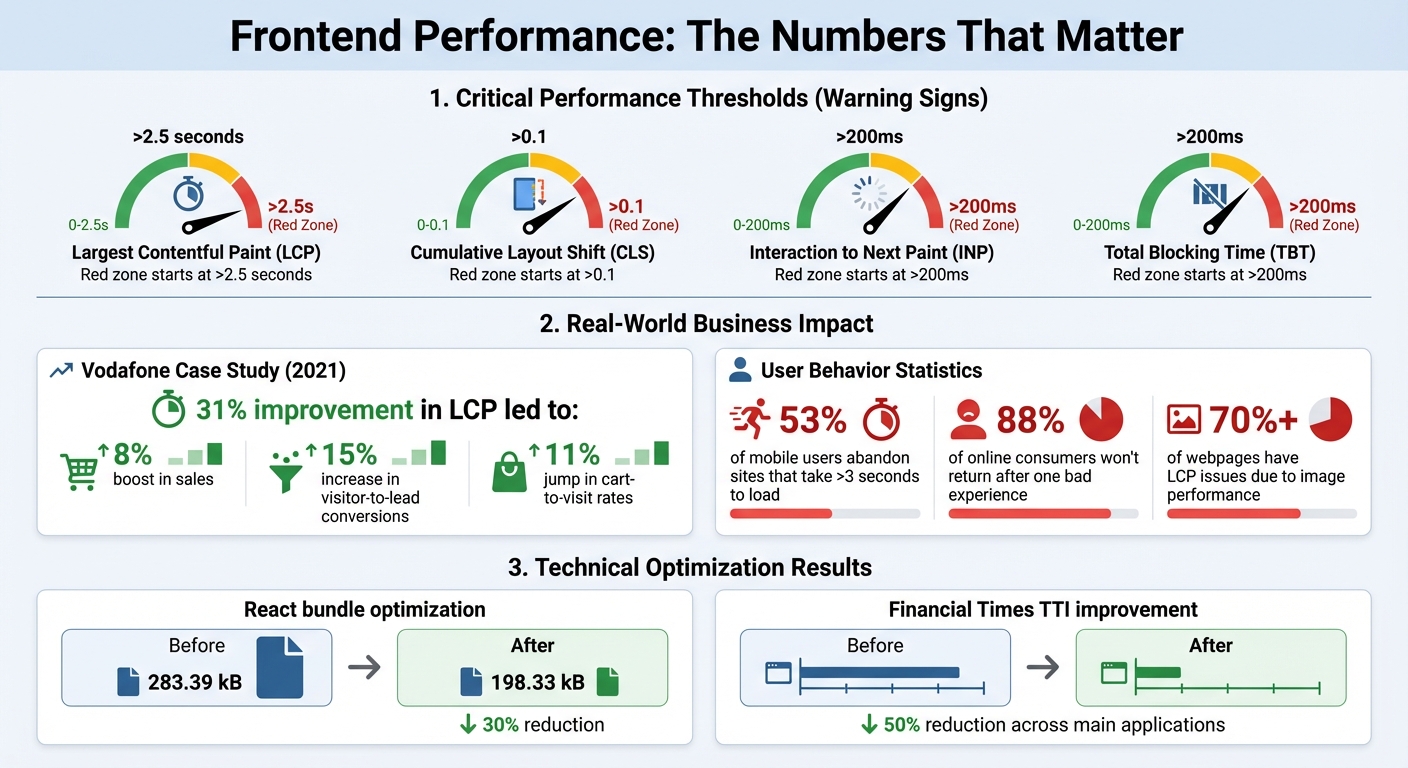
Frontend Performance Metrics Impact on User Behavior and Revenue
Identifying frontend issues before they escalate is crucial to maintaining a stable and user-friendly system. Often, teams only become aware of problems when users start complaining or project timelines slip. However, there are early warning signs – like slow performance, recurring bugs, and inconsistent user experiences – that can signal trouble long before it becomes critical. Let’s break down these key indicators.
Slower Performance and Load Times
One of the first red flags is declining performance. Metrics like Largest Contentful Paint (LCP) exceeding 2.5 seconds, Cumulative Layout Shift (CLS) above 0.1, or Interaction to Next Paint (INP) over 200ms are clear signs that your frontend might be struggling[6][3]. Interestingly, over 70% of webpages experience LCP issues due to image performance[8], pointing to problems like oversized assets or inefficient delivery pipelines.
The stakes are high. For example, Vodafone ran an A/B test in 2021 to improve their LCP by 31%. The results? An 8% boost in sales, a 15% increase in visitor-to-lead conversions, and an 11% jump in cart-to-visit rates[8][3]. Additionally, 53% of mobile users will abandon a site if it takes longer than 3 seconds to load[7]. Common culprits include bloated JavaScript bundles and too many third-party scripts, which lead to long tasks that block the main thread for over 50ms. If your Total Blocking Time (TBT) exceeds 200ms, it’s a sign that your features might be inefficiently implemented.
More Bugs and Delayed Releases
A fragile frontend often reveals itself through an uptick in regression bugs – where fixing or adding one feature breaks another[12][13]. This is especially common when business logic and UI components are tightly coupled, creating a system where small changes cause widespread disruptions. Over time, as the frontend grows more monolithic, build and test times also increase, slowing down your release cycle[9]. If your team is spending more time fixing old features than delivering new ones, it’s a clear signal that your development approach might need rethinking.
Broken User Experience Patterns
Rushed development can lead to visual inconsistencies that frustrate users. A high CLS score often means your system isn’t reserving space for dynamic content, causing elements to shift unexpectedly during page loads[8][10]. This issue is frequently linked to "copy-paste" coding practices, where components are duplicated instead of properly abstracted. The result? Design drift and fragmented user experiences[12].
When navigation menus keep moving, forms behave unpredictably, or loading states look different across pages, it’s a sign of deeper architectural problems. And the consequences are serious – 88% of online consumers are less likely to return to a site after just one bad experience[14].
Why Adding One More Feature Breaks Your Frontend
Adding features without considering their impact on your frontend’s architecture can lead to a host of problems. Let’s break down why this happens.
Bloated Code and Dependency Problems
Every new feature often brings along extra dependencies or expands the scope of existing ones. A tech lead once pointed out that "every dependency reduces your project’s lifespan"[15]. It’s not just about the larger download size – it’s about the growing maintenance burden and the risk of breaking changes when third-party libraries are updated.
Take early versions of WeChat, for example. The app’s size grew significantly as new features were added without proper optimization[4]. This phenomenon is well-captured by Wirth’s Law, which states: "Software speed is decreasing more quickly than hardware speed is increasing"[4].
One common culprit for bloated bundles is improper use of barrel files (index.js files that re-export components) or including files with side effects, such as modifying the window object. These practices prevent tools like bundlers from performing tree-shaking, which means unnecessary code ends up in your final bundle. In one optimization effort, removing side effects, replacing heavy libraries, and implementing lazy loading reduced a React bundle from 283.39 kB to 198.33 kB – a 30% reduction[16].
Dependency issues also lead to cluttered and disorganized codebases, making maintenance a nightmare.
Messy Code Structure and Poor Organization
Without a thoughtful approach to planning, your codebase can quickly turn into what developers call a "haunted forest" – a place where any change risks breaking something else[11]. This happens when business logic is tightly coupled with UI components, making testing or refactoring a dangerous game.
The Financial Times experienced this firsthand. Their frontend system became so unmanageable that even minor updates felt risky. After restructuring their system, they managed to cut their Time To Interactive (TTI) metric by 50% across their main applications[11]. The real issue wasn’t a lack of skilled developers – it was the technical debt that had piled up from rushed feature additions.
A clear sign of poor structure is change amplification. This is when a simple feature update that should only take a day ends up requiring changes in dozens of unrelated files. This happens due to implicit dependencies – connections between parts of the system that aren’t obvious until something breaks[5]. Developers often refer to these as "unknown unknowns", and they can wreak havoc on your architecture.
When your codebase is poorly structured, it creates the perfect environment for feature regressions to thrive.
Breaking Existing Features
Over time, the accumulation of these issues forces rapid, unplanned changes that destabilize your frontend. This often leads to regression bugs – fixing one feature unintentionally breaks another. This is a common problem in frameworks like React and Vue.js, where tightly coupled components can cause cascading failures.
Twitter is a prime example of this. During its early growth, the company focused on rapid feature development at the expense of stability. This led to the infamous "Fail Whale" error page that users saw regularly. Eventually, Twitter had to rebuild its entire infrastructure, moving from Ruby on Rails to a JVM-based backend to handle the scale[2]. Digg faced an even worse scenario. In August 2010, their "v4" launch introduced ambitious new features but was riddled with bugs and performance issues. The result? A mass user exodus[2].
A single flaw can spiral into system-wide crashes[12]. For instance, mixing API calls directly into useEffect hooks or scattering business logic throughout components creates a fragile system. Testing becomes near-impossible, and every update feels like trying to defuse a bomb[12].
How to Add Features Without Breaking Your Frontend
Adding new features to your frontend can be tricky. Without the right strategies, you risk creating chaos in your codebase and slowing down your app. To keep things scalable, focus on modular design, automated processes, and consistent maintenance.
Build with Reusable Components
Break your frontend into small, independent components. This approach avoids instability and makes your code easier to manage. Instead of crafting massive, monolithic pages, create self-contained building blocks that can be reused, tested, and updated without affecting unrelated parts of your app.
"Build large apps by assembling small, testable pieces." – Justin Meyer[11]
This method has been proven effective by companies like the Financial Times. In April 2020, their team, led by Matt Hinchliffe and Maggie Allen, replaced an outdated system with "Page Kit", a modular toolset built with strict boundaries. The result? They reduced their Time to Interactive (TTI) by 50% across their key pages[11]. Similarly, Atlassian tackled inconsistencies caused by years of scattered development – like having 60 different dropdown menu types – by adopting component-driven development. This not only standardized their UI but also restored consistency across their entire product suite[18].
To succeed with this approach, stick to the Single Responsibility Principle. Each component should do one thing and do it well. If a component starts handling too many tasks or props, split it into smaller pieces[18]. Organize your codebase around business domains (e.g., /cart, /products, /checkout) rather than technical layers. This structure makes it easier to locate and remove features without breaking unrelated parts of the app[19]. Many organizations have reported up to 60% faster development speeds with this system because teams can pull from shared libraries instead of starting from scratch[18].
Once your components are in place, automation can help you safeguard your system.
Use Automated Testing and CI/CD
Automated testing and continuous integration pipelines are your safety net. They catch bugs early – long before they hit production, where fixes can be far more expensive. Without automation, every new feature feels like a gamble, as you can’t predict what might break.
The Financial Times implemented a robust "layers of confidence" testing strategy. They used TypeScript to align interfaces, Jest for unit tests to validate logic, and jest-puppeteer for integration tests to replicate user flows. These tests were integrated into their delivery pipeline, giving developers the confidence to make frequent and reliable updates to their codebase[11].
"Providing fast and precise feedback is crucial for building a developer’s confidence in a system and encouraging them to return." – Matt Hinchliffe, Senior Engineer, Financial Times[11]
Incorporate performance budgets into your CI/CD pipelines. For instance, Pinterest implemented custom ESLint rules to block developers from importing dependency-heavy files, preventing unintentional app bloat[3]. Tools like Lighthouse CI and Bundlesize can enforce these budgets, ensuring your app meets Google’s Core Web Vitals benchmarks: Largest Contentful Paint (under 2.5s), First Input Delay (under 100ms), and Cumulative Layout Shift (under 0.1)[3].
To catch UI issues that manual testing might miss, use visual regression testing tools like Chromatic or Percy. These tools compare screenshots to flag unintended layout changes when new features are added[21][22]. Follow the testing pyramid: prioritize a high number of unit tests, fewer integration tests, and a small number of end-to-end tests. This balances speed, coverage, and maintainability as your app grows.
Finally, don’t neglect your codebase – keep it healthy with regular refactoring.
Schedule Regular Code Refactoring
Refactoring isn’t optional; it’s essential upkeep. Think of it like maintaining a car – you can’t keep adding features without addressing wear and tear. The trick is to make refactoring a planned, ongoing task rather than a last-minute scramble.
Carve out time in your sprints for small, incremental improvements. This doesn’t mean rewriting everything. Instead, focus on cleaning up areas that could otherwise turn your codebase into a "haunted forest" – a place developers fear to touch[11]. Document the reasoning behind major technical decisions so future developers (or even your future self) can make changes without accidentally breaking critical features[11].
Avoid premature abstraction. As the React team advises, "We prefer boring code to clever code. Code is disposable and often changes. So it is important that it doesn’t introduce new internal abstractions unless absolutely necessary"[17]. Sometimes, duplicating a small piece of code is better than creating a complex abstraction that becomes a nightmare to untangle later. Follow the "WET" principle (Write Everything Twice) before committing to shared utilities[19].
When tackling major changes, take an incremental approach. Avoid massive overhauls that could disrupt your app. For example, in 2024, the Solana Foundation partnered with Webstacks to migrate their website to a modular architecture powered by Builder.io. By gradually introducing a unified design system and modular components, they empowered content editors to work independently of developers, speeding up workflows without compromising their live site[20].
AlterSquare‘s I.D.E.A.L. Framework for Scalable Frontend MVPs
A scalable frontend can handle ongoing feature requests without crumbling under pressure, and AlterSquare’s I.D.E.A.L. Framework is designed to make that possible. This framework combines thoughtful scalability planning, modular architecture, and a commitment to continuous improvement from day one. By addressing these factors early, teams can sidestep the pitfalls of rushed fixes that often occur when tight deadlines clash with ambitious feature lists. A well-known example of such challenges is Microsoft’s Windows Vista project, which faced a five-year delay due to an overly ambitious scope of features [23][24]. AlterSquare’s approach emphasizes rigorous planning before a single line of code is written.
Discovery and Strategy
The discovery phase is all about laying a solid foundation. AlterSquare starts by defining a clear Scope Statement, which includes not only what the project will cover but also what it won’t. This helps set realistic expectations from the start. Early on, the team dives into analyzing user flows, technical constraints, and potential edge cases to ensure that every architectural decision aligns with the product’s needs. By fostering a performance-driven culture with measurable goals – like aiming for load times 20% faster than competitors – the framework ensures the architecture remains adaptable for future features [3]. This focus on decoupled architecture provides the flexibility needed to evolve without breaking under the weight of new demands.
Agile Development and Rapid Prototyping
Once the strategy is set, the agile phase brings ideas to life. Using a component-based architecture and Atomic Design principles (Atoms, Molecules, Organisms), the user interface is broken down into reusable pieces that can grow and improve based on user feedback. This modular approach keeps the team from spreading itself too thin, avoiding the classic trap of trying to do everything but excelling at nothing [24][26]. By iterating in small, focused cycles and gathering real user feedback early, the team ensures resources are spent on features that truly matter. This is especially critical given that, in most software products, around 80% of features end up being rarely or never used [24]. Plus, developers often lose about 13.5 hours per week dealing with technical debt – a time sink that could be better spent creating value for the product [24].
Post-Launch Support and Continuous Improvement
The work doesn’t stop after launch. AlterSquare keeps a close eye on key metrics like Largest Contentful Paint (LCP), Cumulative Layout Shift (CLS), and Time to Interactive (TTI). Regular analytics reviews and performance feedback ensure the frontend stays healthy as the product scales [9]. This data-driven approach helps avoid the dreaded feature creep that can bog down performance – an issue that has led to the discontinuation of many bloated apps [24]. To keep things on track, a robust change control process evaluates each proposed feature for its impact on timeline, budget, and long-term maintenance. By addressing these factors, the framework minimizes technical debt while ensuring the product remains resilient over time [25][24]. Together, these practices create an MVP that not only meets today’s needs but is ready to grow with future demands.
Conclusion: Building Frontend Systems That Last
Key Takeaways
Feature creep is like a snowball rolling downhill – it grows and grows, turning what starts as a manageable planning issue into a serious technical problem. The warning signs are hard to miss: slower load times, more frequent bugs, and a disjointed user experience. These issues often stem from deeper problems like change amplification (where a simple update triggers changes in multiple areas), increasing complexity, and hidden dependencies that can lead to unexpected failures[5].
The way forward is striking a balance between adaptability and solid architectural principles. Modular architecture is a great starting point – it reduces duplication and keeps your design consistent. Pair this with automated testing and CI/CD pipelines to catch problems before they impact users. As iStealer Sn, Developer, aptly put it:
"A scalable frontend isn’t just about performance. It’s about people, process, and platform."[22]
By embracing these practices, you lay the groundwork for a frontend that can grow without crumbling under its own weight. This approach is especially critical for startups looking to scale effectively.
Next Steps for Startups
If your frontend feels fragile, start by defining a clear scope that outlines not just what you’ll build, but what you won’t. Introduce a change control process to carefully evaluate new feature requests, weighing their actual costs. Dedicate around 20% of your sprint capacity to tackling technical debt[1]. And remember the 80/20 rule: about 20% of your product features typically deliver 80% of the value[27]. Focus your efforts where they count most.
Building a durable frontend takes more than good intentions – it requires thoughtful architecture, modular design, and a commitment to continuous improvement from the very beginning. AlterSquare’s I.D.E.A.L. Framework provides a strong starting point, blending discovery, strategy, agile development, and post-launch support to create scalable MVPs that encourage long-term growth. To build a product that thrives, work with engineers who understand how to balance speed with sustainability, ensuring your system stays healthy and ready for the future.
FAQs
How can I avoid feature creep in frontend development?
To keep feature creep in check, start by identifying your product’s core priorities – the key user flows and business objectives that define its purpose. This approach ensures every new feature request is assessed based on how it contributes to these primary goals. Regularly revisiting your backlog can help the team stay focused on tasks that truly matter while postponing ideas that don’t fit the current strategy.
Adopting a modular architecture is another effective way to manage complexity. By keeping features isolated through loosely coupled components and adhering to strict coding standards, you can minimize the risk of one change impacting the entire system. Tools like automated tests and linting software can also help catch potential issues early, saving time and effort down the line.
Additionally, keep an eye on your system’s overall health by tracking metrics such as bug rates, performance trends, and lead times. Implementing feature flags or gradual rollouts allows you to test new features incrementally, reducing the risk of introducing problems. By maintaining focus and prioritizing simplicity, you can meet user needs while ensuring your product remains manageable and efficient over time.
What are the early signs of frontend performance problems?
Frontend performance issues often start small, with signs that can be easy to overlook. You might notice pages taking a bit longer to load, animations or scrolling feeling choppy, or an uptick in JavaScript errors and memory usage in the console logs. These symptoms often stem from problems like bloated bundle sizes, inefficient rendering processes, or overly complicated components, all of which can chip away at the user experience.
On the development side, watch for longer-than-usual development timelines, missed sprint deadlines, or a surge in bug reports. These could signal mounting technical debt, often tied to an overcomplicated or overloaded codebase. Spotting these red flags early gives teams a chance to tackle the issues head-on with solutions like refactoring, streamlining the architecture, or focusing on performance improvements.
Why is modular design crucial for keeping frontend systems stable and scalable?
Modular design simplifies frontend development by breaking it into smaller, independent pieces – think of it like assembling something with LEGO bricks. Each piece, or module, can be developed, tested, and maintained separately, allowing developers to tackle one part at a time without worrying about the entire system. This not only reduces complexity but also helps contain bugs, making debugging and updates far easier to handle.
With well-defined interfaces, these modules can be reused across various pages or even different projects. This approach speeds up development and cuts down on repetitive work. When it’s time to introduce new features, teams can simply tweak or add specific modules without needing to overhaul large portions of the codebase. This targeted approach keeps changes efficient and avoids the buildup of technical debt from unchecked feature additions. In the long run, modular design provides a system that’s flexible, scalable, and easier to maintain.








Leave a Reply