

Modernizing your frontend doesn’t have to mean starting from scratch. Incremental updates can reduce risks, save time, and keep your product development on track. Here’s how you can tackle legacy systems effectively:
- Why Modernization Matters: Outdated frameworks like jQuery (still used by 72% of websites in 2026) and AngularJS (discontinued in 2021) struggle to meet modern standards like Google’s Core Web Vitals. Falling short impacts SEO, user experience, and revenue.
- Risks of Full Rewrites: Rewriting everything halts feature development, introduces risks, and often fails to meet business goals.
- Incremental Strategies Work Better: Techniques like the Strangler Fig pattern, feature flags, and component-based redesigns let you modernize step-by-step while avoiding chaos.
This guide walks you through assessing your system, prioritizing updates, and using strategies like Outside-In, Inside-Out, and the Strangler Fig pattern to modernize without derailing your roadmap. You’ll also learn how to improve performance, build reusable component libraries, and explore micro frontends for scalability – all without pausing development. Let’s dive into the details.
Evaluating Your Current Frontend System
Take a close look at your current frontend setup to spot inefficiencies and areas for improvement.
Auditing Code and Finding Performance Issues
Start by analyzing your codebase with static code tools like ESLint. These tools can help you identify outdated code, unused patterns, and dependencies that are no longer supported. For instance, libraries like AngularJS or compatibility layers for Internet Explorer 11 may still be lurking in your system, unnecessarily increasing complexity and size [3][9]. A bundle analysis might also uncover heavy libraries like Moment.js (290 KB), which could be replaced with lighter alternatives such as date-fns (89 KB) [3].
To dig deeper into performance, use tools like Chrome DevTools Coverage and "Live Metrics" to monitor Core Web Vitals. Pay close attention to metrics like Interaction to Next Paint (INP), Google’s key responsiveness benchmark starting in March 2024 [3][13]. Look for long tasks exceeding 50 ms and check if your Largest Contentful Paint (LCP) images are missing their source URLs in the initial HTML response – an issue that can delay page loading [10].
Another critical area to examine is technical debt. This often shows up as code smells, such as duplicated logic, overly complex methods, or tightly coupled components, which signal deeper quality issues [12]. On average, organizations spend 70–80% of their IT budgets maintaining existing systems, leaving limited resources for innovation [12]. A Technical Debt Ratio under 5% is generally considered healthy [12].
Once you’ve mapped out these performance bottlenecks and flagged areas of technical debt, the next step is deciding where to begin your modernization efforts.
Deciding Which Features to Modernize First
After auditing your frontend, it’s time to prioritize. One effective way is to use an Impact vs. Effort Matrix [7][12]. Plot modernization tasks based on their business value and the effort required. Start with "quick wins" – low-risk, high-value changes that deliver results without disrupting your core workflows [7].
Focus on frequently updated pages first. For example, modernizing a checkout flow built on legacy jQuery can significantly reduce friction for users. Similarly, targeting modules with fewer dependencies minimizes the risk of cascading issues [11].
A great example of systematic modernization comes from Airbnb. In July 2024, they upgraded from React 16 to React 18 across all their web surfaces. Engineers Andre Wiggins and Joshua Nelson created a "React Upgrade System" that used module aliasing and environment targeting. This approach allowed them to A/B test the new version in production. They maintained a "permitted failures" list in their test suite, which made it possible to fix test failures incrementally without disrupting ongoing feature development. This strategy led to a 100% rollout with no rollbacks [5].
AI-powered auditing tools can also speed up the process. These tools can map legacy codebases, identify hidden dependencies, and even highlight accessibility issues that might be overlooked during manual audits [3]. Organizations leveraging AI for software modernization have reported productivity boosts of 20–45% [3]. To manage technical debt effectively, consider dedicating 10–20% of your development capacity – or scheduling quarterly sprints – for systematic debt reduction [12].
sbb-itb-51b9a02
Incremental Refactoring Approaches
Modernizing legacy systems can feel like a daunting task, but breaking it into smaller, manageable steps ensures progress without bringing everything to a standstill. Here are three strategies to approach this incrementally:
Outside-In Migration
The Outside-In approach focuses on rebuilding entire pages or features one at a time. Traffic is routed to these modernized sections using tools like a reverse proxy or API gateway. For example, you could revamp the /checkout page using React while leaving the /dashboard page untouched.
What’s great about this method is that it allows your team to work independently on isolated sections, avoiding tangled interdependencies. As Mark Knichel from Vercel puts it:
"The most reliable path from legacy to modern architecture is incremental migration rather than a complete rewrite" [7].
This approach is ideal when you can clearly separate pages or groups of related pages. However, you’ll first need to update your application shell (such as the router and layout) to establish boundaries for these isolated updates. If isolating entire pages isn’t possible, you might need a more detailed strategy like the one below.
Inside-Out Migration
The Inside-Out approach takes things a step further by focusing on replacing individual components within your existing system. For instance, you might swap out a legacy data table for a React-based one, leaving the rest of the page’s structure as is.
This method is perfect for situations where page boundaries are unclear. Start with smaller, low-risk components – like footers or modals – and gradually tackle areas with higher technical debt. The tradeoff? Running both legacy and new components simultaneously can lead to performance issues, state conflicts, or style mismatches. If these challenges become too significant, you may need to consider a more comprehensive replacement strategy.
Strangler Fig Pattern
The Strangler Fig pattern offers a gradual yet effective way to retire legacy systems. Here, new components and routing functionalities wrap around the old system, intercepting requests and directing them to either the legacy or modern implementation. Over time, the legacy system is phased out entirely.
This approach allows both systems to run in parallel without downtime. Feature flags or percentage rollouts can help shift traffic gradually. As Martin Fowler explains:
"While this [transitional architecture] may appear to be a waste, the reduced risk and earlier value from the gradual approach outweigh its costs" [14].
The pattern works best for self-contained, low-risk features like a read-only catalog or reporting tool. For example, Vercel used this method during a significant migration, achieving zero downtime while improving latency and CPU usage. Similarly, a regional bank successfully transitioned from a legacy MVC architecture to React over 18 months, seeing a 60% boost in feature delivery speed and avoiding any unplanned downtime [8].
These strategies show that modernization doesn’t have to mean hitting pause on development. By tackling updates in smaller, focused steps, you can keep delivering value while steadily moving toward a more modern architecture.
Creating a Component-Based Design System
Once you’ve refined your migration strategy, the next step is to standardize your UI elements. This not only speeds up your modernization efforts but also ensures consistency across your application.
Start by building a reusable component library. This library will house modular, isolated UI elements that can be used across both legacy and new pages. Begin with a thorough audit of your existing UI components. You’ll likely discover multiple versions of the same element scattered throughout your codebase – like several variations of a card design. Consolidating these into a single, flexible component can clean up your system and streamline development[17].
Make sure your components are independent of your main application code. Heap Engineering is a great example of this approach. They started small, creating a RadioButton component, and ensured isolation by using the no-restricted-imports rule in ESLint. To maintain quality as they scaled to more complex components, they incorporated Chromatic for automated visual regression testing. This approach allowed them to align their components with their Figma UI kit, maintaining a 1:1 match. As their team put it:
"A component library is essential for maintaining a consistent, easy to develop app while scaling up our teams"[16].
Organizing your components can be simplified with a structured model like Atomic Design. This breaks components into categories based on complexity: Atoms (basic elements like buttons and inputs), Molecules (small combinations like search bars), and Organisms (larger structures like navigation headers)[18]. Tools like Storybook can further enhance the process by providing a sandbox for developers and designers to explore component states and variants without interfering with production code[16].
Using Modern Frameworks for Components
Modern frameworks like React or Vue make it easier to integrate new components into older systems. For instance, React’s createRoot function allows you to render components into specific elements, such as <div id="navigation"></div>[20].
Another option is Web Components, which offer built-in isolation for CSS and JavaScript through Shadow DOM. By wrapping your React or Vue components as native Custom Elements, you can ensure that modern and legacy CSS don’t conflict[15].
For teams handling multiple applications, it’s worth considering framework-agnostic primitives built with pure HTML, CSS, or Web Components. While framework-specific libraries provide deeper integration, they can tie you to a particular ecosystem. Framework-agnostic components, on the other hand, remain flexible during migrations – whether you’re transitioning from React to Vue or another framework altogether[21].
Integrating Modern Components with Legacy Code
To bridge the gap between modern and legacy systems, you’ll need a shared component library. For example, Searchmetrics used React and Next.js to co-develop a library while creating hybrid components that worked within their legacy templates. Tools like Storybook can also serve as a visual QA tool, ensuring the transition happens smoothly and without downtime[1].
Andreja Migles, Senior Software Engineer at Conductor, shared her experience:
"The old library was difficult to maintain, as every change introduced bugs or made it hard to extend some of the components. Working with the Crocoder team, we were able to rethink the architecture, implement new core components quickly, and start using them alongside the existing ones"[1].
To connect modern components with legacy code, define interfaces using props and events. For more complex use cases, a client-side event bus can enable communication between modern fragments and the legacy parent page while keeping the systems loosely coupled[19].
Hosting your component library in a dedicated directory – whether in a monorepo or as a private package – simplifies sharing and versioning between your legacy and new frontend code[16]. To maintain quality, enforce contribution guidelines that require thorough testing, accessibility checks, and clear documentation[16].
These steps, combined with incremental refactoring, help ensure a smooth and consistent modernization process.
Improving Frontend Performance
Boosting performance is a key step in enhancing user experience. Faster load times and smoother interactions make a noticeable difference, and the good news is that you can achieve these improvements without completely rewriting your application. Modern tools allow you to make incremental updates, starting with high-traffic pages.
Code Splitting and Lazy Loading
One of the most effective ways to improve performance is by delivering only the code users need. Code splitting breaks your JavaScript into smaller chunks, so users don’t have to download everything at once.
Tools like Vite, Rollup, and Webpack automate this process when they detect the import() syntax. For example, in Vue, you can use defineAsyncComponent to load components only when they’re needed. Similarly, in React, React.lazy achieves the same outcome. As Lee Robinson, VP of Product at Vercel, puts it:
"By starting small and incrementally adding more pages, you can prevent derailing feature work by avoiding a complete rewrite" [23].
For single-page applications (SPAs), lazy-loading pages can significantly reduce initial load times. If you’re managing a large app with multiple independent sections, tools like Single-SPA or Webpack 5 Module Federation enable lazy-loading entire microfrontends dynamically at runtime [24].
Another way to slim down your app is through tree-shaking, which removes unused code during the build process. For instance, if your Vue templates don’t use the <Transition> component, modern tools can strip it out, saving 14kb of minified and gzipped JavaScript [22]. Pre-compiling templates can save an additional 14kb by avoiding the need to ship the compiler [22].
Once you’ve optimized your code delivery, you can take things further with server-side techniques.
Server-Side Rendering and Image Optimization
To make your app feel faster, consider server-side strategies like Server-Side Rendering (SSR). SSR delivers fully rendered HTML to the browser, so users don’t have to wait for JavaScript to execute. This is particularly helpful for users on slower networks. You can adopt SSR incrementally using the Strangler Fig pattern, which allows you to modernize one page or subpath at a time (e.g., example.com/store) [23].
For instance, you can route high-priority pages to an SSR framework like Next.js, while proxying the rest to your existing system. This approach avoids overhauling your entire codebase while still improving key areas [23].
Another quick win is image optimization. Swap standard <img> tags for components that automatically resize, lazy-load, and convert images to formats like WebP or AVIF. These formats shrink file sizes without losing quality. Plus, components can prevent Cumulative Layout Shift (CLS) by defining image dimensions or using placeholders [27].
To speed up delivery, store images and fonts in a dedicated directory (like /public) so they’re cached by CDNs. For third-party libraries or complex visualizations, consider dynamic imports to keep your initial JavaScript bundle lean [25][26].
Using Micro Frontends for Scalability
When your frontend grows too large for a single team to manage, micro frontends can break it into smaller, independent parts. Instead of organizing by technical layers, this method divides your UI by business domains – like checkout, user profiles, or product catalogs. Each team takes full ownership of a vertical slice, managing everything from the UI to the backend. This setup reduces coordination needs and speeds up deployment cycles.
At the core of this approach is an application shell (or container) that manages global tasks such as navigation, authentication, and routing. This shell dynamically loads specific micro frontends based on user actions or the current URL. Cam Jackson from Thoughtworks explains it as:
"An architectural style where independently deliverable frontend applications are composed into a greater whole" [29].
You can integrate these modules using tools like Webpack Module Federation or Single-SPA for client-side assembly. Alternatively, server-side methods, like assembling HTML fragments with SSI, or edge-side rendering via platforms like Cloudflare Workers, can be used [24][29][28][30]. To avoid conflicts, enforce strict isolation for styles and scripts [24][29]. For example, namespace global variables, events, and storage keys – prefixing localStorage keys with your team name is one way to do this [24].
Communication between micro frontends should be minimal. When necessary, use neutral methods like native CustomEvent instances or share state through URLs [24][30][31]. Let’s explore practical ways to implement this architecture effectively.
Pros and Cons of Micro Frontends
One major benefit is team independence. Teams can pick their own frameworks, deploy on their schedules, and work without waiting on others. This approach also supports the Strangler Fig pattern, making gradual updates easier [2][29].
But it’s not without challenges. Managing multiple repositories, CI/CD pipelines, and ensuring version compatibility across modules adds complexity [2][29]. Performance can also take a hit – loading multiple independent bundles can lead to "payload bloat" if shared dependencies like React or Vue are duplicated [32][29][24]. Without proper governance, conflicts in CSS or JavaScript could cause unexpected UI issues [2][24].
Adding Micro Frontends to Legacy Applications
To integrate micro frontends into a legacy system, take an incremental approach. Start by migrating entire pages rather than individual components. For instance, build new pages with a modern framework and route specific paths (like example.com/checkout) to the updated application, while keeping the legacy system active for other pages [2]. This reduces dependencies during the transition and immediately improves the developer experience [2].
Feature flags can help control traffic between the old and new systems. They allow you to test changes with a small group of users and roll back quickly if issues arise [2][6]. For highly complex legacy codebases, you might even embed the old application in an iframe within a new "Base App" to avoid unintended side effects during migration [33].
If deeper integration is required, Web Components can act as a framework-agnostic bridge. For example, a React or Vue component can be wrapped as a Custom Element, allowing the legacy system to treat it like standard HTML [24][2]. Another option for single-page applications is fragment piercing – modern fragments are rendered at the top level of the HTML for immediate interactivity, then moved into the legacy DOM when the main app loads [30].
Cloudflare recently demonstrated this idea, integrating modern fragments into a legacy React shell. In their example, a Qwik-based login fragment was interactive and accepted user credentials before the main React shell finished loading [30].
To maintain independence, limit shared libraries to simple visual elements like buttons or icons. Avoid sharing business logic, as this can create dependencies that undermine the benefits of micro frontends [29]. Ideally, each micro frontend should have its own backend or API aggregator to keep the data layer independent [24][29]. This method allows teams to modernize specific areas without disrupting overall operations.
Comparing Modernization Strategies
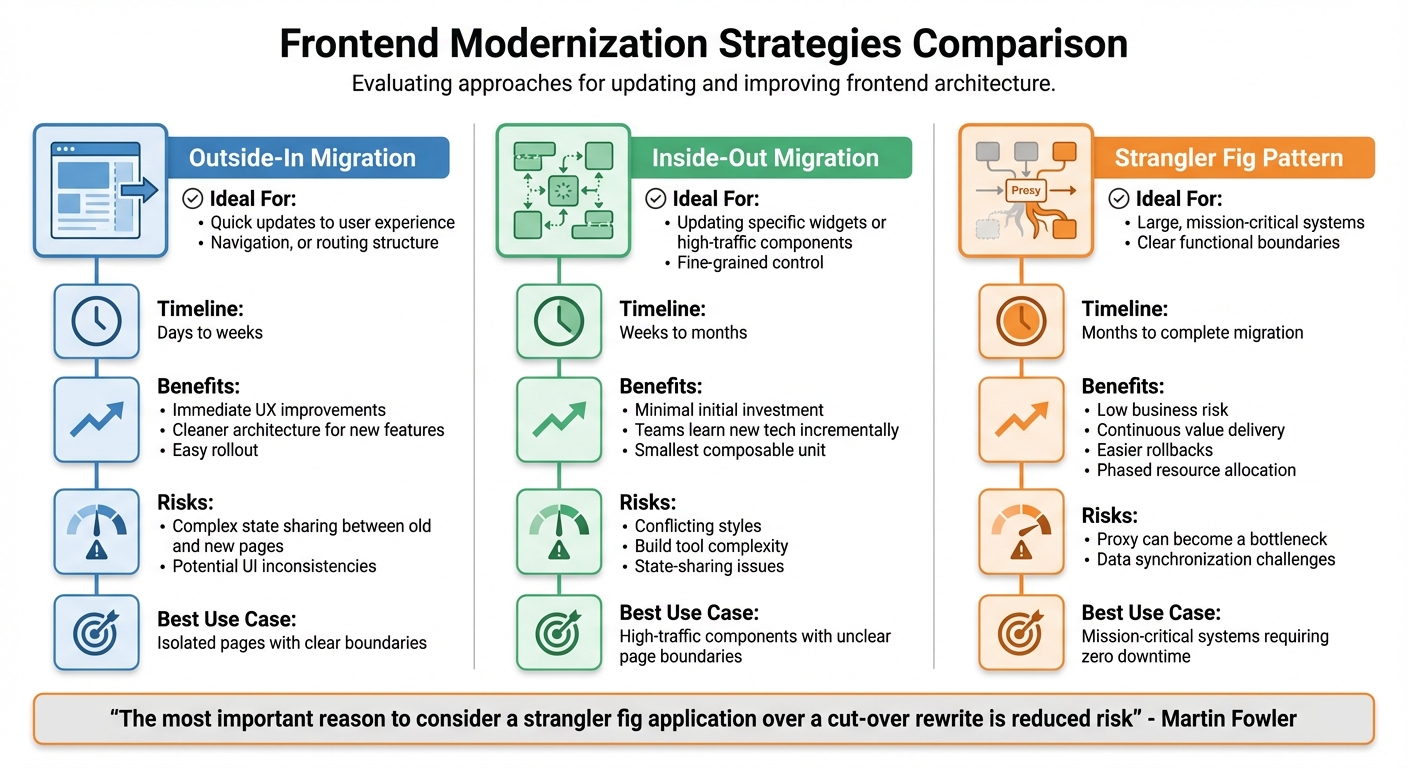
Frontend Modernization Strategies Comparison: Outside-In vs Inside-Out vs Strangler Fig
Modernization strategies depend on factors like system complexity, risk tolerance, and how quickly results are needed.
The Outside-In approach focuses on replacing top-level routing or entire pages, delivering quick improvements to the user experience. On the other hand, Inside-Out targets specific components or widgets within existing pages. This method allows for updates to high-traffic elements without needing a complete architectural overhaul. Lastly, the Strangler Fig strategy gradually integrates new functionality by routing traffic through a proxy. Over time, the legacy system is replaced entirely.
Martin Fowler highlights the key advantage of the Strangler Fig method:
"The most important reason to consider a strangler fig application over a cut-over rewrite is reduced risk" [34].
This reduced risk is crucial for systems where downtime isn’t an option or where a "big bang" launch could disrupt operations.
Each of these strategies comes with unique timelines. Outside-In changes can deliver results in just days or weeks, making it ideal for rapid improvements. In contrast, Inside-Out and Strangler Fig approaches may take months, as they tackle deeper architectural issues. Malte Ubl, CTO at Vercel, emphasizes the value of incremental migrations:
"Incremental migrations minimize risk, improve the time to validating the business value of a change, and eliminate planned downtime" [4].
Strategy Comparison Table
| Approach | Ideal For | Risks | Benefits |
|---|---|---|---|
| Outside-In | Quick updates to user experience, navigation, or routing structure | Complex state sharing between old and new pages; potential UI inconsistencies | Immediate UX improvements; cleaner architecture for new features; easy rollout |
| Inside-Out | Updating specific widgets or high-traffic components; fine-grained control | Conflicting styles; build tool complexity; state-sharing issues | Minimal initial investment; lets teams learn new tech incrementally; smallest composable unit |
| Strangler Fig | Large, mission-critical systems with clear functional boundaries | Proxy can become a bottleneck; data synchronization challenges | Low business risk; continuous value delivery; easier rollbacks; phased resource allocation |
Before committing to a strategy, consider whether your system can be intercepted with a proxy or façade layer. If not, the Strangler Fig approach might not be feasible. Start with low-complexity, high-impact areas to validate the migration process before scaling up.
This framework provides a foundation for selecting the best path forward in modernizing your frontend.
Conclusion
Updating your frontend doesn’t have to mean halting development or diving into a risky, all-at-once overhaul. The approaches covered in this guide – Outside-In, Inside-Out, and Strangler Fig – offer practical ways to enhance performance, scalability, and user experience without interrupting your product’s flow.
To make the most of these strategies, weave modernization into your product roadmap. As Gloria Babić from Crocoder advises:
"Don’t pause delivery. Integrate migration into the roadmap for better quality and long-term stability" [1].
A smart way to start is by focusing on high-value, low-risk areas, such as modals or footers, to test your migration strategy.
Leverage tools that reduce risks, like feature flags for controlled rollouts, reverse proxies to manage traffic seamlessly, and shared component libraries to maintain consistency during the process. Teams using modern frameworks like React often report a 20–30% boost in productivity, while hybrid migration approaches can lower operating costs by up to 30% [8].
Success in modernization also depends on team alignment and solid documentation. Invest in clear, thorough documentation and shared standards to ensure your new stack is easy to maintain long after the migration. As Alex Kukarenko, Director of Legacy Systems Modernization at Devox Software, wisely points out:
"The safest upgrades look uneventful on the outside and disciplined on the inside" [8].
FAQs
What’s the best way to decide which frontend features to modernize first?
The smartest way to kick off frontend modernization is by focusing on areas that can deliver quick wins while tackling major pain points. Start by identifying features or components that have a significant impact on user experience or business performance. By prioritizing these, you can showcase tangible progress early on.
Another key step is addressing the parts of your application that cause the most headaches – think performance bottlenecks, recurring bugs, or outdated code that slows down development. Approaches like incremental refactoring or adopting microfrontends can help you tackle these problem areas gradually. This way, you reduce risks and avoid major disruptions to your team’s workflow.
The goal is to align these updates with your business objectives and user expectations. Taking a phased approach keeps the process manageable, cuts down technical debt, and ensures consistent improvements without overwhelming your team or users.
How does the Strangler Fig pattern help with frontend modernization?
The Strangler Fig pattern offers a smart way to update your frontend by gradually swapping out outdated components for newer ones. This approach ensures minimal disruption, as it allows old and new elements to function side by side during the transition.
By taking things step by step, this pattern lowers the risks that come with a complete system overhaul. It also helps tackle technical debt more efficiently, letting your product evolve without interrupting workflows or negatively impacting the user experience.
How do micro frontends help improve scalability in large applications?
Micro frontends boost scalability by breaking the frontend into smaller, self-contained modules, each tailored to a specific business domain. These modules can be built, deployed, and maintained by different teams independently, ensuring that changes in one area don’t disrupt the entire application.
This setup supports incremental updates, cuts down on complexity, and allows teams to work simultaneously, which shortens development timelines. It also simplifies the process of integrating modern frameworks or tools into specific parts of the application without needing a full-scale rewrite.






Leave a Reply