
LangGraph vs CrewAI vs AutoGen: State, Cost, and Reliability Compared
Taher Pardawala April 14, 2026
Choosing the right AI framework can save you time, money, and headaches in production. Here’s what you need to know:
- LangGraph: Best for regulated industries and high-stakes workflows. It uses graph-based state machines with persistent checkpoints, ensuring reliability and auditability. However, it has a steeper learning curve and higher setup time.
- CrewAI: Ideal for fast prototyping and smaller-scale workflows. Its role-based system is simple to use but lacks advanced state recovery and scalability for dynamic environments.
- AutoGen: Suited for research-heavy or iterative tasks but struggles with long-running workflows due to its ephemeral state model. It’s resource-intensive and requires additional safeguards for production use.
Quick Comparison
| Framework | Strengths | Weaknesses | Avg. Cost/Task | Recovery Rate |
|---|---|---|---|---|
| LangGraph | Reliability, state persistence | High memory usage in long workflows | $0.08 | 96% |
| CrewAI | Quick setup, role-based workflows | Limited scalability, lacks granularity | – | 72% |
| AutoGen | Flexible for research tasks | High costs, prone to conversation drift | $0.45 | 68% |
Recommendation: Start with CrewAI for quick prototyping, but use LangGraph for production systems requiring durability and compliance. AutoGen is a fit for experimental or research-focused projects.
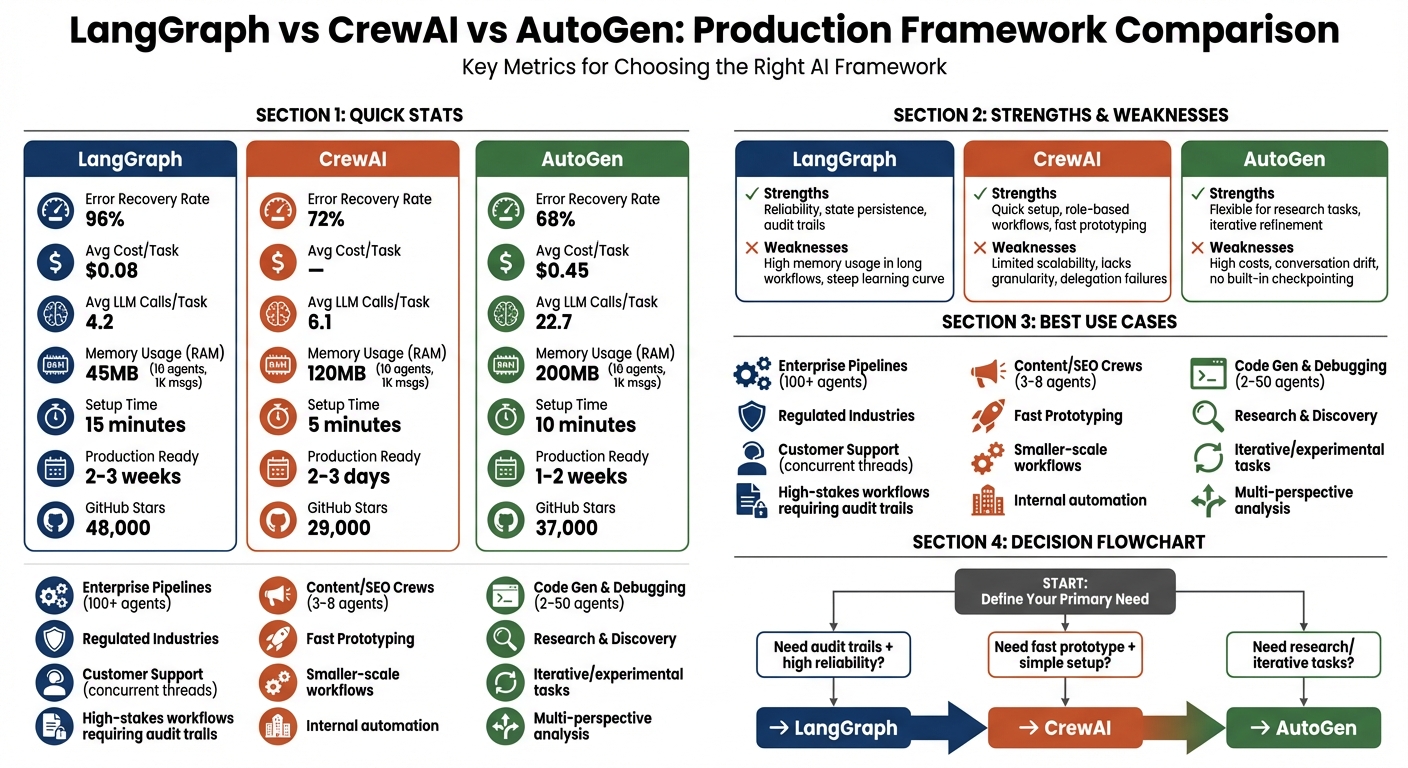
LangGraph vs CrewAI vs AutoGen Framework Comparison: Performance Metrics and Use Cases
Your Next AI Framework Decision: LangGraph vs CrewAI vs AutoGen
sbb-itb-51b9a02
State Management Architecture Differences
State management is where frameworks show how prepared they are for real-world challenges. A system’s ability to handle failures and recover often depends on how it manages, stores, and restores its state. Let’s break down how each framework’s approach to state management impacts reliability in practice.
LangGraph: Graph-Based State Machines
LangGraph uses a typed state object that moves through a directed graph. After every "super-step" (execution of a single node), the framework creates a checkpoint – a full snapshot of the state, metadata, and pending tasks. These checkpoints are stored in backends like PostgreSQL, Redis, or DynamoDB, enabling workflows to pause, survive crashes, and resume exactly where they stopped [1][2].
One of LangGraph’s standout features is time-travel debugging. This allows developers to inspect previous checkpoints, modify the state, and replay execution from a specific point. This is particularly useful in regulated environments, such as those governed by the EU AI Act (Article 14), where maintaining immutable, timestamped logs and clear control flows is mandatory [1].
"LangGraph’s persistence and checkpoint system will save you weeks of engineering work. It is the only framework in this comparison with production-grade workflow persistence out of the box." – iBuidl Research Team [2]
However, LangGraph’s approach comes with a learning curve. Its graph-based model requires a shift in thinking, which can be challenging for those unfamiliar with this structure. To address error conditions, LangGraph introduced a RetryPolicy in late 2024, offering features like exponential backoff and exception-specific handling to manage repeated errors effectively [1].
By comparison, CrewAI opts for simplicity with a role-based model, though this comes at the expense of fine-grained control.
CrewAI: Role-Based Memory Model
CrewAI manages state through Flows, introduced in 2025. Using the @persist decorator, state is saved at the method level to backends like SQLite, PostgreSQL, or Redis. While this method is easier to understand than LangGraph’s node-level checkpoints, it sacrifices granularity – state is saved per method execution rather than per individual LLM call [1][9].
CrewAI also features a multi-tiered memory system, including short-term, long-term, entity, and contextual memory. This setup is well-suited for role-based tasks, such as when a "Researcher" agent passes findings to a "Writer" agent, maintaining context without requiring explicit state channels.
That said, CrewAI’s flow-level persistence isn’t ideal for complex workflows. If a task fails midway, you can reload the state upon restart, but you won’t have the replay-and-modify capabilities that LangGraph offers. While this simplified approach speeds up development, it limits recovery options for intricate pipelines [1].
AutoGen: Conversation-Based Message History
AutoGen uses conversation history as its state model. Each agent keeps a log of messages, which serves as the record of past interactions. However, without built-in checkpointing, the state is ephemeral unless developers manually serialize it [1][4].
This model works for short, research-focused tasks where agents collaborate to reach conclusions. But in production, the lack of durable state can lead to failures. Developers must implement their own persistence layer to ensure workflows can survive restarts [1][2].
AutoGen 0.4, released in January 2026, introduced an async-native, event-driven architecture to handle hundreds of conversations simultaneously. While this improves concurrency, it doesn’t solve the durability issue. Additionally, long-running tasks may suffer from context drift as the message history grows, potentially leading to errors unless context pruning or verification by multiple agents is performed [1].
This lack of durability highlights the limitations of AutoGen’s state model in production environments.
| Feature | LangGraph | CrewAI | AutoGen |
|---|---|---|---|
| State Model | Persistent checkpoints per node | Flow-level state with @persist |
Conversation history (ephemeral) |
| Persistence Backend | PostgreSQL, Redis, DynamoDB | SQLite, PostgreSQL, Redis | Manual implementation required |
| Error Recovery | RetryPolicy with exponential backoff | Task-level retries and callbacks | Manual handling or human-in-the-loop |
| Durability Mechanism | Atomic state updates per node | State reloads on restart | Caching and human intervention |
| Learning Curve | High (graph-based thinking) | Low (role/task metaphors) | Moderate (conversation design) |
For systems with high risks or regulatory requirements, LangGraph’s explicit state machine and checkpointing system stand out as the most reliable choice. CrewAI is better suited for quick development cycles, while AutoGen works for research-focused pipelines – but its ephemeral state model requires extra engineering to be production-ready [1][4][5].
Tool-Calling Reliability Across Frameworks
Tool-calling reliability plays a key role in both completing tasks efficiently and keeping costs under control. In a head-to-head comparison using GPT-4o, LangGraph demonstrated a 96% error recovery rate, outperforming CrewAI at 72% and AutoGen at 68% [4]. Accuracy in multi-step tasks followed a similar trend: LangGraph led with 94%, followed by AutoGen at 91% and CrewAI at 87% [4].
The cost differences between these frameworks are equally striking. AutoGen averaged 22.7 LLM calls per task, primarily due to its conversational approach, while LangGraph required only 4.2 calls [4]. These findings align with earlier observations on state management, showcasing how each framework’s design impacts both cost efficiency and reliability in practical applications. Building on this, let’s dive into how their tool-calling strategies influence production performance.
LangGraph: LangChain Ecosystem Integration
LangGraph takes a structured approach by tying tools directly to LLM schemas and using typed state channels (via TypedDict) to safeguard against data corruption [5][2]. If a tool call fails, its built-in RetryPolicy applies exponential backoff and filters errors based on type [1]. Additionally, LangGraph checkpoints after every node execution, allowing users to "time-travel" to the exact failure point, adjust the state, and resume execution without restarting the entire workflow [1].
"LangGraph’s state is explicit and inspectable… debugging went from ‘print statements everywhere’ to ‘click on the node that failed.’" – Kalpaka, Software Engineer [11]
This deterministic setup makes LangGraph particularly well-suited for regulated industries where audit trails are essential. However, this precision comes with a learning curve – developers must think in terms of nodes, edges, and state machines rather than conversational flows.
CrewAI: Native Tools for Structured Workflows
CrewAI, on the other hand, focuses on task-level retries and structured workflows. It defines structured outputs through the expected_output parameter, ensuring agents retry failed tool calls up to three times by default [5]. If retries fail, a manager agent can step in to reassign the task or escalate it to a human, all without restarting the entire workflow [5][12].
While CrewAI’s role-based model is effective for sequential workflows, it has limitations. Passing large JSON blobs between agents can lead to data loss or truncation [10]. The task-level isolation prevents a single tool failure from derailing the entire process, making it great for prototyping. However, the lack of fine-grained replay capabilities – like those in LangGraph – can be a drawback for workflows that demand precision.
AutoGen: Conversational Tool Invocation
AutoGen takes a conversational approach to tool invocation, prioritizing flexibility over rigid control. It relies on conversational refinement and explicit function schemas to handle errors. When a tool call fails, agents try to "reason" through the issue via dialogue or escalate to a proxy agent [2][1]. While this flexibility works well for research tasks, it struggles with strict control flows – agents can veer off into tangents or even infinite loops without proper safeguards [3].
The conversational retry mechanism also comes at a cost. AutoGen often requires multiple LLM calls to resolve issues that a deterministic retry policy could handle in one attempt. Without built-in circuit breakers, developers must implement their own safeguards, such as revision_count caps, to prevent runaway costs [11].
| Feature | LangGraph | CrewAI | AutoGen |
|---|---|---|---|
| Structured Output | High (Typed State) | Moderate (Task-based) | Low (Conversational) |
| Error Recovery | Native RetryPolicy |
Task-level callbacks | Manual/Conversational |
| Avg. LLM Calls/Task | 4.2 [4] | – | 22.7 [4] |
| Recovery Rate | 96% [4] | 72% [4] | 68% [4] |
| Debugging | LangSmith (Trace-level) | Verbose logs (Task-level) | Conversation traces |
Orchestration Models: Graph vs Role-Based vs Event-Driven
The way a framework coordinates agents can make or break your deployment. It’s the difference between scaling smoothly or buckling under pressure. LangGraph uses a directed graph model, where nodes are functions and edges dictate state transitions. CrewAI organizes agents into role-based teams, following sequential or hierarchical workflows. AutoGen, on the other hand, adopts an event-driven model, relying on multi-turn conversations between agents to negotiate solutions, with workflows emerging from the dialogue history rather than a pre-set structure [1][4]. Let’s dive into how these orchestration models affect scalability and control in real-world deployments.
LangGraph: Node-and-Edge Execution
LangGraph thrives on deterministic branching logic. It allows you to define conditional edges that route state based on specific criteria. For example, if a validation node fails, the workflow reroutes to a retry node; if it succeeds, it moves forward. This precision makes LangGraph a solid choice for scenarios where audit trails are essential. One fintech startup leveraged LangGraph to create an investment assistant with a structured flow: Researcher Node → Code Node → Report Node → Human Review Node. This structure ensured compliance in their regulated environment [5].
However, this level of control comes with a cost. LangGraph’s frequent state checkpoints – key for "time-travel debugging" – can lead to high memory usage in long workflows. While it scales horizontally by using stateless workers and persistent storage options like Redis or Postgres, developers must implement safeguards like max_iterations limits to avoid spiraling costs [1][7].
CrewAI: Hierarchical Task Delegation
CrewAI simplifies workflows by organizing agents into roles with specific goals and backstories. You can choose between sequential processes (linear handoffs) or hierarchical processes (a manager agent delegates tasks). This setup works well for prototyping or smaller-scale automation projects with clear structures, such as content pipelines or team-based tasks [1][7]. In 2025, CrewAI introduced "Flows" to handle branching workflows, though it still lacks the granular control offered by LangGraph [1][9].
The downside? It struggles in large-scale, dynamic environments. Hierarchical delegation can create bottlenecks, especially when a manager agent becomes a single point of failure. CrewAI is best suited for smaller teams (3–10 agents); scaling beyond that introduces coordination challenges. Additionally, its task-level isolation prevents a single failure from derailing the entire workflow, but it lacks the ability to resume from an exact failure point – you’ll need to restart tasks or escalate to a human [5][10].
AutoGen: Event-Driven Chat Orchestration
AutoGen takes a conversational approach, prioritizing flexibility for iterative workflows. Here, workflows emerge from dynamic, multi-turn dialogues among agents, making it ideal for tasks that require debate, refinement, or complex reasoning. For instance, a financial services firm used AutoGen in 2025 to improve multi-agent research, achieving a 30% boost in response quality through debate and critique cycles. Similarly, a logistics company saved $2 million by letting agents negotiate delivery schedules dynamically [7].
But this flexibility comes at a price. AutoGen’s conversational model can generate over 20 LLM calls per task as agents refine their outputs, making it far more resource-intensive than LangGraph (4.2 calls) or CrewAI (6.1 calls) [4]. It’s also prone to "conversation drift", where agents deviate from intended workflows or get stuck in infinite loops. While AutoGen v0.4 (released January 2026) introduced an async-native, event-driven architecture to handle hundreds of concurrent conversations, developers still need to implement safeguards like revision_count limits to control costs and avoid runaway scenarios [2][11].
These models highlight the trade-offs between control, scalability, and flexibility.
"LangGraph for control freaks, CrewAI for fast shippers, AutoGen for research pipelines. Pick based on how much control you need over agent coordination." – Till Freitag [6]
Developer Experience and Community Maturity
Setup and Debugging Tools
When it comes to developer experience, the ease of setup and debugging tools can make or break a framework’s appeal. Setup times differ significantly across platforms: CrewAI allows prototyping in just 5 minutes, AutoGen takes about 10 minutes, and LangGraph requires 15 minutes for the same task [4]. Moving to production readiness, CrewAI stands out again, taking only 2–3 days, compared to AutoGen’s 1–2 weeks and LangGraph’s 2–3 weeks [2]. Code verbosity also plays a role – CrewAI’s three-step pipeline can be implemented in just three lines of code, while LangGraph requires 30 lines for a similar setup [2].
Debugging tools further highlight the differences. LangGraph offers a standout feature called LangSmith, which enables "time-travel debugging." This tool lets developers replay each execution step-by-step to inspect states at failing nodes, with production tracing priced at $0.50 per 1,000 traces [1][4]. AutoGen integrates with AgentOps, offering session-level tracking and replay analytics. However, its conversational logs can be challenging to analyze when agents veer off-script [1]. CrewAI, meanwhile, relies on simpler logging tools and its enterprise AMP platform. While AMP provides task-level visibility, it lacks the detailed trace-level insights offered by LangSmith [1][14].
A real-world example illustrates CrewAI’s efficiency: in early 2026, a four-person startup used CrewAI to deploy a research pipeline capable of handling 200 daily research requests. The team – comprising three engineers and one PM – achieved a working prototype in just four hours, even without deep machine learning expertise [10].
Strong setup and debugging tools don’t just simplify development – they also lay the groundwork for better community support.
Community Support and Ecosystem
Community engagement and the strength of an ecosystem are equally important for a framework’s long-term success. GitHub activity provides some insight: as of March 2026, LangGraph has amassed 48,000 stars, AutoGen 37,000, and CrewAI 29,000 [2]. However, GitHub stars don’t tell the whole story. LangGraph leads in actual deployments, with approximately 40% more adoption according to developer surveys [2].
LangGraph benefits from the extensive LangChain ecosystem, offering comprehensive documentation and a variety of tools. AutoGen, backed by Microsoft, integrates seamlessly with Azure, providing enterprise-level support [13][14]. CrewAI’s community, while younger, is growing rapidly, with its courses reaching over 100,000 developers [13].
In terms of platform offerings, LangGraph supports both Python and JavaScript SDKs and provides LangGraph Cloud. The Cloud service includes a Plus tier priced at $0.001 per node and a $155/month standby fee for 24/7 availability [1]. CrewAI offers a free self-hosted version, though its enterprise pricing remains undisclosed [1]. AutoGen, on the other hand, is fully open-source, with costs limited to infrastructure and LLM API usage [1]. For teams without dedicated DevOps resources, LangGraph’s managed infrastructure reduces operational complexity, while AutoGen demands a more hands-on approach.
Ultimately, developer experience and community support are just as critical as technical capabilities when evaluating a framework’s scalability and production readiness.
Where Each Framework Breaks Under Production Load
LangGraph: Resource Consumption in Long Pipelines
LangGraph saves its entire state after processing each node. If unused data isn’t removed, workflows with many steps can generate a massive amount of checkpoint data. This slows down the serialization process and increases storage expenses over time [1].
Another issue is infinite loops, where agents repeat the same tasks endlessly. A dramatic example occurred in July 2025 when a Fortune 500 insurance company faced an incident involving a claims-processing agent. This agent got stuck in a loop, making 847,000 API calls to an outdated underwriting system in just four hours. The result? A staggering $63,000 cloud bill [1]. The problem stemmed from LangGraph’s lack of safeguards like a maximum iteration limit or a circuit breaker to stop such runaway processes.
LangGraph’s resource consumption can vary depending on the workload. In one benchmark test where 10 agents processed 1,000 messages, LangGraph used 45MB of memory – significantly less than CrewAI’s 120MB or AutoGen’s 200MB [5]. However, the frequent checkpointing that LangGraph relies on can add up financially, especially at scale. For instance, its Plus tier charges $0.001 per node execution, along with a $155 monthly standby fee [1].
While LangGraph’s checkpoints can be resource-heavy, CrewAI faces its own set of challenges when workloads become unpredictable.
CrewAI: Inflexibility Under Dynamic Workloads
CrewAI’s role-based system struggles when faced with fluctuating workloads. It scales by increasing concurrency at the crew level, but it doesn’t include built-in queue management for handling high-volume pipelines. Additionally, CrewAI’s @persist decorator, which uses SQLite as its default backend, can accumulate unneeded data over time if not manually cleared. This leads to performance degradation [1].
The framework’s hierarchical delegation model also hits a limit when the number of agents grows. Manager agents in CrewAI can effectively oversee up to 5–10 agents, but beyond that, coordination becomes chaotic. This often results in task assignment failures and inconsistent execution paths. Furthermore, CrewAI lacks automatic fault isolation, meaning a single agent’s failure can disrupt the entire crew.
In production benchmarks, CrewAI’s error recovery rate stands at 72%, which is significantly lower than LangGraph’s 96% [4].
While CrewAI contends with delegation and data management issues, AutoGen faces a different set of hurdles under production loads.
AutoGen: Multi-Agent Consistency Issues
AutoGen’s conversational model introduces challenges that are harder to predict. Since the framework depends on a linear message history, longer conversations can exceed the context window. This slows down the system and leads to "conversation drift", where agents lose sight of their objectives during extended tasks. This inefficiency results in over 20 LLM calls per task, costing around $0.45 per task with GPT-4o. In comparison, LangGraph averages just $0.08 per task [1][4]. Without financial safeguards, these runaway sessions can quickly become a budgetary nightmare.
"Agents may pass tasks to each other, workflows may branch unexpectedly, and debugging can quickly become guesswork."
– TrueFoundry [15]
AutoGen’s reliance on speaker selection also creates problems. As the conversation history grows, routing decisions become less predictable [4]. This contributes to AutoGen’s low error recovery rate of 68% in production benchmarks, the weakest performance among the three frameworks. Additionally, because AutoGen doesn’t include built-in checkpointing, its state must be manually saved. If a failure occurs, the entire conversation context is lost [1].
These challenges highlight the trade-offs of each framework, as summarized in the comparison table below.
| Framework | Memory (10 agents, 1K msgs) | Primary Failure Mode | Error Recovery Rate |
|---|---|---|---|
| LangGraph | 45MB [5] | Infinite loops / Memory bloat [1] | 96% [4] |
| CrewAI | 120MB [5] | Delegation failure at scale [1] | 72% [4] |
| AutoGen | 200MB [5] | Conversation drift / Context exhaustion [1] | 68% [4] |
Framework Selection Matrix by Use Case
Use Case Comparison Table
Choosing the right framework hinges on your workload type, your team’s expertise, and how much operational complexity you’re willing to handle. Here’s a breakdown of how these frameworks align with real-world production needs:
| Use Case Type | Recommended Framework | Reason for Selection | Maximum Load Capacity |
|---|---|---|---|
| Enterprise Pipelines | LangGraph | Offers precise control and state persistence for critical automation tasks. | High (100+ agents/nodes) |
| Content/SEO Crews | CrewAI | Quick setup for role-based tasks with minimal state requirements. | Low (3-8 agents) |
| Code Gen & Debugging | AutoGen | Excels in iterative refinement through agent-to-agent feedback. | Moderate (2-50 agents) |
| Customer Support | LangGraph | Handles human-in-the-loop workflows and multi-turn session persistence. | High (Concurrent threads) |
| Research & Discovery | AutoGen | Ideal for open-ended reasoning and collaborative problem-solving. | Low (Due to LLM costs) |
This table provides a snapshot of how each framework fits specific production needs, helping you make an informed choice.
LangGraph is the go-to option for regulated industries or systems requiring high throughput. Its built-in checkpointing and state management make it indispensable when audit trails are non-negotiable.
CrewAI shines in scenarios where speed matters most, such as internal content workflows or SEO tasks. However, it does have limitations – teams with more than 5–10 agents or those needing advanced state recovery may outgrow it quickly.
AutoGen is best suited for research-heavy tasks where complex reasoning justifies higher costs. For example, its conversational model averages $0.45 per task using GPT-4o [4], significantly higher than LangGraph’s $0.08 per task. Despite this, its ability to tackle complex code generation or multi-perspective analysis can make it worth the expense.
Making the Decision for Your System
Building on the comparison table, here are actionable recommendations based on your production needs:
"LangGraph is the production choice in 2026 – its explicit state model, first-class persistence, and growing ecosystem… make it the lowest-risk path for serious workloads." – iBuidl Research Team [2]
LangGraph is the clear choice if your system needs to handle restarts, support human-in-the-loop workflows, or maintain audit trails. It’s a framework designed for durability and reliability.
A common approach in 2026 is to start with CrewAI for rapid prototyping and validating business logic, then transition to LangGraph for production hardening [2]. This hybrid strategy allows teams to move quickly during the initial phases while building a robust architecture for long-term use.
That said, selecting the right framework is only part of the equation. Success in production also depends on external tools for observability (such as LangSmith), retry mechanisms, and robust state management [8]. If you’re building a proof of concept, CrewAI offers the fastest path. But for production environments with real users and financial stakes, LangGraph ensures you won’t have to rewrite your system six months down the line.
This matrix serves as a comprehensive guide, helping you deploy the right framework tailored to your system’s unique demands.
FAQs
How hard is it to migrate from CrewAI to LangGraph later?
Migrating from CrewAI to LangGraph is doable, but it takes some effort because of the differences in how the two systems are structured. CrewAI operates with role-based orchestration, while LangGraph uses graph-based state machines. For a standard setup involving five agents, the migration process typically takes around 2–5 days. Most of this time is spent integrating key production features like authentication and observability. Additionally, workflows need to be reworked to fit LangGraph’s graph-based control flow, requiring a redesign of the orchestration logic.
What should we persist to avoid state bloat while supporting restarts?
To avoid unnecessary storage bloat while still enabling system restarts, it’s important to focus on saving only essential, structured state data. A lightweight schema, such as a typed dictionary or a checkpoint, works well for this purpose. These can store critical elements like key variables, intermediate results, and control flow details.
Avoid saving transient or overly verbose runtime data. This approach reduces storage overhead, enhances fault tolerance, and aligns with best practices for graph-based architectures and multi-agent systems in production settings. By keeping things streamlined, you ensure your system remains efficient and scalable.
How do we prevent infinite loops and runaway LLM costs in production?
Preventing infinite loops and escalating costs in AI systems calls for strong safeguards. Key strategies include state management (like using checkpoints and rollbacks), fault tolerance (such as implementing timeouts and circuit breakers), and monitoring (tracking resources and ensuring observability). Incorporating human-in-the-loop controls adds an extra layer of protection, allowing for manual intervention when necessary. These combined measures help identify anomalies, stop processes spiraling out of control, and keep production AI deployments cost-efficient.






Leave a Reply