
Autodesk BIM 360 and ACC Pricing: The Real Cost Breakdown for AEC Teams
Huzefa Motiwala July 20, 2026
TL;DR
- BIM 360 no longer sells on its own; it is folded into Autodesk Construction Cloud, and BIM Collaborate Pro lists near $1,284 per user per year.
- Autodesk Docs lists around $500 per user per year and Autodesk Build near $1,625, but every figure is a starting point because pricing is sales-led.
- Volume packs cut the per-seat rate roughly 27 percent, from about $945 single-user to about $693 per seat at 100 seats.
- The real cost hides in training, implementation, add-ons, and annual renewal, not the sticker price on the plan page.
- Under roughly 15 heavy users, a custom integration layer over IFC and open APIs often beats paying for more full seats.
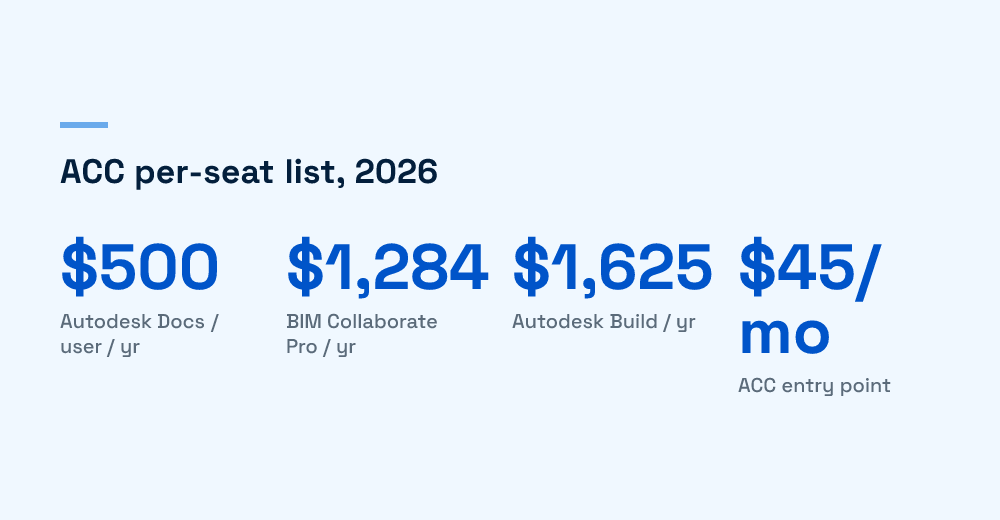
If you are pricing BIM 360 in 2026, the first thing to know is that BIM 360 no longer sells as a standalone product. Autodesk folded it into Autodesk Construction Cloud (ACC), renamed Autodesk Forma in March 2026, with BIM Collaborate Pro now sold as Forma Design Collaboration. The products and pricing are unchanged, only the names. and the closest equivalent most AEC teams buy is BIM Collaborate Pro, which lists at roughly $1,284 per user per year. Autodesk Docs sits near $500 per user, and Autodesk Build lands around $1,625. None of those are final numbers, because Autodesk prices through sales quotes, not a checkout page.
One naming note before the math: in March 2026 Autodesk renamed ACC to Autodesk Forma, so BIM Collaborate Pro now appears as Forma Design Collaboration in some quotes. It is a rename, not a repricing, and most teams and resellers still say ACC, so this breakdown uses the ACC product names throughout.
That gap between the published figure and the invoice is where most cost surprises live. We work with construction and AEC product teams on exactly this decision, and the sticker price is rarely the part that hurts.
What does BIM 360 actually cost in 2026?
BIM 360’s capabilities now live inside ACC’s role-based products, priced per user per year. The common tiers, based on reseller and pricing-tracker figures, break down like this. Treat them as list anchors, not quotes.
| Product (ACC) | Approx. list, per user / year | What it covers |
|---|---|---|
| Autodesk Docs | ~$500 | Common data environment, document control, model viewing |
| BIM Collaborate | ~$705 | Design coordination and clash detection |
| BIM Collaborate Pro | ~$1,284 | Adds cloud worksharing / live co-authoring in Revit and Civil 3D |
| Autodesk Takeoff | ~$1,250 | 2D and model-based quantity takeoff |
| Autodesk Build | ~$1,625 | Field collaboration, RFIs, submittals, project management |
ACC entry points start from around $45 per user per month, but that low figure maps to the lightest tier, not the coordination bundle most teams actually need. For the official line items, Autodesk publishes its own construction pricing page, though it still routes serious buyers to a quote.
Term length and bundles move the number
Two levers change the headline price before you ever negotiate. Billing term is the first: monthly plans cost more per year than an annual commitment, and locking a multi-year term holds your rate against list-price increases. The second is the AEC Collection. Autodesk Docs is included with an AEC Collection subscription, so teams already paying for Revit, Civil 3D, and the wider toolset may not need to buy Docs as a separate line at all. Check what your existing Collection seats already grant before adding standalone ACC products on top.
Which bundle do most AEC teams actually buy?
Most teams that were on BIM 360 land on BIM Collaborate Pro, because it is the tier that keeps live Revit and Civil 3D worksharing in the cloud. That single feature is the reason the Pro tier costs nearly double the standard BIM Collaborate seat.
The per-seat math changes with volume
Autodesk and its resellers discount hard as seat counts climb. Published reseller packs show the pattern clearly:
- Single user: about $945 for a one-year seat
- 10-user pack: about $870 per seat
- 25-user pack: about $781 per seat
- 100-user pack: about $693 per seat
So a large team pays roughly 27 percent less per seat than a solo buyer. If you are budgeting, model the blended rate at your real headcount, not the single-seat list price. We walk teams through this same volume curve in our ROI comparison of cloud-powered BIM versus BIM 360, which sits next to this breakdown.
Where do the hidden costs show up?
The subscription line is the visible cost. The real total cost of ownership shows up in the parts that never appear on the plan page, and in the first year they can rival the licensing line itself.
- Migration from BIM 360 to ACC: moving projects, permissions, and folder structures is real project work, not a toggle.
- Training and adoption: a seat nobody uses well is pure waste, and field teams need real onboarding.
- Add-ons: Takeoff, Build, and preconstruction tools are separate line items that stack fast.
- Annual renewal: list prices drift up, and the leverage you had at signing is weaker at renewal.
- Integration glue: pushing ACC data into your ERP, scheduling, or a custom viewer is engineering effort you own.
If your firm is coming off spreadsheets and messaging apps rather than a real platform, the adoption cost is even larger, which is the exact problem we map in our migration playbook for briefing a dev team on a BIM product.
When does building beat buying more seats?
Buying more full ACC seats is the right call when your team lives inside Revit coordination every day. It stops being obviously right when most of your seats only view models, pull data, or run a narrow workflow. Paying $1,284 a year so someone can look at a federated model is a weak trade.
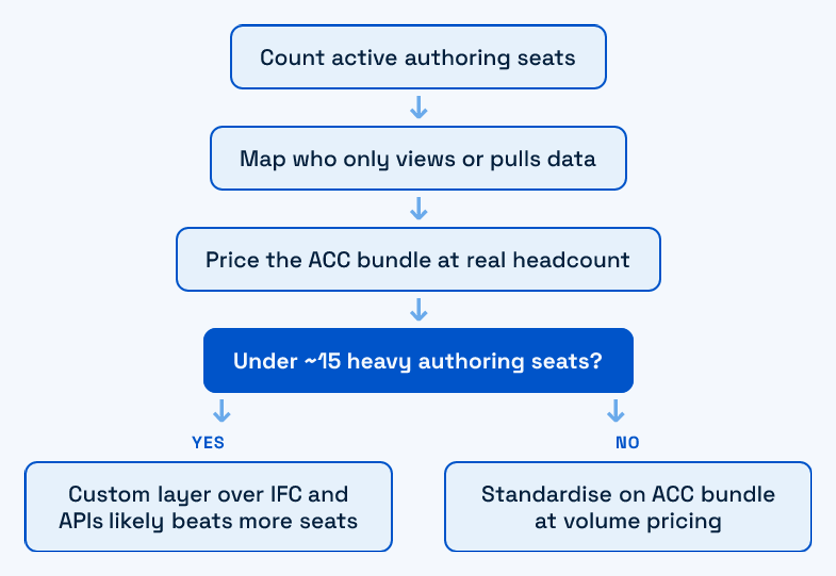
In our client work, the break point sits around 10 to 15 heavy authoring seats. Below that, a thin custom layer built over IFC and open BIM APIs often delivers the viewing, reporting, and integration your non-authoring users need for less than another rack of Pro seats. We have shipped this pattern using an open-source BIM stack and connected it back to ACC through real-time construction data APIs.
This is not an argument to drop Autodesk. Keep Pro seats for the people authoring geometry. The point is to stop over-provisioning full seats for users who need a fraction of the product, and to compare that per-seat spend honestly against a build. We break the same trade-off down in the real cost of building it in-house.
If you are staring at a renewal quote and quietly wondering how many of those seats you actually need, that is the right question. Map your real workflows first, price the bundle at your true headcount, and only then decide what to buy. If you want a second set of eyes on that math, start a conversation with us, no pitch.
Frequently Asked Questions
Is BIM 360 still available to buy in 2026?
Not as a standalone product. Autodesk migrated BIM 360 into Autodesk Construction Cloud (ACC). The nearest equivalent for design coordination and cloud worksharing is BIM Collaborate Pro, and document control now lives in Autodesk Docs. Existing BIM 360 accounts have been transitioned into the ACC platform.
How much does BIM Collaborate Pro cost per user?
BIM Collaborate Pro lists at roughly $1,284 per user per year at single-user rates. Volume packs bring that down to about $693 per seat at 100 seats. Because Autodesk prices through sales quotes and reseller discounts, treat any published figure as a starting anchor rather than the final invoice.
Why is Autodesk pricing so hard to find?
Autodesk sells construction products through a sales-led, quote-based model rather than transparent checkout. Published list prices exist, but actual cost depends on seat count, contract term, bundled add-ons, and negotiation. That is why two firms buying the same products can pay noticeably different per-seat rates.
When is a custom BIM layer cheaper than more ACC seats?
Usually when you have more viewers and data consumers than active model authors. Below roughly 10 to 15 heavy authoring seats, a custom layer over IFC and open BIM APIs can cover viewing, reporting, and integration for less than buying more full BIM Collaborate Pro seats. Keep Pro seats for the people authoring geometry.

Huzefa Motiwala
Huzefa Motiwala is a co-founder of AlterSquare, an application-layer partner that helps SaaS and tech-led companies stabilise, modernise, and extend complex systems without breaking what already works. He comes at software from design and frontend, with a focus on data-heavy interfaces and on getting real teams to actually adopt what gets built — not just ship it. He writes about working in fragile, high-stakes codebases: incremental change over risky rewrites, UX and technical debt, and embedding AI into real workflows.







Leave a Reply