
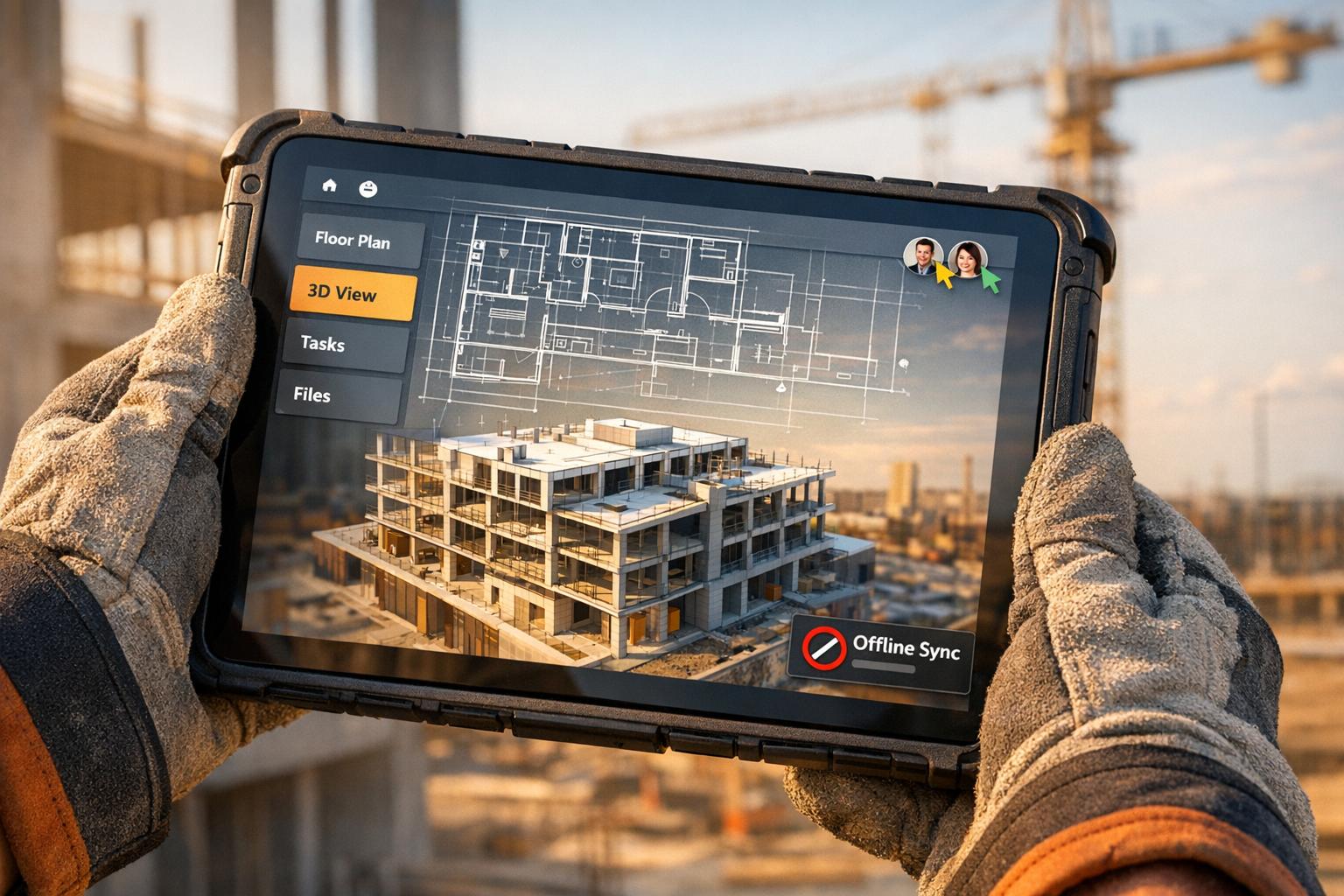
Building software for the construction and AEC industries is no walk in the park. Why? These tools must handle massive 3D models, render precise blueprints, and work flawlessly in challenging environments like job sites with poor connectivity and harsh weather conditions. Here’s a quick rundown of the main challenges and solutions:
- Blueprints and 2D Plans: Rendering large, complex files like DWGs often crashes devices. Solutions include geometry batching, progressive rendering, and tiling to reduce memory usage and improve performance.
- 3D Models and BIM Files: BIM files can exceed 1 GB, causing slow load times and crashes. Optimizations like file compression (e.g., converting to glTF), culling, and Level of Detail (LOD) techniques help reduce size and improve frame rates.
- Field-Friendly Interfaces: Workers deal with gloves, sunlight, and unstable connections. Apps need offline-first functionality, high-contrast designs, and touch-friendly elements (minimum 44×44 pixels).
- Multi-Device Support: Devices range from rugged phones to vehicle-mounted displays. Responsive designs and offline data syncing ensure reliability across all hardware.
- Real-Time Collaboration: Keeping teams aligned requires tools like WebSockets for instant updates, delta compression to minimize bandwidth use, and conflict resolution techniques like CRDTs.
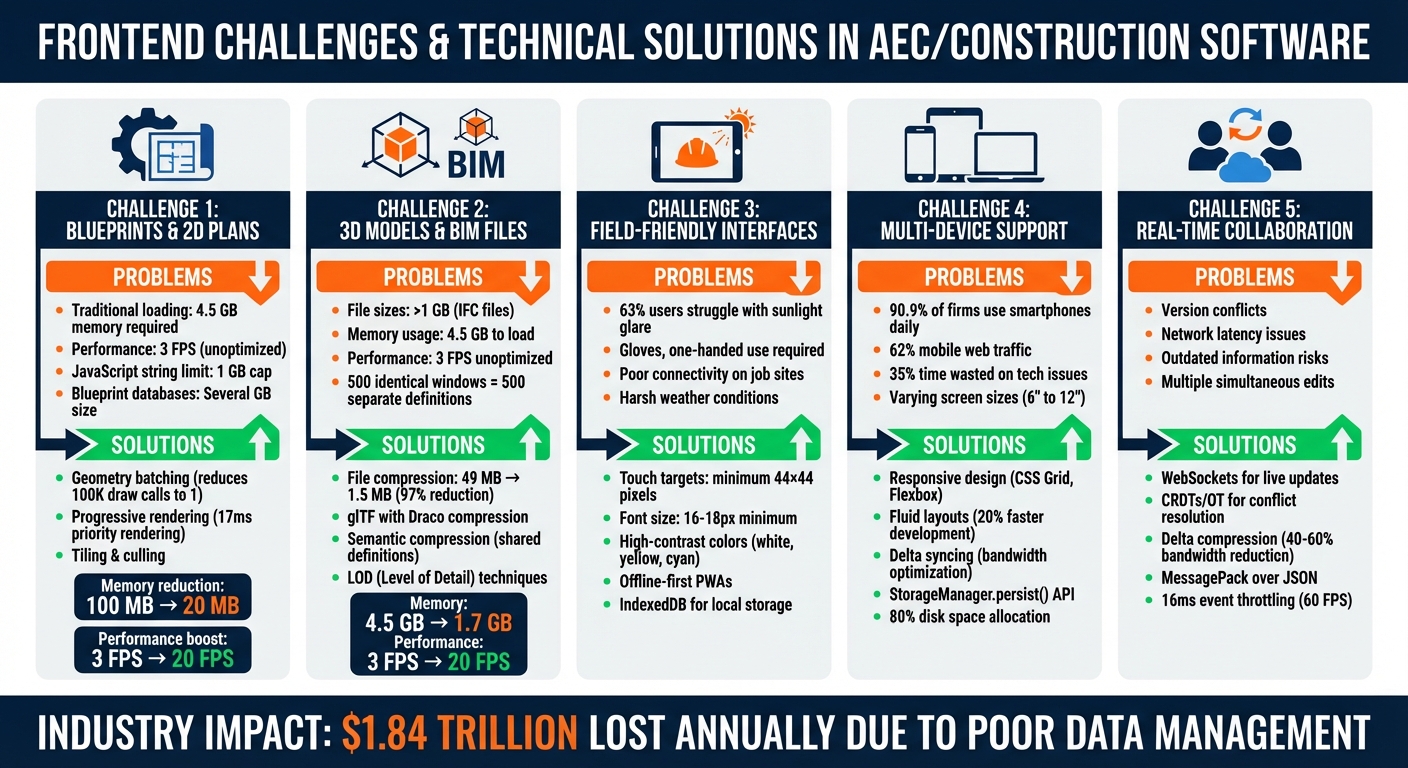
AEC Software Frontend Challenges and Technical Solutions Comparison
Next-Gen AEC Tools: BIM, Automation & AI – AEC-Tech Talk 19
sbb-itb-51b9a02
Displaying Blueprints and 2D Plans
Rendering blueprints in construction and AEC software presents unique challenges, especially when dealing with the intricate data involved. Unlike standard web images, blueprints often consist of millions of lines, arcs, and annotations in complex formats like DWG, which require specialized binary decoding. This complexity becomes even more pronounced on mobile devices, where hardware and memory constraints are more restrictive.
For instance, high-resolution blueprints can quickly hit technical limits. JavaScript engines typically cap text strings at 1 GB [6], and mobile browsers operate within a memory sandbox that limits access to system RAM [1]. Traditional loading methods can demand as much as 4.5 GB of memory, leading to frequent crashes on field devices [6]. Even when files do load, unoptimized blueprints can render at a sluggish 3 frames per second, making basic interactions like zooming and panning frustratingly slow [6]. On top of that, blueprint databases can grow to several gigabytes, which poses additional challenges when working over unstable field connections [7].
These issues are compounded on mobile devices, where limited processing power and unreliable networks amplify the difficulties.
Blueprint Display Issues on Mobile Devices
Mobile devices face three main hurdles when displaying blueprints:
- GPU context loss: Switching between apps or running low on memory can cause frequent disruptions, making the viewing experience inconsistent [1].
- Single-threaded processing: Handling large datasets in a single-threaded JavaScript environment often results in UI stuttering and unresponsive scripts [5][6].
- Bandwidth constraints: Spotty 4G connections make loading full-resolution blueprints impractical without aggressive optimization.
Rendering precision is another challenge. At varying zoom levels, standard rendering methods often lose the fine details critical for tasks like measuring electrical conduits. This is particularly problematic for blueprints integrated with GIS coordinates, where double-precision rendering becomes essential [4].
Technical Solutions for Blueprint Rendering
Overcoming these challenges requires carefully designed frontend optimizations. One effective approach is geometry batching, which reduces the number of individual draw calls. Instead of issuing 100,000 separate calls – something that can drag CPU performance below 1 frame per second – batching these entities into a single GPU buffer significantly improves performance [10].
Another technique is progressive rendering, which prioritizes rendering the most visible sections within 17 milliseconds to maintain a smooth 60 frames per second. Additional details are then filled in during subsequent frames [9].
For low-bandwidth environments, tiling and culling offer a practical solution. By breaking large blueprints into smaller, logical sections (like floors or zones) and loading only the visible portion, memory usage can be drastically reduced [6]. For instance, skipping the property database (using options like skipPropertyDb: true) can cut memory requirements from 100 MB to under 20 MB [7]. Using Web Workers for background parsing ensures the UI thread remains responsive [1], while storing parsed assets in IndexedDB can reduce warm-load times from several seconds to under 100 milliseconds [8].
"xeokit is a success enabler for our customers. Incredibly fast load times and super high-performance rendering, even on mobile browsers."
– Toni Marti, Software Artist, Tribia SA [4]
For interactive features like annotations, leveraging GPU-accelerated SVG transforms via CSS transform properties can significantly improve performance during tasks like panning or markup [7]. With these strategies, rendering performance can leap from a sluggish 3 frames per second to a much smoother 20 FPS, even on budget-friendly field tablets [6].
Working with 3D Models and BIM Files
BIM files bring a whole new level of complexity compared to 2D blueprints. Instead of flat drawings, these files deliver fully detailed 3D representations of buildings. They include everything – geometry, materials, and metadata for every component, from structural beams to tiny electrical outlets. It’s not uncommon for a single IFC file to exceed 1 GB in size, requiring up to 4.5 GB of memory just to load. That’s more than most field tablets can handle, and even powerful laptops often struggle with these hefty files.
One major issue is redundancy. For instance, if a building has 500 identical windows, the file doesn’t reference one shared definition; instead, it stores 500 separate, complete definitions of the same window. This bloats file sizes unnecessarily. On top of that, JavaScript engines have strict limits – text strings are capped at 1 GB – so trying to parse these massive datasets often causes browser crashes before the 3D model even appears. This complexity directly impacts how quickly models load and how smoothly users can interact with them.
Performance Issues with 3D Model Loading
When IFC files exceed 300 MB, most viewers hit their limits. Browsers process these files on a single thread, overloading the CPU and causing unresponsive script warnings. On mobile devices, the situation is even worse – limited processing power and tight memory constraints make rendering high-polygon models nearly impossible without heavy optimization.
Unoptimized models perform poorly, running at just 3 FPS. That makes simple tasks like rotating the view or selecting objects painfully slow. Imagine field workers trying to inspect a mechanical room or verify pipe routing under these conditions. Add the challenge of downloading hundreds of megabytes over a shaky 4G connection, and the workflow becomes almost unmanageable.
3D Model Optimization Techniques
To tackle these challenges, compression, culling, and smart loading strategies are essential. Converting IFC files into optimized binary formats like XKT or glTF (with Draco compression) can dramatically reduce file sizes and speed up loading. For example, a 49 MB IFC file compressed into XKT format shrinks to just 1.5 MB and loads in about 2–3 seconds – a staggering 97% size reduction.
Semantic compression helps too. Instead of duplicating data for repeated elements like those 500 identical windows, it references a single shared definition. When combined with server-side culling (removing objects outside the user’s focus area) and client-side frustum culling (only rendering what’s visible on screen), memory usage can drop from 4.5 GB to 1.7 GB. This also boosts rendering speed from a sluggish 3 FPS to a much more usable 20 FPS.
Level of Detail (LOD) is another game-changer. It simplifies geometry for objects further away, ensuring that a mechanical unit 100 feet from the viewer doesn’t have the same polygon count as one being closely inspected. Tools like xeokit, built specifically for these challenges, use WebGL-based frameworks to maintain precision in large-scale GIS/BIM models. Unlike standard WebGL engines, xeokit avoids the rounding errors that can compromise accuracy.
"xeokit’s unmatched loading and rendering speed enables us to create interactive and customizable Web visualization experiences for large BIM models, even when loading many large models simultaneously"
– Hugo Duroux, Technical Director at BIMData.io [4]
Optimizing how models are rendered is a critical first step before tackling user interface challenges in the field.
Interface Design for Field Workers
Creating interfaces for field workers means designing for tough, unpredictable environments. These workers aren’t sitting at desks – they’re juggling tools, safety gear, and devices in places where mud, sunlight, or darkness are the norm. Because of these conditions, interfaces must include tactile-friendly elements and offline functionality. This ensures that even complex tasks like accessing blueprints or updating real-time data remain doable, no matter what the job site throws at them.
UI Requirements for Field Use
A user interface for field workers has to be as rugged as their work environment. For starters, touch targets need to be at least 44 × 44 pixels, with 8-pixel spacing between elements. Gloves, unstable surfaces, and one-handed use are standard challenges, so anything smaller makes accurate interaction nearly impossible. One-handed usability is a must since workers often have one hand occupied with equipment or tools [2].
Typography also plays a critical role. Font sizes should be 16–18px minimum, paired with a 1.5x line height for better readability. High-contrast colors are essential for visibility in direct sunlight. Shades like white, yellow, green, and cyan work well outdoors, while darker tones like blue can be harder to read in bright light. A study shows that 63% of users struggle to read mobile screens in direct sunlight when contrast levels drop too much [3].
"When designing a UI for mobile apps for bright light use, focus on high contrast, vibrant but not overly saturated colors, and larger, sans-serif fonts for readability." – Richard Hope, iOS Tech Lead [3]
These design principles aren’t just theoretical. In June 2025, Mike Armstrong, Assistant Project Manager at EllisDon, highlighted the impact of well-designed tools on their $800 million Providence Care Hospital project:
"It has probably saved us 2–3 QA/QC people on our project." – Mike Armstrong, Assistant Project Manager, EllisDon [3]
Offline-First Design Approaches
Field workers often face unreliable internet, whether it’s weak cellular signals in steel-framed buildings or low-bandwidth connections. That’s where offline-first design becomes crucial. Progressive Web Apps (PWAs) with service workers can cache essential data – like blueprints, task lists, or safety checklists – when a connection is available, ensuring uninterrupted access [2].
For instance, Zerock Construction’s offline-first strategy significantly cut costs and timelines. The key is designing apps to prioritize local storage (e.g., IndexedDB for structured data, Cache Storage API for assets) and sync changes to the server in the background when connectivity returns. Clear visual indicators are critical here: show network status (e.g., green for online, red for offline) and provide sync progress messages like “Syncing 3 of 7 reports” so workers know their data is secure [12].
For the US market, interfaces should default to formats workers are familiar with: MM/DD/YYYY for dates, feet and inches (e.g., 12′-6") for measurements, and 12-hour AM/PM for time. These small adjustments align with standard field documentation practices [2] [3].
The stakes are high. Poor data management costs the construction industry $1.84 trillion annually, and 90.9% of construction firms rely on smartphones daily for field operations [3]. Designing interfaces that work seamlessly in these environments can mean the difference between software that’s indispensable and software that’s abandoned on the job site.
Multi-Device Support in Harsh Conditions
Construction software needs to function seamlessly across a wide range of devices, from high-end tablets to rugged handhelds and vehicle-mounted units. These devices face tough environments – think drops, moisture, and dust – so designing software that works reliably under such conditions is essential.
With mobile devices driving over 62% of global web traffic [2] and 90.9% of construction firms using smartphones daily [3], responsive design isn’t just a nice-to-have – it’s a necessity. The diversity of hardware on construction sites is staggering. A superintendent might analyze blueprints on a 12-inch tablet in the office, while a foreman relies on a 6-inch rugged phone onsite, and an equipment operator uses a vehicle-mounted display. Each device comes with its own quirks: varying processing power, storage, and screen capabilities. If a device freezes while loading a 100MB blueprint, the software becomes a bottleneck. This is a real issue, as 35% of a construction professional’s time is wasted on unproductive tasks like troubleshooting tech [2]. Whether it’s rendering blueprints or designing intuitive field interfaces, multi-device support in rugged environments demands thoughtful, tailored solutions.
Device and Environment Compatibility
Responsive design in AEC software goes beyond resizing screens. It involves using modern techniques like CSS Grid and Flexbox to create interfaces that adapt effortlessly to different screen sizes and orientations. Fluid layouts based on percentages, for example, can cut development time by up to 20% [2].
But it’s not just about screen size. Environmental challenges like sunlight glare can make standard screens almost unreadable. In fact, 63% of users report struggling to see their mobile screens in direct sunlight due to reduced contrast [3]. High-contrast color schemes – featuring white, yellow, and cyan – perform better in bright conditions compared to blue tones, which tend to fade. Additionally, touch targets must be designed with device-specific constraints in mind, ensuring usability even in tough environments.
However, visual compatibility is only part of the equation. Continuous access to data, even in challenging conditions, is just as critical.
Offline Data Sync and Storage
Construction sites often have connectivity issues caused by obstacles like steel frames and concrete walls. These "dead zones" make it crucial for software to function offline. The solution? Treat the local database as the Single Source of Truth (SSOT), allowing the interface to interact with local storage immediately while a background sync engine updates data once connectivity is restored [13].
For structured data like task lists or inspection reports, IndexedDB is a solid choice. The Cache Storage API is better suited for larger assets, such as blueprints or images. And for complex, relational data, SQLite via WebAssembly offers full SQL capabilities right in the browser [15]. To further optimize performance, delta syncing – sending only the changes made since the last update – can save bandwidth in areas with weak networks [13].
Another critical step is using the StorageManager.persist() API to ensure offline data isn’t wiped when storage runs low. Chrome, for example, allocates up to 80% of disk space for browser storage, with individual apps allowed up to 60% [14]. Service Workers can also enhance offline functionality by retrying failed uploads automatically, even if the app has been closed [11].
Real-Time Data Updates and Team Collaboration
In the construction world, staying up-to-date isn’t just helpful – it’s crucial. Architects, engineers, and site managers rely on the most current data to avoid costly mistakes. Delays in updates can lead to outdated information being used, which might result in rework or schedule disruptions. Imagine a superintendent referencing an outdated Gantt chart and mistakenly sending crews to the wrong site, or an engineer overlooking a vital design revision. Real-time collaboration ensures projects stay aligned with timelines and budgets, but achieving this level of immediacy comes with its own technical challenges.
Real-Time Collaboration Difficulties
One of the biggest hurdles in real-time collaboration is handling version conflicts. When multiple team members edit the same element simultaneously, the system must determine which changes to keep. Add to this the issue of network latency, where even small delays can lead to decisions being made on outdated or incomplete information.
Technical Solutions for Live Updates
Modern AEC (Architecture, Engineering, and Construction) tools have stepped up to tackle these challenges. Real-time communication protocols and smarter data handling strategies make it possible. For example, WebSockets facilitate continuous, two-way communication, ensuring updates are instant. A combination of approaches works best: initial actions like creating tasks or editing links are processed via REST APIs, while updates are broadcast to all connected users through WebSockets [20].
To resolve conflicts, systems use either Operational Transformation (OT) or Conflict-Free Replicated Data Types (CRDTs). OT, used by tools like Google Docs, relies on a central server to sequence actions. Meanwhile, CRDTs, as seen in Figma, allow decentralized changes to merge seamlessly [16][17]. In July 2023, Speckle introduced new features like "Follow Mode", which synchronizes a highlighted user’s viewport, sections, and filters in real time. Speckle also added a version comparison tool to quickly identify changes – whether objects were added, removed, or modified – between model versions [19].
Performance is another key factor. Instead of sending the entire project state with every update, delta compression transmits only changes, cutting bandwidth use by 40–60% when paired with binary protocols like MessagePack instead of JSON [21]. To prevent overload during interactive updates, events are throttled to 16 milliseconds, aligning with 60 frames per second [16][21].
"Modelers reduced their delivery time from 9 days to 12 minutes thanks to Speckle."
– Benedetta Ravicchio, Senior Computational Designer, Arup [18]
These advancements ensure that AEC platforms remain efficient and reliable, even in challenging field environments. By combining cutting-edge techniques with practical strategies, real-time collaboration becomes not just feasible but seamless.
Frontend Technology Stack for AEC Software
Once you’ve tackled the challenges of rendering blueprints and managing offline data, the next step is choosing a frontend technology stack that can handle the demands of AEC software. The ideal framework should support complex data handling, offline functionality, and perform well on rugged devices. Two standout options are Vue.js and React – both capable, but each with advantages depending on your project’s needs and team structure.
Why Choose Vue.js?
Vue.js is an excellent choice for smaller teams aiming for rapid development. Its template-based structure and approachable learning curve make it easier to create interactive tools like 2D plan viewers or detailed field forms. At its core, Vue 3.5 is lightweight, with a bundle size of just 18–22KB compared to React 19.2’s 32–40KB [25]. This difference can significantly impact performance, especially on devices with limited resources.
According to AlterSquare, "Vue.js is an excellent fit for construction software because it handles complex workflows, real-time updates, and offline functionality efficiently" [22]. The framework’s automatic dependency tracking ensures that components only re-render when necessary – perfect for use cases like monitoring real-time equipment locations or tracking concrete pours without bogging down the UI [23]. For teams prioritizing performance and offline reliability, Vue.js is a strong contender.
Why Choose React?
On the other hand, React shines in large-scale projects, particularly when native mobile apps are part of the plan. With React Native, you can share code across iOS, Android, and web platforms – a major advantage for AEC teams needing mobile solutions for inspections or progress tracking [26][27]. React’s widespread adoption also makes it easier to find developers, as the framework boasts a developer pool roughly four times larger than Vue’s in most hiring markets [27].
However, React’s one-way data flow and JSX syntax require a deeper understanding of JavaScript, which can slow down development for less experienced teams [23]. That said, the framework’s scalability and ecosystem make it ideal for enterprises looking to build robust, multi-platform solutions.
Vue.js vs. React for AEC Applications
Both frameworks support Progressive Web App features and service workers, enabling teams to work offline and sync data once connectivity is restored [22][24]. When it comes to performance, Vue 3.5 hydrates server-rendered pages in just 25–45ms, compared to React 19.2’s 40–70ms. This speed difference is especially noticeable on slower devices, making Vue a strong choice for dashboards in resource-constrained environments [25].
For state management, Vue offers Pinia as an official solution, while React relies on third-party libraries like Zustand or Redux. While React’s approach offers flexibility, it also demands more upfront architectural decisions [22].
Making the Choice
- Choose Vue.js if you’re building a web-focused MVP, working with a lean team, or need to prioritize speed and performance on constrained devices.
- Choose React if you’re developing a large-scale platform with native mobile apps or need access to a broader talent pool to scale your team quickly [26][27].
In short, Vue.js offers faster development and better performance for smaller teams, while React provides the scalability and ecosystem support needed for large, complex projects. Your decision will depend on your specific priorities – whether that’s delivery speed, team size, or platform scalability.
How AlterSquare Builds AEC Frontend Solutions
AlterSquare tackles the unique challenges of frontend development in AEC software with a focus on practical usability and technical expertise. Their I.D.E.A.L. Delivery Framework guides projects through a 90-day process, from initial discovery to post-launch support. This method emphasizes a field-first design approach, addressing real-world conditions like poor connectivity, bright sunlight, and the need for interfaces that work with gloves. Acting as an Engineering‑as‑a‑Service partner, AlterSquare integrates directly with startup teams to develop MVPs tailored to US market standards.
The company leverages tools like Vue.js, Nuxt.js, and Pinia to create modular architectures and enable reactive data handling. Progressive Web Apps (PWAs), built with Service Workers and IndexedDB, allow field teams to access critical resources like blueprints and manuals even when offline. By using Vue’s modular capabilities, AlterSquare develops reusable components for complex AEC features, such as Gantt charts, floor plan viewers, and interactive site maps, while Pinia ensures centralized state management across various views.
For rugged devices, performance is a top priority. AlterSquare incorporates virtual scrolling (via tools like vue‑virtual‑scroller) to efficiently manage large datasets, such as equipment records. They also use code splitting (with defineAsyncComponent) to optimize the loading of heavy 3D modules. Handling massive BIM files requires advanced techniques like culling, tiling, and compression, which reduce memory usage from 4.5 GB to 1.7 GB and improve frame rates from 3 FPS to 20 FPS [6]. These optimizations ensure the software remains fast and reliable, meeting the specific demands of on-site work in the US.
Every interface is designed to align with US standards, including imperial measurements, MM/DD/YYYY date formats, and 12-hour clocks. Touch targets are sized at a minimum of 44×44 pixels to accommodate gloved users, and high-contrast color schemes – featuring white, yellow, and cyan – enhance readability in direct sunlight. These design choices are rigorously tested through on-site pilots in tough conditions, such as connectivity dead zones, rugged terrain, and extreme device usage.
The end result? Software that overcomes AEC challenges, from rendering large IFC files to syncing real-time project data across multiple devices.
Conclusion
Frontend development for construction and AEC (Architecture, Engineering, and Construction) stands apart from typical web applications. Field workers face unique challenges – interfaces must stay readable in direct sunlight, function reliably without internet access, and handle BIM files without overwhelming their devices. The stakes are high: the industry loses $1.84 trillion annually due to poor data management, and 90.9% of construction firms rely on smartphones daily, yet many tools still fall short of meeting these essential needs [3].
Key solutions include offline-first architecture using PWAs and IndexedDB, high-contrast UI designs with touch-friendly targets (minimum size of 44×44 pixels), and optimized 3D rendering through techniques like culling, tiling, and compression. These approaches not only reduce memory usage but also improve frame rates, ensuring smoother performance in demanding field conditions. The results speak for themselves – Zerock Construction cut 50% in costs and time by adopting field-first UX principles, and EllisDon’s Mike Armstrong highlighted how their $800 million Providence Care Hospital project eliminated the need for 2–3 QA/QC personnel through smarter software design [3].
Every technical hurdle, from rendering blueprints on mobile devices to syncing real-time data, has a practical solution. The challenge lies in finding a development partner who truly understands both the technical requirements and the realities of on-site construction work. Addressing these issues head-on ensures better performance and usability where it matters most.
AlterSquare’s 90-day I.D.E.A.L. Delivery Framework tackles these challenges directly, creating MVPs designed for the toughest conditions – dead zones, bright sunlight, and rugged environments. These solutions meet U.S. industry standards, including imperial measurements, MM/DD/YYYY date formats, and OSHA compliance. If you’re developing AEC software and need a team that understands these unique demands, AlterSquare delivers scalable, reliable applications built for the job site.
FAQs
How can I view huge DWG plans on mobile without crashes?
To smoothly view large DWG plans on your mobile device, you’ll need apps specifically designed to handle these file types. These apps are built to manage large files efficiently, minimizing the chances of crashes or slow performance.
Some reliable options include AutoCAD Mobile App and Autodesk Viewer, both of which are tailored for working with DWG files. For the best experience, make sure your app is updated to the latest version, as updates often include performance improvements and bug fixes.
What’s the fastest way to load 1GB+ IFC/BIM models in the browser?
The quickest way to load massive 1GB+ IFC/BIM models in a browser involves using smart techniques like culling, tiling, compression, and streaming. These strategies work by focusing on efficiency: loading only the parts of the model that are visible or necessary, breaking large models into smaller, manageable pieces, and converting them into web-optimized formats like XKT. This approach ensures smoother rendering and faster performance.
How do I support offline work and conflict-free syncing for field teams?
To make offline work possible and ensure smooth syncing without conflicts, consider an offline-first strategy using local data storage. This setup lets field teams access and update critical information – such as tasks, blueprints, or logs – even when there’s no internet connection. Implement tools like conflict-free replicated data types (CRDTs) or similar models to handle concurrent updates while avoiding data loss. Additionally, establish strong sync mechanisms to maintain consistent data, even when network connections are unstable or intermittent.
Related Blog Posts
- Why Construction Tech UX Is Different: Designing for Jobsite Realities
- Responsive Design for Construction Sites: Making Web Apps Work in the Field
- Field-First UX: Designing Offline-Capable BIM Tools for Job-Site Realities
- Building Construction Software with Vue.js: Why We Choose It for Complex Applications






Leave a Reply