

When your frontend architecture begins to slow down development or impact performance, it’s a clear sign that something needs to change. Here’s what to watch for:
- Technical Debt Overload: Frequent bugs, unexpected regressions, and high maintenance costs signal growing inefficiencies. Developers spend more time fixing than building.
- Monolithic Codebase: A single, tightly coupled codebase leads to merge conflicts, long build times, and system-wide risks from small changes.
- Sluggish Feature Development: Tasks that should take days stretch into weeks due to workarounds and debugging.
- State Management Chaos: Poorly organized state leads to unpredictable behavior, unnecessary re-renders, and confusion.
- Performance Struggles: Slow load times, large bundles, and poor handling of traffic spikes highlight architectural weaknesses.
Key takeaway: If your team is spending more time maintaining code than delivering features, it’s time to rethink your frontend structure. Solutions like modular components, micro-frontends, better state management, and performance optimizations can help you regain speed and efficiency.
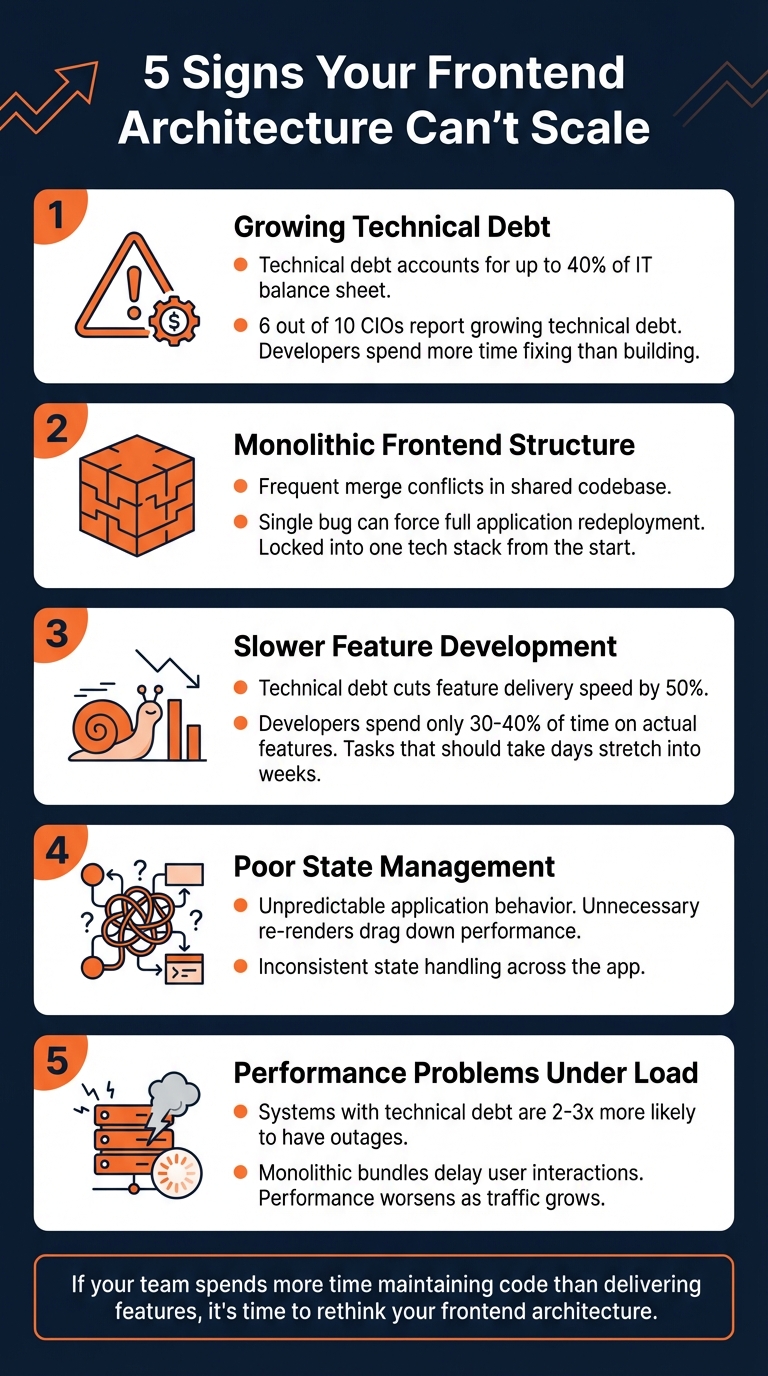
5 Signs Your Frontend Architecture Can’t Scale
5 Signs Your Frontend Architecture Can’t Scale
Sign 1: Growing Technical Debt and Maintenance Costs
When scaling becomes a challenge, technical debt starts to siphon resources. Bugs pop up more often, and fixing one issue might unexpectedly break another. It’s a common problem – technical debt can account for up to 40% of a company’s IT balance sheet [7], and 6 out of 10 CIOs say this debt only continues to grow [6].
"Technical debt isn’t just bad code. It’s the accumulation of quick fixes, skipped documentation, and short-term decisions made to save time, all of which slow you down later."
The real-world consequences are hard to ignore. Take Sqreen, for instance – they significantly reduced weekly critical errors by implementing automated testing and modern tools [1]. On the flip side, fragmented logic and repetitive components make code harder to understand [8]. Outdated documentation can also leave new developers struggling to get up to speed, dragging out the onboarding process.
This accumulation of debt isn’t just an annoyance – it lays the groundwork for deeper structural challenges.
Sign 2: Monolithic Frontend Structure
A monolithic frontend setup often creates bottlenecks that hinder team efficiency. Shared codebases lead to frequent merge conflicts and require heavy coordination, even for minor UI tweaks [10]. This rigid structure locks the project into a single tech stack from the start, making it nearly impossible to adopt newer tools or frameworks incrementally [12].
The risks don’t stop there. In a monolithic system, a bug in one small feature might force you to redeploy the entire application, increasing the chances of a system-wide outage [11]. Changes in one area can also trigger unexpected regressions elsewhere, further degrading code quality [12]. As the codebase grows, new developers face lengthy build and test times, making it harder to contribute effectively in a tightly coupled environment.
Sign 3: Slower Feature Development
When your architecture struggles to scale, feature development slows to a crawl. Technical debt can cut the speed of new feature delivery by as much as 50% [4]. Tasks that should take days begin to stretch into weeks due to the need for constant workarounds [9].
Deadlines become unpredictable, and lead times for new features grow longer. Developers often find themselves spending only 30% to 40% of their time on actual feature development, with the rest eaten up by debugging and patching [4].
"Prudent technical debt is healthy and desired, especially in the initial phases of a startup’s journey… But as the company looks to scale up, we have to address the shortcuts taken, or it will very quickly affect the business."
- Tim Cochran, Technical Director, Thoughtworks [9]
This creates a snowball effect. Once developers accept the messy state of the code as "normal", each new feature tends to pile on even more debt, perpetuating the cycle.
Sign 4: Poor State Management
Disorganized state management often leads to unpredictable behavior, which becomes harder to debug as your application grows. Overusing global state or relying too heavily on deep prop drilling can make it tough to track where data changes originate [3]. These practices often result in unnecessary re-renders, which drag down performance.
Inconsistent state handling across different parts of the app adds another layer of confusion. This lack of clarity in data flow not only slows down feature development but also amplifies the broader scalability issues already in play.
Sign 5: Performance Problems Under Load
Performance struggles under increased traffic are a clear indicator that your architecture isn’t built for growth. Monolithic bundles, for example, delay user interactions by forcing the browser to load one massive file [2]. Systems weighed down by technical debt are also 2 to 3 times more likely to experience production incidents and outages compared to well-structured architectures [4].
In frameworks like React, inefficient component isolation can lead to expensive re-renders of entire sub-trees, slowing down the reconciliation process [2]. Meanwhile, shipping independent bundles might duplicate dependencies, inflating download sizes [10]. Without techniques like code splitting, lazy loading, or server-side rendering, users may encounter "white screen" delays or jolting layout shifts as parts of the page load asynchronously. These performance hiccups only worsen as traffic grows.
Spotting these red flags is the first step in addressing scalability challenges effectively.
Your Frontend Doesn’t Scale (Here’s Why Seniors Fix It)
How to Diagnose Frontend Scalability Problems
Once you’ve spotted early warning signs, the next step is to dive deeper into diagnosing the root causes. This involves analyzing your code’s structure, assessing performance metrics, and evaluating how efficiently your team delivers features. Here’s how to break it down.
Review Your Code and Component Structure
Start by auditing your codebase for structural issues. A well-organized directory structure should align with business domains (e.g., shopping/cart or products) rather than technical layers. This approach makes it easier to add or modify features without disrupting unrelated parts of the codebase [5][10].
Keep an eye out for overly complex shared components that might represent "wrong abstractions." While it might seem counterintuitive, duplicating some code can often be less of a headache than maintaining rigid abstractions [5].
Examine where data fetching occurs in your application. If parent components are fetching data for deeply nested children, you’re introducing unnecessary dependencies. Instead, move data fetching closer to the components that need it. This makes your code more modular and easier to refactor [5]. Additionally, watch for unnecessary prop drilling or excessive use of global state for minor UI elements like modal toggles – these patterns can complicate your code unnecessarily [11][17].
Automation can also save you time and prevent errors. Tools like ESLint and Prettier help enforce consistent coding standards, catching issues early in the development process [13][1]. For example, in 2021, Sqreen’s engineering team faced frequent production issues due to rapid codebase growth. By introducing ESLint, Prettier, and mandatory unit and end-to-end tests for every commit, they reduced critical errors from 10 per week to just a few per year [1].
Once you’ve reviewed your code structure, it’s time to back up your findings with performance data.
Measure Performance Metrics
Performance metrics can uncover hidden bottlenecks. Use Lighthouse to monitor Core Web Vitals. Aim for these benchmarks:
- Largest Contentful Paint (LCP): Under 2.5 seconds
- First Input Delay (FID): Less than 100ms
- Cumulative Layout Shift (CLS): Below 0.1 [16]
If your LCP is too high, it might point to unoptimized assets or a monolithic architecture. A high FID often signals that the main thread is bogged down by JavaScript execution [15][16].
Tools like Webpack Bundle Analyzer can help identify bloated dependencies and ensure tree-shaking is removing unused code effectively [14]. Keep your total DOM nodes under 1,500 and the depth below 32 levels, as large DOMs can increase memory usage and trigger costly layout reflows [15]. To prevent performance regressions, set performance budgets with tools like Lighthouse CI, which can enforce bundle size limits during your build process [16].
For a complete picture, combine lab data from Lighthouse with real-user data [15][16].
While performance metrics highlight code inefficiencies, team productivity metrics can reveal how these issues impact delivery speed.
Track Team Velocity and Delivery Speed
Your team’s productivity can reveal architectural problems. If developers are spending more time debugging than building, it’s a sign your architecture is holding them back [4]. Monitor metrics like feature implementation time, bug fix cycle time, and lead times for delivering features. Teams dealing with heavy technical debt often deliver 25% to 50% fewer features compared to those working with clean, well-organized code [4].
Another red flag is when tasks that should take days stretch into weeks. This often means developers are working around architectural issues rather than solving them. Consider this: organizations typically spend 60% to 80% of their software budget on maintenance rather than new development. If your maintenance costs are even higher, it’s time to take a closer look at your architecture [4].
sbb-itb-51b9a02
How to Fix Frontend Scalability Issues
Tackling frontend scalability challenges requires a step-by-step approach. Instead of overhauling everything, focus on targeted solutions to address specific pain points.
Solution 1: Build Modular Components
Break your frontend into smaller, reusable pieces to make scaling easier. Follow the Single Responsibility Principle, where each component handles just one task. If a component becomes too complex, split it into smaller sub-components [2].
Separate rendering logic from business logic by using custom hooks for tasks like state management and side effects. For instance, instead of having a single component handle data fetching, validation, and UI updates, move those responsibilities into a custom hook like useProductData(). This way, the component can focus solely on rendering [3].
Tools like Storybook can help you develop and test components in isolation, covering all possible states such as loading, errors, or partial data scenarios [2][13].
"A component should ideally only do one thing. If it ends up growing, it should be decomposed into smaller sub-components." – Thinking in React (cited by Frontend Mastery) [2]
To make your components flexible, use patterns like Inversion of Control. Instead of relying on numerous configuration props, use slots or children props to give consumers control over what gets rendered. Organize components using Atomic Design Principles, where you start with basic building blocks (Atoms like buttons), combine them into more complex structures (Molecules like form fields), and scale up to larger structures (Organisms like headers) [3].
Lastly, structure your code around business domains using Feature-Sliced Design.
Solution 2: Use Feature-Sliced Design
Feature-Sliced Design (FSD) organizes your codebase by business features rather than technical layers. Instead of grouping all components or services together, FSD structures code by domains like "product-catalog" or "user-profile" [22].
FSD splits the application into layers such as App (initialization), Pages (route components), Widgets (composite blocks), Features (user interactions), Entities (business entities), and Shared (reusable utilities) [19]. This structure limits directories to a manageable number (seven or fewer), making it easier to navigate [19].
Each feature or entity gets its own folder with an index.ts file that only exposes the public API, hiding internal details. This prevents accidental dependencies between features and allows you to update or remove functionality without affecting unrelated parts of your app [19].
Teams using FSD have reported that the structure helps new developers onboard faster since the organization mirrors familiar business domains [19].
Solution 3: Move to Micro-Frontends
For large-scale applications, micro-frontends split your monolithic frontend into smaller, domain-specific pieces. Each micro-frontend operates independently, managed by a dedicated cross-functional team [10][20].
"A microfrontend is essentially the microservice idea applied to the browser UI: instead of one big frontend repository, you compose the user interface from multiple smaller, self-contained applications." – SourceTrail [10]
This approach can drastically reduce build times (by up to 80%) and allow for more frequent deployments [21]. Tools like Webpack 5 Module Federation enable sharing dependencies between micro-frontends at runtime, keeping bundle sizes in check while supporting independent builds [10].
A central application shell handles shared functionality like navigation and authentication. Each micro-frontend can be encapsulated using Web Components, making them framework-agnostic [10][20].
Here’s a quick comparison of traditional monolithic frontends versus micro-frontends:
| Feature | Monolithic Frontend | Micro-Frontend Architecture |
|---|---|---|
| Deployment | Single, synchronized release for the app | Independent, per-domain deployment pipelines [10][18] |
| Team Autonomy | High coordination; teams block each other | High autonomy; teams own vertical slices [10][20] |
| Tech Stack | Single framework/version across the app | Different frameworks/versions per slice [10][20] |
| Build Times | Increase with codebase size | Faster builds scoped to individual apps [21] |
| Failure Impact | A single error can crash the entire UI | Failures are isolated to specific fragments [10][18] |
To avoid conflicts between teams, establish namespaces for CSS classes, DOM events, and local storage keys [10][20].
Solution 4: Improve State Management
State management often becomes a bottleneck as applications grow. A layered approach can help separate concerns and simplify scalability [3][22].
- Local State: Use hooks like
useStatefor UI-specific data, such as form inputs or modal visibility. - Contextual State: Share data between related components without prop drilling by using React Context or similar tools.
- Global State: Reserve tools like Redux Toolkit, Zustand, or Pinia for application-wide data, such as user authentication or global settings [3][22].
For server-side data, rely on libraries like React Query, SWR, or TanStack Query. These tools handle caching, revalidation, and background updates, reducing manual synchronization work.
In Vue applications, optimize performance with shallowRef or shallowReactive for large, immutable data structures, minimizing the overhead of deep dependency tracking [14].
Solution 5: Boost Performance with Modern Tools
Performance optimization is a mix of good coding practices and leveraging the right tools. Use code splitting and lazy loading to ensure users only download what they need. Framework-specific features like React.lazy or Vue’s defineAsyncComponent can help with this [14][3].
For better page load times and SEO, consider Server-Side Rendering (SSR) or Static Site Generation (SSG) with frameworks like Next.js or Nuxt [14][22]. When dealing with large lists or tables, virtualization libraries like vue-virtual-scroller can significantly reduce DOM overhead by rendering only what’s visible [14].
Set performance budgets to catch issues early, and use Real User Monitoring (RUM) tools to understand how your app performs on actual devices and networks [3]. To minimize bundle sizes, choose tree-shaking-friendly libraries like lodash-es over lodash [14]. In Vue projects, pre-compile templates to avoid shipping the compiler to the browser, saving valuable kilobytes [14].
"A scalable frontend isn’t just about performance. It’s about people, process, and platform." – DEV Team [3]
For managing multiple applications and shared libraries, tools like Nx or Turborepo can streamline processes with build caching and enforced boundaries, speeding up development and reducing errors [3][22].
These strategies form the backbone of scalable frontend architectures, setting the stage for more efficient and maintainable applications.
How AlterSquare Builds Scalable Frontend Architectures
AlterSquare tackles the challenges of frontend scalability with its I.D.E.A.L. Framework – a process that includes discovery, design validation, agile development, launch preparation, and post-launch support. This method directly addresses common pain points like technical debt, rigid monolithic designs, and slow feature rollouts. Instead of just focusing on shipping features, AlterSquare prioritizes creating frontend architectures that grow and adapt smoothly over time.
To solve these challenges, AlterSquare provides specialized services designed to improve frontend scalability. Their Architecture Modernization service focuses on eliminating structural bottlenecks by introducing micro-frontend architectures and modular component design. By applying principles like Atomic Design and Feature-Sliced Design, they enable cross-functional teams to manage vertical slices of the stack independently – from the database to the user interface. This independence allows for faster, more efficient deployment and scaling [10].
For startups in their early stages, AlterSquare offers a 90-day MVP Development program. This program builds scalable products from the ground up, avoiding the pitfalls of monolithic systems that often require expensive rewrites later. Using tools like Vue.js, Nuxt.js, and GoLang, they create modular and maintainable codebases. Additionally, their Tech Team Augmentation service embeds skilled engineers into teams, ensuring scalability principles are applied consistently. These engineers focus on areas like state management, server-side rendering, and code splitting to optimize performance.
AlterSquare also emphasizes aligning technology choices with business objectives. Their Integrated Product Management ensures technical decisions support broader business goals, while their Software Consulting service provides CTO-level guidance for non-technical founders. For products already struggling with outdated architectures, the Architecture Rescue & Legacy Modernization service offers zero-downtime migrations and performance improvements. This transforms fragile systems into adaptable platforms ready for future growth. These services integrate seamlessly with larger growth strategies, ensuring your product evolves efficiently and without interruption.
Conclusion
Your frontend architecture isn’t just about code – it’s a critical driver of business growth. When developers spend 60% to 80% of their time maintaining outdated code, you’re losing ground to competitors [4]. The signs are hard to miss: growing technical debt, monolithic systems that slow down deployments, sluggish feature development, messy state management, and performance that collapses under real-world conditions.
Letting these issues linger only makes things worse. Maintenance costs skyrocket, feature delivery slows to a crawl, and customer trust – and ultimately revenue – takes a hit [4].
But there’s a way forward. Solutions like modular components, Feature-Sliced Design, micro-frontends, better state management, and modern performance tools can transform your architecture and your team’s efficiency. Take Kong, for example. After adopting micro-frontends in January 2024, they slashed their PR-to-production time from 90 minutes to just 13 minutes, while nearly doubling their weekly deployments [21]. That’s the kind of agility that turns market challenges into opportunities.
Addressing scalability challenges early is key to avoiding a cascade of technical debt. As Sandy Metz wisely puts it:
"The more complicated and incomprehensible the code, i.e. the deeper the investment in creating it, the more we feel pressure to retain it (the sunk cost fallacy)" [2]
The longer you delay, the harder – and more expensive – it becomes to fix. A practical approach? Dedicate 25% of your development capacity – whether that’s one day a week or a sprint each quarter – to tackling technical debt [4]. This regular investment ensures debt doesn’t grow faster than you can manage it, a strategy that has helped companies like AlterSquare build scalable, growth-focused architectures.
Your frontend architecture should be a launchpad for innovation, not a bottleneck. By addressing scalability early and aligning technical improvements with business objectives, you create a foundation that keeps your product agile and competitive in a fast-moving market.
FAQs
What are the signs that my frontend architecture is struggling with technical debt?
When technical debt sneaks into your frontend architecture, it tends to manifest as overly complex, hard-to-maintain code. This not only drags down development speed but also raises the chances of introducing bugs. Over time, you might find new developers taking longer to get up to speed, adding features becomes a headache, and performance starts to falter as your application scales.
Some telltale signs? Rigid component structures that don’t adapt well, clunky state management that feels like a constant battle, and recurring workarounds to sidestep existing limitations. Tackling these problems early can save you from bigger scalability headaches later and keep your development process running smoothly.
What are the benefits of switching to a micro-frontend architecture?
Switching to a micro-frontend architecture comes with some standout benefits, especially for large-scale projects. One of the biggest perks is that it allows teams to work independently on different sections of the user interface. This independence speeds up both development and deployment processes, keeping things moving efficiently.
By breaking the frontend into smaller, self-contained modules, you also cut down on code coupling and technical debt. This makes the overall system easier to manage, maintain, and scale as your project grows.
Another advantage? Testing and upgrades become a lot simpler. Changes made to one module won’t ripple through and disrupt the entire application. On top of that, developers often enjoy working within this framework. Why? They get to focus on smaller, more manageable pieces of the project while using the tools and frameworks that best fit their specific tasks. It’s a win-win for both productivity and developer satisfaction.
How does Feature-Sliced Design help make frontend architecture more scalable?
Feature-Sliced Design helps frontend teams manage growth by structuring applications into business-focused layers and slices. This setup separates different functionalities, limits unwanted dependencies, and allows features to be built, tested, and deployed on their own.
By dividing the codebase into smaller, more manageable parts, teams can simplify maintenance, improve teamwork, and handle scaling challenges more smoothly. This method ensures your application can grow alongside your business needs.








Leave a Reply