
AI Coding Tools in Production: What Holds Up on Codebases You’re Afraid to Touch
Huzefa Motiwala July 15, 2026
TL;DR
- AI coding tools are evaluated on greenfield and deployed on legacy; the demo’s happy path does not exist in the fragile, undocumented system where the tool actually has to hold up.
- In a METR randomized trial, experienced developers were 19% slower with AI tools on mature 1M-line repos, while believing they were 20% faster. The felt speedup is not the measured one.
- Faros AI’s study of 10,000+ developers found high-AI-adoption teams merged 98% more pull requests but saw review time rise 91%. The cost moves from writing code to reviewing it.
- GitClear’s analysis of 211 million changed lines found copy-pasted code overtook refactored code in 2024 and duplicated blocks rose eightfold. AI code is a new form of tech debt.
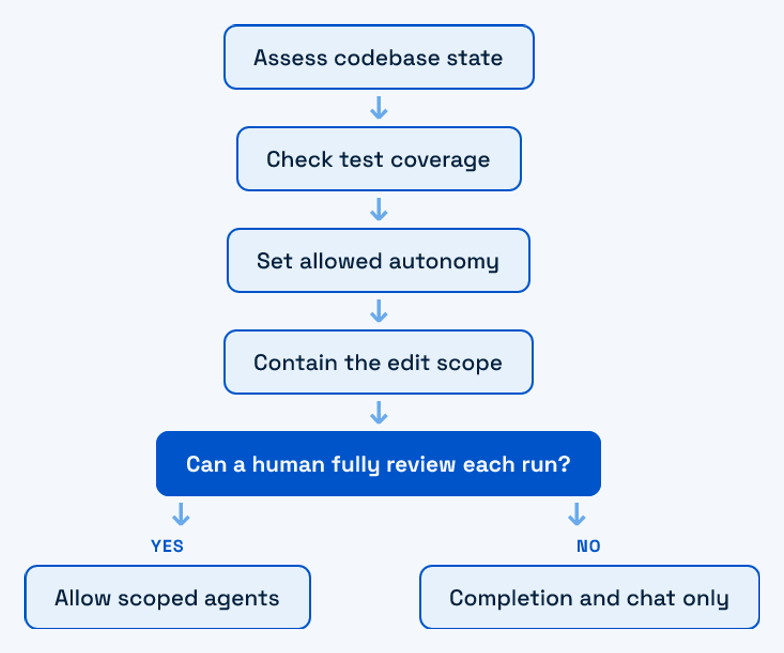
- The rule that generalizes: tool autonomy should be inversely proportional to how much you lose if the tool is wrong. Match the tool class to the codebase risk, not to the benchmark.
AI coding tools are evaluated on greenfield and deployed on legacy, and that gap is where most of the disappointment lives. The demo flies on a clean toy repo with good tests and no history. The system you actually ship into is 200k lines nobody fully understands, with load-bearing code no test covers and assumptions documented only in the heads of people who left. This guide is about the second case: which class of AI coding tools holds up on a production codebase you can’t afford to break, where the tools quietly fail, and how to choose. We rescue fragile systems for a living, so this is written from the maintenance seat, not the launch stage.
Here is what this covers:
- The three classes of AI coding tool, and how each one’s risk profile changes on legacy code.
- The honest failure modes: the productivity trap, the review load, and a new kind of technical debt.
- A decision framework that maps tool autonomy to how much you’d lose if the tool is wrong.
What an AI coding tool actually spans: autocomplete, chat, and agents
“AI coding tool” is not one product category. It spans three classes that differ less in vendor and more in how much of the work they take off your hands, and therefore how much damage they can do unattended. On a greenfield repo the distinction is academic. On a system you can’t afford to break, it decides everything.
- Autocomplete and completion. Inline suggestions as you type, Copilot-style. The human writes and stays in the loop line by line. Lowest blast radius: a wrong suggestion is one keystroke from rejection.
- Chat and conversational. Ask-and-refactor in an IDE panel. You describe intent, the tool proposes a diff, you accept or reject. Medium blast radius: the edit is scoped to what you asked, but you own the review.
- Agent-first and autonomous. The tool plans and edits across many files, runs commands, and iterates. Highest blast radius: it can touch code you never named, in service of a goal you stated loosely.
The risk gradient is the point. Autonomy is a multiplier: it multiplies output on well-understood code and multiplies cleanup on code the tool misreads. Read the three classes along a single axis, the cost of the tool being wrong. Completion keeps that cost at one line and one glance. Chat raises it to one diff you asked for. Agents raise it to a set of changes you did not name, in files you did not open, justified by a goal you stated in a sentence. The demo hides this axis because on a clean repo the cost of being wrong is near zero everywhere. Production is where the axis reappears. We go deeper on where the line sits between the three head-to-head in our Cursor, Copilot and Claude comparison, and on the newer agent-first crop in our agentic tools comparison for production.
The three tools most teams actually evaluate
Most evaluations narrow to the same short list: Cursor, GitHub Copilot, and Claude Code, with Google Antigravity now in the agent-first conversation. The honest read is that there is no category winner, only fit. Copilot leads on frictionless inline completion inside an existing workflow. Cursor and Claude Code compete on codebase awareness and larger multi-file context, which matters more the bigger and messier your repo gets.
We keep this section short on purpose, because the named comparison is a decision about your stack, not the category. The full breakdown, with where each tool held up and where it stalled on real repos, lives in the spokes: our Cursor, Copilot and Claude comparison, the broader field test in what actually works after trying 20 tools, and the open-source angle in OpenCode versus Claude Code. Pick on fit to your codebase and your team’s review capacity, not on a benchmark leaderboard.
Agent-first IDEs on legacy codebases: where autonomy helps and where it hurts
Agent-first tools are the ones teams are most excited and most burned by. On legacy code the answer is not “good” or “bad,” it’s a question of scope. Autonomy earns its keep on mechanical, bounded work and turns dangerous the moment the blast radius exceeds what a human can review in one sitting.
Where agents genuinely help
- Mechanical refactors with a clear pattern: renaming across a module, migrating a deprecated API call, updating a call signature everywhere it appears.
- Test scaffolding for code that has none, giving you a characterization-test net before you change behavior.
- Dependency bumps and the boilerplate follow-on edits they trigger.
Where agents hurt
- Silent wide-blast-radius edits. An agent asked to fix one thing refactors five, and the diff is too large to review honestly.
- Confident wrong changes in undocumented code. The tool infers an assumption the code never stated, and the assumption is wrong in exactly the path no test covers.
The guardrail is scope containment, not tool choice. A well-contained agent on a fragile repo beats an unconstrained one on any tool. We walk through this in detail, including where agent-first IDEs break on undocumented systems, in Google Antigravity versus Cursor on legacy codebases. The teams that get value from agents are the ones that treat every autonomous run as a proposal to be reviewed, never a change to be trusted.
A pattern from our client work makes the difference concrete. On an undocumented service with a single integration test, an agent asked to “add retry logic to the payment call” produced a clean, plausible diff that also changed the timeout on an unrelated call it decided was related. The syntax was fine. The behavior change was not, and no test would have caught it. The fix was not a better tool, it was a smaller ask: write a characterization test around the current behavior first, then constrain the agent to a single function. Same model, same repo, opposite outcome. The variable was scope, and scope is something you control, not the vendor.
The productivity you measure isn’t the productivity you get
This is the section vendors skip. Acceptance rate and lines generated are vanity metrics; they measure how much code the tool produced, not how much working software the team shipped. The real cost does not disappear. It moves downstream, into review load, rework, and trust decay.
The most careful study so far makes the gap concrete. In a METR randomized controlled trial, 16 experienced developers worked on mature repositories averaging over a million lines of code. With AI tools allowed, they took 19% longer to complete tasks. They believed the tools had made them 20% faster. That 39-point gap between felt and measured productivity is the trap in one number, and it is worst on exactly the large, familiar codebases this guide is about (full paper here).
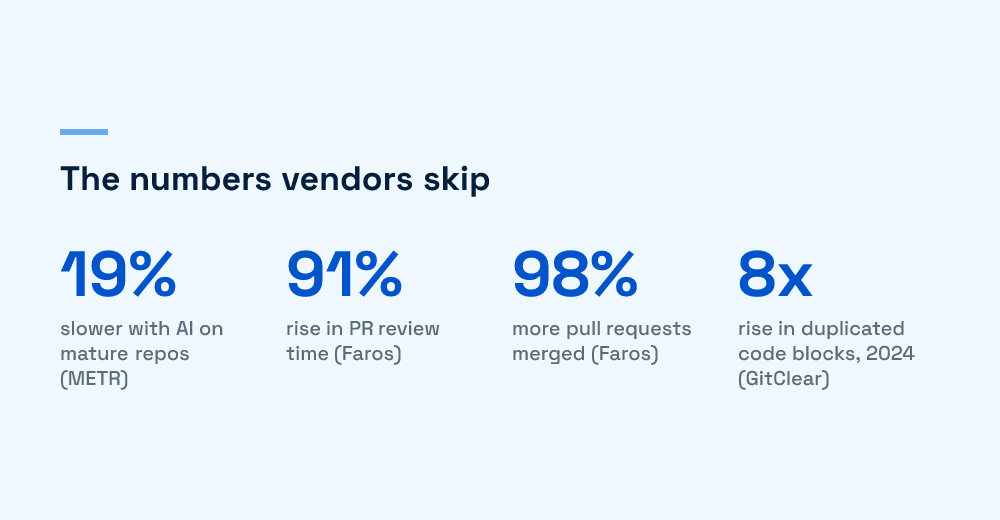
Zoom out to the team and the cost surfaces as a queue. Faros AI’s study of more than 10,000 developers across 1,255 teams found that high-adoption teams merged 98% more pull requests and completed 21% more tasks, but PR review time rose 91% and average PR size jumped 154%, with no measurable improvement in DORA metrics at the organizational level. Individual speed went up; the system did not, because the bottleneck moved to human review and nobody scaled that. This is the review burden teams underestimate, and we cover it head-on in what happens when agents open dozens of PRs.
Trust decay is the quiet third cost
Beyond review load and rework, there is a slower cost that no dashboard tracks: the team’s own model of the system decays. When a developer accepts generated code they did not fully reason through, they ship a change they cannot later explain. Do that across a quarter and the people who are supposed to understand the system understand it less than they did before the tools arrived. On a fragile codebase, that shared mental model is the actual safety net, and it is the thing autonomous tools erode fastest.
Sentiment is following the data. Stack Overflow’s 2025 developer survey shows positive feeling toward AI tools falling from over 70% in prior years to around 60%, as the day-to-day reality of cleaning up after them sets in. None of this says the tools are useless. It says the number you put in a slide deck is not the number your delivery pipeline feels. The full argument, and why the metrics mislead, is in our AI developer productivity trap.
AI-generated code creates a new kind of technical debt
The debt from AI-generated code is not the debt teams are used to. Classic tech debt is a shortcut you knew you took. AI debt is a shortcut you did not notice, written in code that looks right, passes review, and quietly does not fit the system it landed in. It is harder to see and therefore harder to unwind, which is precisely the work we get called in to do.
The measurable shift is stark. GitClear’s analysis of 211 million changed lines of code found that in 2024, copy-pasted lines overtook refactored lines for the first time, rising from 8.3% to 12.3% of changes while refactoring fell from 25% to under 10%. Duplicated code blocks rose eightfold. Code churn, the share of code rewritten within two weeks of being committed, climbed from 3.1% to 5.7%. Those are the fingerprints of code added faster than it is being understood.
The failure modes we see most
- Plausible-but-wrong code that passes review. It reads fluently, so reviewers trust it. The bug is in an assumption, not the syntax.
- Undocumented assumptions baked in. The tool guesses how the system behaves and hard-codes the guess, and the guess is invisible until production disagrees.
- Homogenized patterns that fight the architecture. The model writes generic idioms that ignore the conventions your codebase relies on, so every file drifts a little further from the last.
- Review debt compounding. Bigger, more frequent diffs mean reviewers skim, and skimmed AI code is how the first three failure modes reach main.
What makes this debt expensive is not the volume, it’s the invisibility. Traditional debt sits behind a TODO or a known-ugly module the team routes around. AI debt is distributed evenly across the codebase in code that passes every surface check, so there is no single place to point at and no obvious moment it accrued. By the time it surfaces, as a production incident or a change that mysteriously breaks three unrelated things, the assumption that caused it is buried under months of commits. Unwinding it means reverse-engineering intent from code that never had any, which is slow, careful work, and it is a growing share of what teams call us in for.
This failure mode and the productivity trap above are a pair: the review shortcut that hides the debt is the same shortcut that makes the team feel faster. We unpack the mechanics, and why this debt behaves differently, in how AI systems create new forms of technical debt, and the field-tested view across real projects in AI coding tools used across 20 client projects.
Prompting is a production skill, not a party trick
The difference between a tool that helps and a tool that generates cleanup work is often the operator, not the model. On a fragile codebase, prompting is a reproducible engineering practice with three habits: load the right context before you ask, set explicit constraints on scope, and review the diff as adversarially as you would a stranger’s PR.
- Context loading: give the tool the interface, the tests, and the constraint before the request, so it works from your reality rather than a plausible average of the internet’s.
- Constraint setting: name what it must not touch. “Change only this function, keep the signature, do not modify callers” is the difference between a scoped edit and a wide-blast-radius one.
- Diff review: read every line. AI code earns the same scrutiny as a new hire’s first PR, not the benefit of the doubt.
These are learnable and worth standardizing across a team. Our copy-paste-ready set is in five AI prompts every developer should master, and the design-to-code corner, where prompting quality shows up fast, is in Figma to code with tools that actually work.
A decision framework: match the tool class to the codebase risk
Here is the original contribution, the framework we use when a client asks which AI coding tools to roll out and how far to trust them. Do not choose by the tool’s benchmark. Choose by the state of the codebase it will touch, because that is what sets the cost of being wrong.
| Codebase state | Safe tool class | Guardrails required | Where it breaks |
|---|---|---|---|
| Greenfield or well-tested | All three, including agent-first | Standard review | Over-reliance erodes the team’s own model of the system |
| Documented legacy, good tests | Chat plus scoped agents | Constrain edit scope; run the full suite per change | Agents refactor beyond the asked-for change |
| Fragile, undocumented, thin tests | Completion and chat only; agents human-piloted line by line | No autonomous multi-file edits; write characterization tests first | Confident wrong edits in code no test covers, where the demo’s happy path does not exist |
| Compliance or safety-critical | Completion only, or none in hot paths | Provenance and audit trail on every AI-touched line | Unattributable AI code fails a review it cannot survive |
Read the table top to bottom as a dial, not four boxes. As the codebase gets more fragile and the cost of a wrong edit rises, you turn the tool’s autonomy down. The one rule that generalizes: tool autonomy should be inversely proportional to how much you’d lose if it’s wrong. A greenfield prototype can absorb a bad agent run. A payment path in a system with thin tests cannot, and no acceptance rate changes that math.
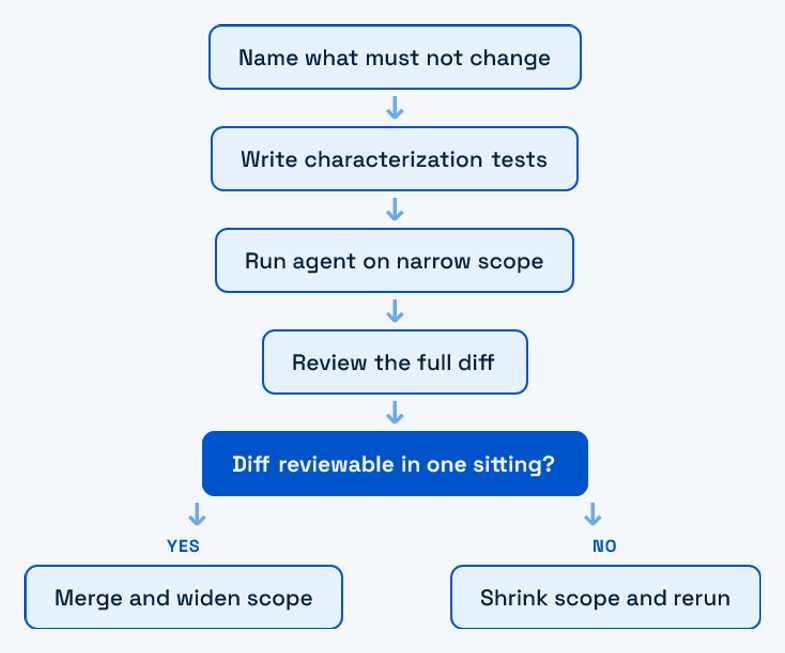
The practical move for most legacy systems is not to ban agents, it’s to shrink their scope until a human can fully review each run, then widen it only where tests and documentation earn the trust. That is the same posture we bring to every rescue: let the system tell you what it can safely absorb, and let the tooling follow that, not the other way around.
The short version for an engineering leader
AI coding tools are real leverage and a real liability, and which one you get depends less on the tool than on where you point it. On clean, well-tested code, use everything and enjoy it. On the fragile, load-bearing system you’re afraid to touch, keep the human in the loop, contain the scope, and treat every generated line as unproven until reviewed. The tools that survive production are the ones held to that standard. The demos never are.
If you’re weighing AI tooling on a system you can’t afford to break, or already unwinding the debt one left behind, that’s the work we do. Start with a conversation, no pitch. We’ll look at the codebase you actually have, not the one the demo assumes.
Frequently Asked Questions
Are AI coding tools worth it for legacy codebases?
Yes, with a scope caveat. On fragile, undocumented legacy code, the value comes from low-autonomy uses: inline completion, scoped chat refactors, and test scaffolding you review line by line. Autonomous multi-file agents are where legacy value turns negative, because they make confident wrong edits in code no test covers. Match the tool’s autonomy to how much you’d lose if it’s wrong, and the tools pay off. Turn them loose on a system you can’t afford to break, and they generate cleanup work faster than features.
What’s the biggest risk of AI-generated code?
Review debt and plausible-but-wrong code, not obvious bugs. AI code reads fluently, so reviewers trust it and skim, and the error hides in an assumption rather than the syntax. GitClear’s analysis of 211 million changed lines found copy-pasted code overtook refactored code in 2024 and duplicated blocks rose eightfold, signs of code added faster than it is understood. The debt is harder to see than a shortcut you knew you took, which makes it harder and more expensive to unwind later.
Which AI coding tool is best?
There is no single best tool, only fit. The right choice depends on your codebase risk and your team’s review capacity. Copilot leads on frictionless inline completion; Cursor and Claude Code compete on codebase awareness and multi-file context that matters more as the repo grows. For fragile production systems, the safer question is not which tool but how much autonomy to grant it. Use our decision framework: match the tool class to the state of the code it will touch, not to a benchmark leaderboard.
Do AI coding tools actually make developers faster?
Often less than it feels. A METR randomized trial found experienced developers were 19% slower with AI tools on mature million-line repositories, while believing they were 20% faster. At team level, Faros AI found high-adoption teams merged 98% more pull requests but saw review time rise 91%, with no organizational productivity gain. Individual coding speeds up while the cost moves to review and rework. The felt speedup is real; the measured one, on complex codebases, frequently is not.

Huzefa Motiwala
Huzefa Motiwala is a co-founder of AlterSquare, an application-layer partner that helps SaaS and tech-led companies stabilise, modernise, and extend complex systems without breaking what already works. He comes at software from design and frontend, with a focus on data-heavy interfaces and on getting real teams to actually adopt what gets built — not just ship it. He writes about working in fragile, high-stakes codebases: incremental change over risky rewrites, UX and technical debt, and embedding AI into real workflows.








Leave a Reply