
Antigravity vs Cursor vs Claude Code: How the Three Agentic Coding Tools Compare for Production Work in 2026
Huzefa Motiwala June 17, 2026
If I had to boil this down to one line: Cursor fits editor-first teams, Claude Code fits high-risk code changes, and Antigravity fits orchestration-heavy work.
If you ship code to production, I would not pick based on autocomplete feel alone. I would look at 5 things first:
- Agent mode: how much the tool acts on its own
- Multi-file editing: how it handles changes across many files
- Codebase context: from 200K to 1M tokens, depending on tool and model
- Workflow fit: editor, terminal, or standalone app
- Price: entry plans start around $20/month, with top tiers at $99.99 to $200/month
Here’s the short version:
- Cursor is the easiest starting point for teams already in VS Code
- Claude Code gives me the most control for larger refactors and terminal or CI use
- Antigravity leans toward parallel agents, manager-style review, and Google Cloud-heavy setups
- Control beats pace in brittle production codebases
- Preview status matters: Antigravity is still in public preview and, at the time covered here, limited to personal Gmail accounts
Quick Comparison
| Tool | Best fit | Main strength | Main tradeoff | Entry price |
|---|---|---|---|---|
| Antigravity 2.0 | GCP teams, parallel task flows | Multi-agent orchestration, 1M-token context, Google stack tie-ins | Preview limits, more workflow change | Free in preview; $19.99/month AI Pro |
| Cursor | VS Code startups and product teams | Low-friction editor flow, close diff review | Context depends on model; less suited to large cross-repo work | Free tier; $20/month Pro |
| Claude Code | High-stakes backend, infra, CI/CD | Plan Mode, hooks, terminal-first flow, up to 1M-token context | Steeper setup for some teams | Included in Claude Pro ($20/month) |
So if you want the shortest answer: pick Cursor for low-friction editing, Claude Code for stricter review and terminal work, and Antigravity for higher-autonomy orchestration. I’d use that as the frame for the rest of the comparison.
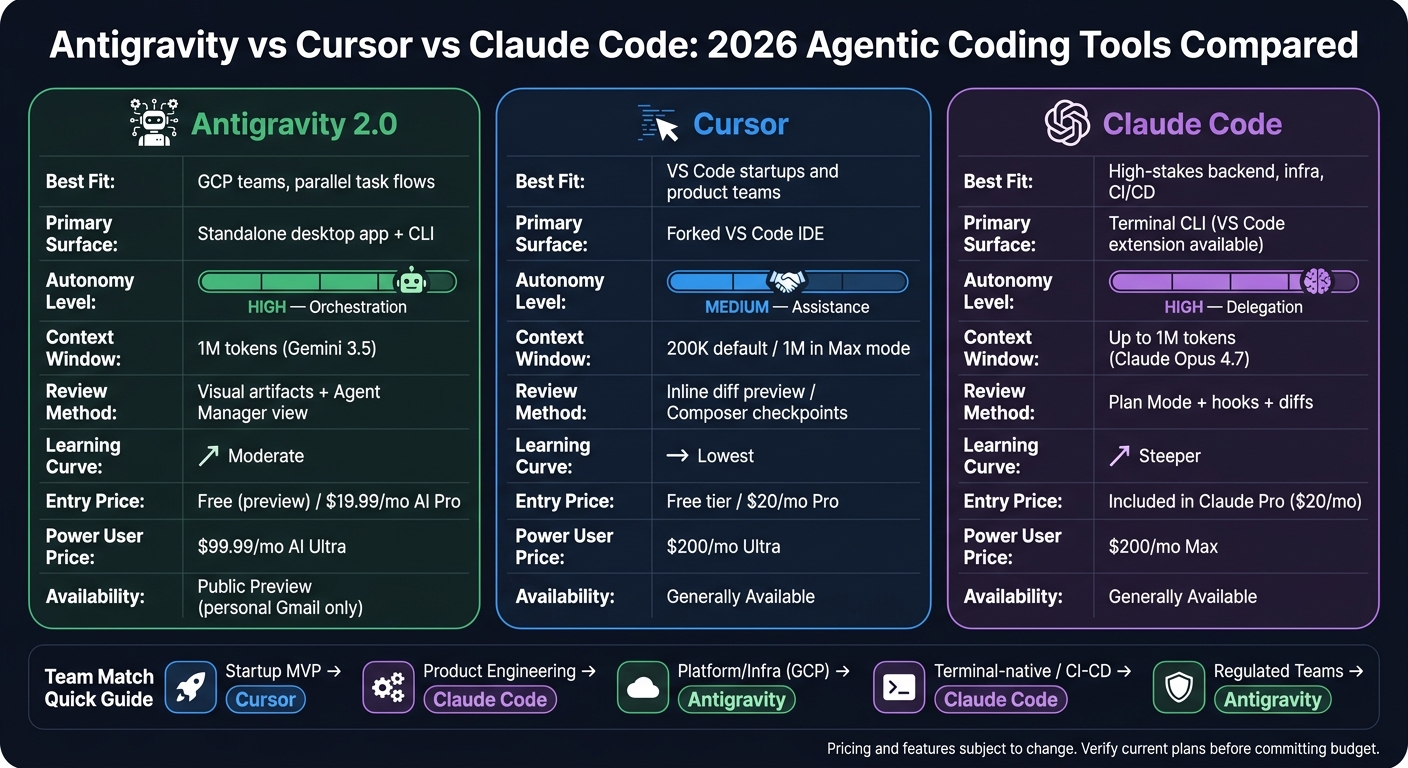
Antigravity vs Cursor vs Claude Code: 2026 Agentic Coding Tools Compared
Cursor vs Claude Code: Which is best for programming? | Lex Fridman Podcast
sbb-itb-51b9a02
Antigravity vs Cursor vs Claude Code: Side-by-Side Comparison Table
The table below narrows this down to the production choices that matter most.
What the table covers
| Dimension | Antigravity 2.0 | Cursor | Claude Code |
|---|---|---|---|
| Availability | Public preview; personal Gmail accounts only [11] | GA | GA |
| Primary Surface | Standalone desktop app + CLI [6] | Forked VS Code IDE [2] | Terminal CLI; VS Code extension available [2][7] |
| Autonomy Model | Multi-agent orchestration [6] | Editor-led agent plus background agents [2][4] | CLI-led agent with subagents [2][4] |
| Multi-File Editing | Parallel sub-agents across files [6] | Composer mode [2] | Single-agent workflows with subagents [4] |
| Context Window | 1M tokens with Gemini 3.5 [6][7] | Varies by model; 200K default, 1M in Max mode [7][8] | Up to 1M tokens with Claude Opus 4.7 [6] |
| Review Mechanics | Agent Manager view + per-agent scopes [2][6] | Composer checkpoints [2][7] | Plan Mode + hooks [2] |
| Entry-Level Pricing | Free during preview; $19.99/mo AI Pro [8] | Free tier; $20/mo Pro [8] | Included in Claude Pro ($20/mo) [6][8] |
| Power User Pricing | $99.99/mo AI Ultra [8] | $200/mo Ultra [8] | $200/mo Max [8] |
| Production/ops fit | Google Cloud, Firebase, Chrome integrations; Vertex AI / Enterprise Agent Platform [6]; native /schedule (cron) [10] |
VS Code ecosystem, MCP support; SOC 2 Type II [7] | MCP servers, hooks, skills; works natively in terminal and CI workflows [2]; audit trails, permissions, SOC 2 [7][4] |
What the table does not claim
This table sticks to documented product differences. It does not compare speed or code quality.
A few rows need extra care. Antigravity is still in public preview, and right now it works only with personal Gmail accounts, not Google Workspace accounts [11]. Cursor’s context window depends on the model in use because it can route across Claude, GPT, and Gemini models [2]. Claude Code can reach 1 million tokens with Claude Opus 4.7 [6].
The next section turns those product differences into workflow tradeoffs.
How the Three Tools Differ in Production Workflows
Agent modes, multi-file editing, and review safety
The table above compares features. This section is about what those features feel like when you’re shipping code in a production setup.
The biggest split comes down to how much control you keep once the agent starts changing files.
Cursor stays closest to the code. It feels more like hands-on help inside the editor. Claude Code hands off more of the job on purpose: its Plan Mode shows the intended work before execution, and hooks can enforce rules like running tests after each edit or blocking writes to protected paths [2]. Antigravity works at a higher level. It uses a Kanban-style Manager View to run parallel sub-agents, while artifacts give you another way to check changes before review [2][5].
| Dimension | Antigravity 2.0 | Cursor | Claude Code |
|---|---|---|---|
| Autonomy | High (orchestration) | Medium (assistance) | High (delegation) |
| Control | Spec-driven | Human-in-the-loop | Hooks and rules |
| Review method | Visual artifacts | Inline diff preview | Plan Mode + diffs |
| Learning curve | Moderate | Lowest | Steeper (terminal/hooks) |
In practice, that means the tools create very different editing rhythms. With Cursor, you’re usually staying close to each change. With Claude Code, you can set guardrails and let it carry more of the flow. With Antigravity, you’re managing work more like a system than a single editor session.
Codebase awareness and context limits
Claude Code is the strongest fit when a task needs reasoning across many files [1][12]. That matters when changes ripple through shared modules, config, tests, and docs all at once.
Antigravity combines a 1M-token context window with Search Grounding, so it can pull in current documentation while working [6][1]. Cursor uses semantic indexing and a local context cache, which helps a lot in day-to-day use. But its standard context window is smaller, so it can be less dependable in very large codebases [1][7].
That gap shows up fast during review. If the tool misses surrounding context, people have to spend more time double-checking edits, tracing file relationships, and making sure nothing subtle got skipped.
IDE fit, terminal workflows, and pricing
Your current workflow will usually decide the best fit faster than any feature checklist.
Cursor is the easiest option for VS Code teams because it’s a fork of the editor they already use. There isn’t much of a mental jump. Claude Code is terminal-first, so it fits cleanly into SSH sessions, containers, and CI pipelines [2][6]. Antigravity doesn’t sit neatly in either camp. It’s a standalone desktop platform with a CLI, so teams have to change how they work to use it well [6][3].
Pricing across all three should be treated more like a tie-breaker than a first filter. The bigger issue is workflow fit, because the cost pattern lines up pretty closely with the feature pattern.
Those differences in control, context, and day-to-day workflow are what shape team fit in production. The next section uses that gap to match each tool to the kind of team most likely to get the most out of it.
Which Tool Fits Which Team in 2026
Team fit by profile and codebase risk
The split is pretty clear once you look at agent mode, multi-file editing, context handling, IDE fit, and review safety. There isn’t one best tool for every team. The right choice comes down to workflow and how much risk your team can take on. The table below turns that into a practical team-by-team view.
Cursor is the natural default for startup and product teams already working in VS Code. It keeps developers close to each diff, which matters when teams are shipping fast. Claude Code makes more sense when mistakes are costly, like complex backend refactors, architecture work across many files, or CI/CD-heavy setups where terminal-native workflows are a better match. Antigravity 2.0 leans hardest into orchestration. It’s built for teams that need to supervise parallel work, especially teams running on Google Cloud. The tradeoff is more setup work up front and tighter permission scoping for browser-driven tasks.
That tradeoff shows up pretty clearly by team type:
| Team Profile | Best Fit | Primary Reason |
|---|---|---|
| Startup MVP | Cursor | Lowest-friction VS Code workflow [11][1] |
| Product engineering | Claude Code | Best for multi-file refactors [2][1] |
| Platform / infra (GCP) | Antigravity 2.0 | Best for orchestration-heavy work [10] |
| Terminal-native / CI-CD | Claude Code | Scriptable hooks and headless use [2][8] |
| Regulated teams | Antigravity 2.0 | Audit trails via Artifacts and Google ecosystem boundaries [11][14] |
The next step has less to do with feature checklists and more to do with how much autonomy a team can safely allow.
How a stabilization-focused engineering partner would evaluate this choice
For fragile or production-critical systems, raw capability isn’t the main issue. The bigger issue is control. The more autonomy a tool has, the more teams need clear gates before anything touches production.
Claude Code stands out when that kind of control matters most. Its Plan Mode requires explicit approval before execution, and its hook system gives teams a place to enforce repo policies before changes move ahead [2][9][10][13]. Cursor gives you a lighter version of that same pattern with its Composer review step. It keeps developers close to each diff without adding much ceremony.
Antigravity can work very well for parallel tasks, but for a fragile codebase, it usually makes more sense as a high-autonomy option for isolated work instead of the default choice. In practice, many teams will end up dual-wielding: use Antigravity for broader orchestration, then use Claude Code or Cursor for the careful, human-reviewed changes that reach production [10][2].
Codebase maturity should matter just as much as team preference. A greenfield MVP can handle more autonomy. A production system with brittle dependencies usually can’t, and the tool choice should match that.
Conclusion: The Practical Verdict for Production Teams
Key points to close on
The five factors that matter most – workflow fit, codebase risk, compliance, cost, and cross-file reasoning – push each tool toward a different kind of team. There isn’t one best pick across the board. Each one is tuned for a different production setup.
That narrows the decision to three practical workflows. Antigravity is built for orchestration, not direct editing. Cursor fits teams that want editor-first help with less friction. Claude Code makes more sense for high-stakes changes where explicit approval gates matter. Cost still counts, of course. But it only becomes the deciding factor after workflow fit is clear.
Entry tiers start at about $20/month, while power tiers usually land in the $100–$200/month range [10][11]. Pricing tiers, rate limits, and feature availability can shift fast, so check the live documentation before you commit team budget or change your stack. Verify current pricing and limits before you commit budget.
FAQs
How should I pilot one of these tools before a team-wide rollout?
Use a structured, low-risk pilot built around specific task types, not a full workflow change all at once.
A simple split works well:
- Send architectural refactors to Claude Code
- Use Antigravity for scheduled or parallel workflows
- Keep Cursor focused on everyday feature work
Then run a short trial with team rotation. That gives people a chance to test each tool without locking the whole team into one setup too early.
Pay close attention to learning-curve friction. In practice, that often shows up in the gap between VS Code fit and terminal-based use. Some people will settle in fast. Others may hit friction right away, even if the tool itself is strong.
It’s also smart to review billing before usage spreads. If Claude limits are shared across both coding and non-coding work, costs and access can get messy fast.
What guardrails matter most for production code changes?
The biggest guardrails are the checks that stop autonomous agents from slipping errors into your code.
- Claude Code: plan mode and custom hooks
- Antigravity: isolated sandboxes and built-in browser testing
- Cursor: inline diff previews
Across all three, lifecycle hooks and strong automated tests are the main line of defense during complex refactors.
When does a 1M-token context window make a difference?
A 1M-token context window matters most when you’re dealing with large architecture work or a monorepo with hundreds of files. It gives the agent room to read extensive docs, dense API specs, and even an entire codebase in one pass, which means far less manual chunking.
That matters in practice. Instead of splitting files, pasting pieces into separate prompts, and hoping nothing gets lost between steps, the agent can keep the full picture in view. For teams working across many services, shared libraries, and long design docs, that’s a big deal.
It also helps with longer-term memory. Project history, past decisions, and coding patterns can stay in context while multiple subagents weigh in or when requirements need to be clarified from large, messy inputs. So if the brief is vague, spread across docs, or buried in old notes, the agent has a better shot at connecting the dots without dropping key details.
Related Blog Posts
- Cursor vs GitHub Copilot vs Claude: Which AI Coding Tool Actually Saves Money
- AI Coding Tools in 2026: What We Actually Use Across 20+ Client Projects (And What We Don’t)
- Google Antigravity vs Cursor: Can an Agent-First IDE Actually Handle Legacy Codebases?
- OpenCode vs Claude Code in 2026: What Changed After Both Shipped Major Releases

Huzefa Motiwala
Huzefa Motiwala is a co-founder of AlterSquare, an application-layer partner that helps SaaS and tech-led companies stabilise, modernise, and extend complex systems without breaking what already works. He comes at software from design and frontend, with a focus on data-heavy interfaces and on getting real teams to actually adopt what gets built — not just ship it. He writes about working in fragile, high-stakes codebases: incremental change over risky rewrites, UX and technical debt, and embedding AI into real workflows.








Leave a Reply