

AI-driven UX design is not like traditional software design. Here’s why:
- AI is probabilistic, not deterministic: The same input can lead to different results, unlike traditional software where outcomes are predictable.
- Non-linear user journeys: AI interactions feel more like a conversation or negotiation rather than a fixed path from A to B.
- Trust is fragile: Users are quick to lose confidence if an AI provides flawed or confusing results.
- Dynamic personalization: AI creates real-time, highly tailored experiences based on individual behavior, unlike static user settings.
- AI learns over time: Unlike traditional systems, AI evolves through user feedback and continuous learning.
To design effective AI-powered interfaces, UX designers must focus on transparency, user control, and clear communication of AI’s probabilistic nature. For instance, tools like autonomy sliders, preview options, and feedback loops help users feel in charge while improving trust. These strategies are key in bridging the gap between AI’s complexity and user expectations.
UX for AI: Challenges, Principles and Methods with Greg Nudelman, Ep20
How AI UX Differs from Traditional UX
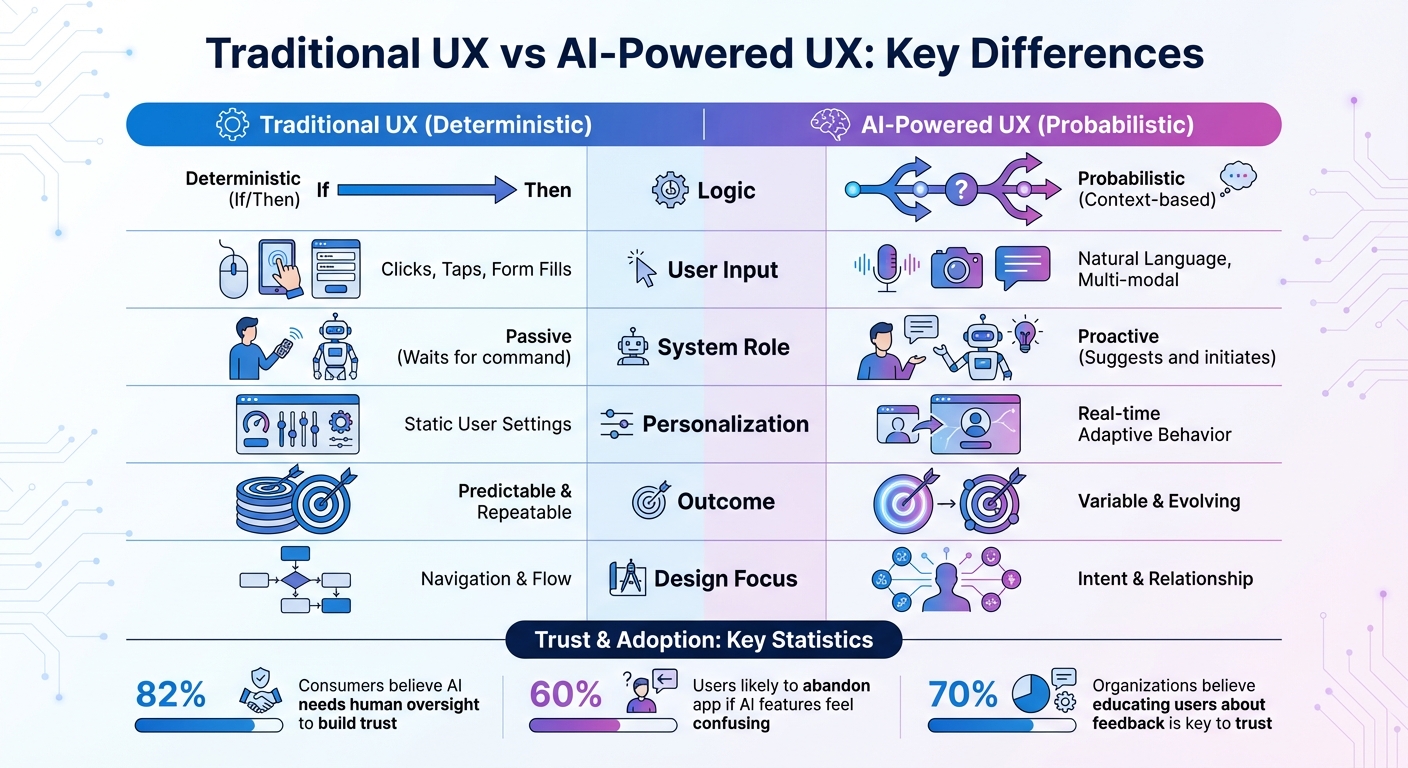
Traditional UX vs AI-Powered UX: Key Differences
The transition from traditional software to AI-powered systems has reshaped how interfaces behave and how users interact with them. Traditional software operates on deterministic logic – where the same input always produces the same output. In contrast, AI systems rely on probabilistic models, meaning identical inputs can lead to different outcomes depending on context, training data, and statistical inference [4]. This shift introduces unique challenges and opportunities for user experience (UX) design.
Predictable Outcomes vs. Probability-Based Results
Traditional interfaces are straightforward – a button click triggers a predefined action. AI systems, however, interpret natural language prompts to infer user intent and context, which can result in outcomes that vary or even feel inconsistent [1]. This probabilistic behavior creates what experts call "gray areas", where results fall on a spectrum rather than being absolute. For instance, 82% of consumers believe AI needs human oversight to build trust, and 60% of users are likely to abandon an application if its AI features feel confusing or hard to use [12].
To address this, designers must create interfaces that embrace uncertainty. This can include using soft language and visual cues to communicate that outputs are probabilistic rather than guaranteed [9]. Additionally, since AI can sometimes produce errors or "hallucinations", incorporating human oversight – such as preview-versus-commit flows – is critical. These features turn users into active collaborators rather than passive operators, fostering trust and engagement.
Real-Time Personalization vs. Fixed User Settings
Traditional UX typically revolves around static user settings and generalized personas – broad representations of user groups. AI-powered UX, on the other hand, uses real-time context modeling to craft personalized experiences based on an individual’s behavior in the moment [10]. Christopher Smith, EY Studio+ US Customer Experience Design Leader, explains this shift:
We’re moving from designing for personas to designing for individuals. With real-time context modeling and adaptive behavior, each UX can now be shaped by actual behavior, not generalized archetypes [10].
This evolution has led to the rise of "Signal Decision Platforms" (SDPs), which analyze real-time signals like location, time of day, emotional state, and even scrolling speed to adjust the interface dynamically [13]. To ensure users feel in control, designers must include nuanced options, such as an "autonomy slider" that lets users decide how much AI intervention they want [1]. Without such controls, users may feel a loss of agency, which can harm trust and increase the likelihood of app abandonment.
How AI Systems Learn from User Input
Unlike traditional systems that operate on fixed programming until updated, AI systems are designed to learn and improve through data and experience [8]. As IBM puts it:
AI is trained, not programmed, by experts who enhance, scale and accelerate their expertise. Therefore, these systems get better over time [8].
This continuous learning process requires interfaces that encourage user feedback, such as thumbs up/down buttons, to refine AI performance [12][4]. It’s crucial for users to understand that their input directly influences the system’s future behavior, transforming the interaction into an ongoing dialogue. This dynamic has been compared to raising a "digital toddler", where constant user guidance helps the AI mature [8]. In fact, 70% of organizations believe educating users about how their feedback shapes the system is key to building trust and ensuring successful AI adoption [12].
| Feature | Traditional UX | AI-Powered UX |
|---|---|---|
| Logic | Deterministic (If/Then) | Probabilistic (Context-based) |
| User Input | Clicks, Taps, Form Fills | Natural Language, Multi-modal |
| System Role | Passive (Waits for command) | Proactive (Suggests and initiates) |
| Personalization | Static User Settings | Real-time Adaptive Behavior |
| Outcome | Predictable & Repeatable | Variable & Evolving |
| Design Focus | Navigation & Flow | Intent & Relationship |
Design Strategies for AI-Powered Interfaces
AI systems are unpredictable by nature, which means designing their interfaces requires a different mindset. Instead of relying on static screens or fixed workflows, designers need to develop experiences that accommodate uncertainty while fostering user trust. According to the National Institute of Standards and Technology, trustworthy AI must be transparent, explainable, interpretable, and fair – qualities that should be integrated directly into the interface design itself [5].
Making AI Decisions Clear and Understandable
To build trust, it’s essential to make AI’s reasoning clear. This can be achieved by showing the rationale behind decisions and citing source materials [2][6]. A great example of this is Refik Anadol’s "Unsupervised" installation at the Museum of Modern Art (MoMA) in November 2022. Using the StyleGAN2 ADA model trained on MoMA’s vast collection of 180,000 art pieces, Anadol’s team openly embraced transparency by highlighting the collaboration between AI and human creativity. The installation adapted in real time using environmental data like weather and visitor movement, offering a dynamic and transparent experience [5].
Designers can also use visual cues to indicate when AI outputs may be uncertain, encouraging users to critically evaluate the results rather than blindly accepting them [2][6]. As Ioana Teleanu, an AI Product Designer, points out:
We can’t trust what we can’t understand. AI systems are not transparent to us for multiple reasons… we have no idea where the information is coming from [5].
Another helpful strategy is intent scaffolding, which bridges the gap between what users want and what the AI can deliver. Many users struggle to articulate their needs, but designers can make this easier by offering suggestions, sample prompts, and previews of AI actions. Onboarding tours that align user expectations with the AI’s actual capabilities can also reduce confusion and build confidence. The key formula here is: Transparency + Control + Predictability = Trust [2].
Giving Users Control Over AI Actions
Users should have the ability to adjust how much control they want over the AI’s actions. One way to achieve this is through an autonomy slider. At one end, "Human-as-Driver" mode allows users to give explicit commands, while "Model-as-Driver" mode lets users set high-level goals, leaving the AI to handle the details [1]. As Andrej Karpathy, former head of AI at Tesla, explains:
Your prompts are now programs that program the LLM [1].
To further enhance control, designers can add steerability – tools like sliders for "Visual Intensity" or "Style Strength" that let users fine-tune how much creative freedom the AI takes [1][11]. This shared approach to control strikes a balance between full automation and user input, giving users the ability to guide the AI rather than just observe it.
Previewing AI outputs before finalizing decisions is another way to keep users in control. Ken Olewiler, Co-Founder of Punchcut, emphasizes:
Offer AI features that enable cooperative user control, preserving a meaningful sense of agency for users [1].
Additionally, features like "undo", "override", and "pause" are critical. These options empower users to actively collaborate with the AI rather than passively watching it work.
Designing for Growth and Change
AI systems are not static – they learn and evolve over time. Interfaces must be designed to grow alongside these systems [1]. One approach is to visualize the shifting balance of control between humans and AI through "autonomy maps", which illustrate how responsibility is shared across the experience [1].
To ensure reliability even when AI systems face disruptions, designers can implement graceful degradation. This might involve falling back to simpler rule-based models or offering a "generative offline mode" [14]. Some organizations are even using "synthetic users" (AI tools that simulate user behavior) to monitor quality and catch issues before they affect real users [3].
Rather than replacing existing user experiences, additive interfaces can complement them. For example, designers can create "sidecars" or additional layers that allow users to monitor and adjust the actions of autonomous agents in real time [14]. As Jordan Burgess explains:
With agents, the UX problem is flipped. Rather than helping you as the main driver, you’re the copilot and you need to help guide the agent to the correct result [14].
sbb-itb-51b9a02
Examples of AI-Focused UX Design
Case Study: Clear AI Recommendations
Adobe Firefly has tackled the challenge of blank page intimidation with a smart, search-like prompt interface that auto-fills sample prompts. This feature is particularly helpful for first-time users who might feel overwhelmed when starting from scratch [11].
The platform’s "Style effects" panel is another standout feature. It provides users with presets and adjustable parameters – like lighting and camera angles – making it easier to guide the AI’s output without needing to master complex prompt engineering. Instead of expecting users to dive into intricate commands, Adobe Firefly offers intuitive, visual controls. Veronica Peitong Chen, Senior AI/ML Experience Designer at Adobe, explains the philosophy behind this user-friendly approach:
The foundational focus… should be to create a reciprocal relationship between the technology and the people using it that evolves in tandem with each technological leap [11].
Additionally, Adobe Firefly includes a built-in feedback tool that allows users to rate specific outputs. This creates a direct feedback loop, enabling Adobe’s team to refine the AI model while giving users a sense of active participation in shaping the tool’s improvements [11].
On the other hand, Google’s Open Data QnA tool emphasizes transparency in a unique way. When users pose questions in plain English, the system not only delivers results but also displays how the natural language query was translated into SQL code. This feature allows users to inspect the system’s logic and verify the reasoning behind the output. For technical users, this openness builds trust by making the AI’s decision-making process clear and accessible [15].
These examples demonstrate how transparency and user control can be designed into AI systems, creating a foundation for trust and usability.
How User Feedback Improved an AI Interface
Real-time user feedback plays a key role in refining AI systems, particularly when paired with transparent design. For instance, Google Cloud conducted usability research with 15 external users to test generative AI prototypes for a travel chatbot. Initially, the feedback feature was placed at the bottom of conversations. However, researchers found that this placement sent the wrong signal – users assumed the interaction had ended. Shantanu Pai, UX Director for Cloud AI at Google, led efforts to redesign the interface, moving feedback requests "in-the-moment" to be directly next to specific hotel recommendations [7].
This small but strategic change made a big difference. Aligning feedback with individual AI responses helped improve the relevance of recommendations. Users also expressed a desire for more control over how suggestions were refined. In response, the team added "Generate Again" buttons with dropdown options, allowing users to regenerate results based on specific factors like price or popularity, rather than offering a generic retry option [7].
Another improvement came through Google Cloud’s customer experience modernization project. Here, a proactive search agent for employees was enhanced with citations and source links. This addition gave users direct access to the data sources behind AI-generated information, making it easier to verify and explore further. By prioritizing verifiability, the team built trust without requiring users to accept results at face value [15].
These examples highlight how clear feedback loops and thoughtful design adjustments can significantly enhance the user experience, fostering trust and ensuring the AI delivers meaningful, reliable results.
AlterSquare‘s Approach to AI UX Design
Recognizing the importance of clarity and user control in AI, AlterSquare has crafted a methodical approach to tackle these challenges head-on.
The I.D.E.A.L. Framework for AI UX
AlterSquare uses a structured framework called the I.D.E.A.L. process to navigate the complexities of designing AI-powered products. This process – spanning discovery, design, agile development, launch, and post-launch support – ensures that every step prioritizes user needs and aligns AI capabilities with real-world applications.
One of the standout aspects of this framework is its emphasis on transparency during the design & validation phase. From the very beginning, AlterSquare integrates features into interfaces that make AI decisions more understandable. For instance, much like LinkedIn’s "Recommended based on your skills" prompts, these design elements provide users with clear explanations for AI-driven suggestions [12]. This fosters trust by helping users see the "why" behind the AI’s actions.
The framework also addresses the shift from static to dynamic outcomes. AlterSquare embraces AI’s flexibility by designing interfaces that adapt to different user contexts and behaviors [12]. To manage this, they focus on four key modes of user interaction:
- Analyzing: Real-time augmentation to assist users in interpreting data.
- Defining: Allowing users to express their intent through unstructured natural language.
- Refining: Enabling users to iteratively adjust and correct AI outputs.
- Acting: Supporting proactive actions by AI agents.
This multi-mode design ensures users can engage with AI’s probabilistic nature without confusion or frustration, creating a smoother and more intuitive experience.
By combining these strategies, AlterSquare not only builds user trust but also creates a strong foundation for agile and adaptive AI product launches.
Building AI-Driven MVPs for Startups
For startups looking to break into the AI space, AlterSquare offers a 90-day MVP program designed to fast-track product development. This program leverages rapid prototyping and generative AI tools to speed up the process and reduce costs, all while keeping the user experience front and center.
A critical part of this program is the inclusion of graceful degradation messaging and ethical transparency panels [12]. These features reinforce user trust by clearly communicating how data is used, what fairness measures are in place, and how algorithmic biases are mitigated. When AI systems face uncertainty, instead of displaying generic error messages, the interface provides detailed, easy-to-understand explanations. This thoughtful approach ensures that even when the AI stumbles, users feel informed and respected.
Such efforts are particularly important for early-stage products, where every user interaction matters. By prioritizing trust and usability, AlterSquare helps startups establish a strong connection with their audience from the very beginning.
Conclusion
The rise of AI in design is reshaping the way users experience technology. Unlike traditional UX, which depended on predictable, rule-based interactions, AI introduces elements like probability, personalization, and autonomy. This shift requires designers to embrace uncertainty rather than relying solely on control.
At the heart of successful AI user experiences lie three key principles: transparency, adaptability, and trust. Transparent AI recommendations, combined with interfaces that adapt to user behavior and allow for adjustments, can transform skepticism into confidence. Shir Zalzberg-Gino, Director of UX Design at Salesforce, captures this perfectly:
Transparency + Control + Predictability = Trust [2].
This shift also calls for a new approach to the design process – one that evolves with user needs and creates a harmonious relationship between humans and AI. Nielsen highlights "intent-based outcome specification" as a groundbreaking interaction paradigm, the first of its kind in 60 years [6]. Instead of focusing on how tasks are completed, users now specify what they want, leaving the execution to AI. This demands interfaces that clearly explain reasoning, provide understandable error messages, and enable users to refine outputs through iteration.
From a business standpoint, designing AI systems with the user in mind is critical for turning technical breakthroughs into widespread adoption. For instance, PayPal achieved a 73% reduction in fraud, and Microsoft Defender improved threat detection accuracy by 87%, thanks to transparent, user-centered AI design [16]. These examples highlight how building trust through transparency not only boosts user satisfaction but also drives measurable business success.
As AI systems grow more autonomous, the designer’s role becomes even more vital. The future belongs to products that strike a balance between technological innovation and human agency – where AI serves as a collaborative partner, not a replacement, and where every interaction reinforces the user’s sense of control and understanding.
FAQs
How can UX designers create trust in AI systems?
To earn trust in AI, designers need to focus on making the system’s reasoning easy to grasp. Break down how decisions are made by sharing details like the AI’s confidence levels, the data it relied on, and any uncertainties – using simple, clear language. When users understand the "why" behind the AI’s actions, they feel informed rather than left in the dark.
Offering real-time feedback, such as progress updates, error messages, or the ability to override decisions, can give users a greater sense of control. This approach helps ease concerns about unpredictable outcomes. Being upfront about the system’s limitations – like saying, “I’m not sure” or “This suggestion is based on past data” – also sets realistic expectations, which naturally builds confidence.
Trust grows further when privacy and ethical considerations are baked into the design. Show users how their data is being used, provide opt-out options, and include clear indicators of security. Personalizing recommendations while allowing users to tweak settings creates a sense of collaboration, making the AI feel like a dependable and supportive partner.
What are autonomy sliders, and how do they give users more control over AI systems?
Autonomy sliders are interactive features, often designed as a horizontal bar or dial, that let users decide how much control they want to retain versus how much they’re willing to delegate to an AI system. Moving the slider toward "manual" keeps the user in charge, with the AI stepping in only when asked. On the other hand, sliding it toward "fully autonomous" allows the AI to make decisions and act without needing constant input.
These tools offer a personalized experience by letting users find the right balance between convenience and control. They also help build confidence in the AI, as users can start with minimal autonomy, observe how the system performs, and gradually increase its role as trust develops. This setup ensures the AI adjusts to individual needs and situations while always giving users the option to step in or revert to manual control whenever necessary.
How does AI’s unpredictable nature change the way we design user experiences?
AI systems work by generating outputs based on probabilities, which means their responses can vary and aren’t always consistent. This inherent unpredictability pushes UX designers to rethink traditional methods and prioritize building trust and transparency in their designs. For instance, features like displaying confidence levels, explaining the reasoning behind suggestions, and giving users the option to confirm, reject, or tweak outputs can make the system feel more dependable and approachable.
To ensure users feel in control, it’s essential to provide tools like “undo,” “edit,” or “retry with new parameters.” These options give users the flexibility to manage AI’s variability while maintaining a sense of ownership over the process. Adding feedback loops where users can refine or correct the AI’s results also transforms the interaction into a collaborative effort, which can reduce frustration and lead to better outcomes.
Designing for AI isn’t about rigid workflows – it’s about focusing on what the user wants to achieve. By setting clear objectives and boundaries for how the AI behaves, designers can create experiences that embrace the system’s variability while still delivering results that align with user intent.







Leave a Reply