
TL;DR
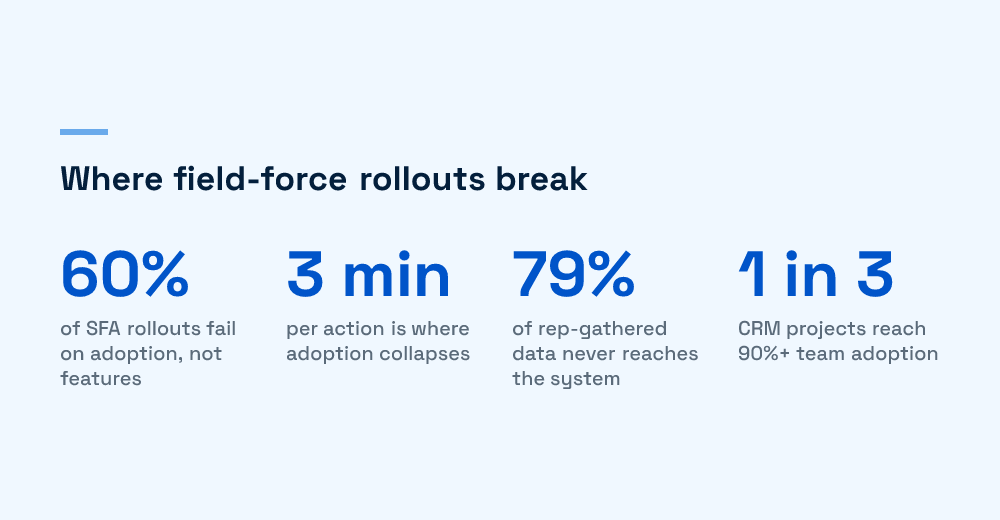
- Reported SFA rollout failure rates cluster around 60% and above, and the cause is adoption, not missing features, in line with the 50 to 70% range analysts report for CRM projects.
- As a field rule of thumb, a core rep action over 60 seconds hurts adoption and past 3 minutes it collapses, which makes data-entry burden the primary abandonment cause.
- About 79% of opportunity data reps gather never reaches the CRM, so a tool reps route around produces no usable secondary sales data.
- Only a third of CRM projects reach 90%+ team adoption; the fix is designing for the rep’s day, offline-first sync, and auto-capture.
- Incentive misalignment is decisive: if the app only serves head-office reporting and gives the rep nothing back, reps stop using it.
Most secondary sales rollouts don’t fail at launch. They fail about six weeks later. The app installs cleanly, training goes fine, the first week of dashboards looks alive, and then the data thins out. Reps start skipping fields, logging visits in bulk at night, or dropping back to WhatsApp and a paper register. The tool still runs. Nobody uses it the way it was designed.
Field force automation adoption stalls after launch because the app is built for head office, not for the rep’s day. Field-sales breakdowns put the SFA failure rate near 60% of implementations, in line with the 50 to 70% range analysts report for CRM projects generally, and the cause is almost never a missing feature. It’s a rep who gets no value back, carrying a data-entry burden the tool never earned. A tool the field force routes around produces no data, which means the secondary sales visibility you bought the rollout for quietly disappears.
Why do secondary sales rollouts stall after launch?
They stall because adoption is a usage problem, not an install problem. The rollout hits its target on day one (everyone has the app) and misses it by week six (few reps enter real data). Only a third of CRM projects reach 90% or higher team adoption, and field sales is harder than office sales: patchy connectivity, hundreds of outlets a week, and reps who are paid to sell, not to type.
The pattern is consistent across distribution, FMCG, and pharma field teams we’ve looked at. Launch metrics measure the wrong thing. Login counts and install rates look healthy while the number that matters, complete and honest visit records, drifts toward zero.
The launch metrics that lie to you
- Installs and logins: everyone opens the app once. That tells you nothing about sustained use.
- Training completion: a rep can pass training and still abandon the tool the first busy Monday.
- First-week data volume: novelty and manager pressure inflate week one, then it decays.
If you want an earlier signal, watch the metrics that flag disengagement before the dashboards go blank. We covered those leading indicators in user resistance detectors, and they apply directly to a field-force rollout.
What actually makes reps abandon the app?
Reps abandon the app for four reasons that compound: the data-entry burden is too heavy, it breaks offline, it gives the rep nothing back, and the incentives point the wrong way. Each one alone slows adoption. Together they kill it. A rule of thumb that holds up in the field: if a core action like check-in, order, or check-out takes more than 60 seconds adoption suffers, and past three minutes it collapses.
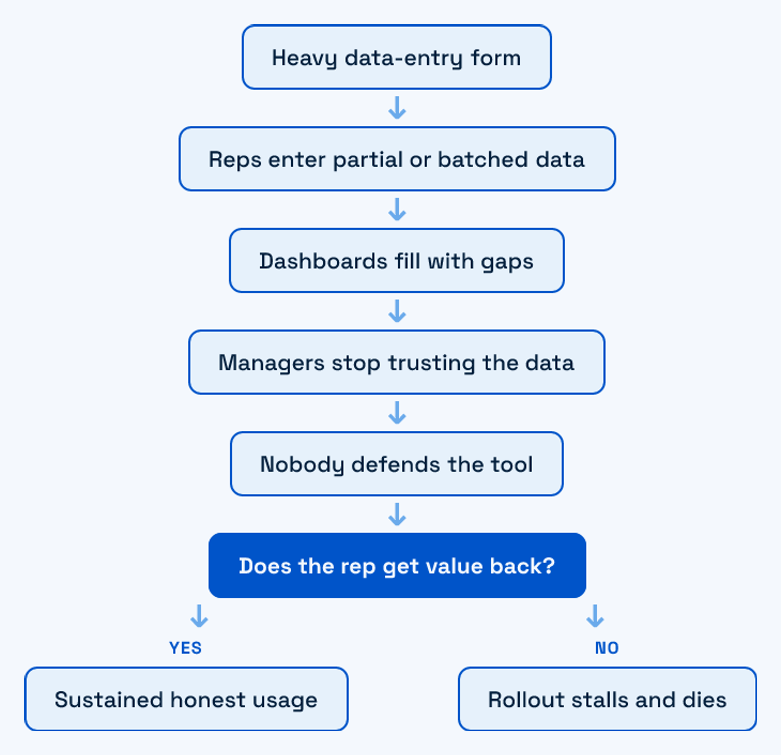
The loop above is the failure mode we see most. A heavy form makes each visit slow, so reps enter partial or batched data, so the dashboard fills with gaps, so managers stop trusting it, so nobody defends the tool, so it dies. It’s self-reinforcing. Once reps learn the app costs them selling time and returns nothing, no feature ships its way out of that hole.
Barrier to fix, in one table
| Why reps abandon it | What it looks like in the field | The design fix |
|---|---|---|
| Data-entry burden | 11 fields to log a no-order visit; reps batch-enter at night | Auto-capture location, time, outlet; ask only what can’t be inferred |
| Offline gaps | App needs constant 4G; fails in rural routes and basements | Offline-first: capture locally, sync when a signal returns |
| No rep-side value | App only feeds head-office reports; rep sees nothing useful | Show the rep their targets, last order, and outlet history |
| Incentive misalignment | Tool reads as surveillance; slows the rep’s real job | Tie the tool to earnings and route efficiency, not just tracking |
| Battery and speed drain | App eats the battery by noon; reps switch it off | Lightweight sync, background batching, no constant GPS polling |
That last row matters more than teams expect. An app that drains the battery by midday gets switched off, and a switched-off app captures nothing for the rest of the route. Reps also read heavy tracking as monitoring, and a tool that feels like a leash gets minimum-effort data at best.
How do you design a field tool reps actually use?
You design for the rep’s day, make it offline-first, and auto-capture everything the phone already knows. The goal is a visit that takes seconds and gives the rep something back. Reps will route around a tool that only serves management, so adoption is a design constraint, not a training problem you can fix with another webinar.
Design for the rep’s day, not the report
Start from the route, not the schema. A rep visits dozens of outlets; the app should open on today’s list, one tap to check in, and a form that asks only what can’t be inferred. Everything reporting wants downstream should be derived, not typed. This is the same principle we apply when building software for non-technical, domain-heavy users: the interface serves the person doing the work, and the reporting layer takes what it needs from clean input.
Offline-first is not optional
Field routes run through dead zones. An app that assumes connectivity loses data exactly where reps spend most of their time. Capture locally, queue, and sync when a signal returns, with conflict handling that never makes the rep re-enter a completed visit. Treating offline as an edge case is the single most common architectural mistake we see in these rollouts.
Auto-capture over manual entry
- Location and outlet: match GPS to the outlet master instead of asking the rep to pick from a list.
- Time and duration: derive from check-in and check-out, not a typed field.
- Order history: pre-fill the last order so a repeat is two taps, not twenty.
- Photos and shelf data: capture once, tag automatically, skip the form.
Auto-capture is also what makes the downstream data trustworthy. When reps type less, fewer errors enter the pipeline, and the reconciliation problems we described in automating secondary sales extraction get smaller before they start.
Why adoption, not features, decides the outcome
A secondary sales program lives or dies on last-mile data, and the rep is the only sensor at the last mile. If reps don’t use the tool honestly, you don’t have thin data, you have no data, and every dashboard above it is fiction. That’s the gap between primary and secondary sales we unpacked in why the last mile is the hardest to capture.
We treat adoption as the first requirement, ahead of the feature list, because a routed-around tool has a real cost. Poor onboarding and a rep-hostile interface quietly burn budget for months before anyone reads it as an adoption failure, a pattern we broke down in the true cost of poor onboarding. When you’re choosing or scoping a stack, weigh it on the rep’s daily friction, not the demo. Our complete guide to secondary sales automation and the build vs buy breakdown both start from that same test.
If your rollout looks healthy on installs but the data is drying up, you’re likely watching an adoption problem, not a feature gap. We’ve worked through this with distributed field teams before. Start with the rep’s day, measure real usage, and fix the friction the demo never showed you.
Frequently Asked Questions
What is field force automation adoption?
Field force automation adoption is the degree to which field sales reps actually use a secondary sales or SFA app in their daily routes, entering complete and honest data rather than working around it. It is measured by sustained real usage, not installs or logins. Adoption is the metric that decides whether a rollout produces usable secondary sales data.
Why do sales reps stop using the SFA app after rollout?
Reps stop because the app costs them selling time and gives them nothing back. The most common causes are a heavy data-entry burden, failure in offline or low-signal conditions, an interface built for head-office reporting rather than the rep, and incentives that read the tool as surveillance. When a core action takes more than a minute, usage decays fast.
How do you measure field force automation adoption correctly?
Ignore installs, logins, and training completion. Track sustained behaviour: percentage of planned visits with complete records, share of orders entered at the outlet rather than batched at night, and week-over-week active reps four to eight weeks after launch. Leading indicators of disengagement, like rising batched entries, flag an adoption problem before the dashboards go blank.
Is offline support really necessary for field sales apps?
Yes. Field routes run through dead zones, rural stretches, and basements where connectivity drops. An app that assumes constant signal loses data exactly where reps spend most of their time and forces re-entry, which reps refuse to do. Offline-first capture with background sync is a baseline requirement for adoption, not an optional feature.
What does it cost when a field force tool has low adoption?
The direct cost is the licence and rollout budget, but the larger cost is invisible: with roughly 79% of the data reps gather never reaching the system, the secondary sales visibility the program was meant to deliver simply does not exist. Decisions on stock, targets, and distribution then run on fiction, which is more expensive than the tool.

Huzefa Motiwala
Huzefa Motiwala is a co-founder of AlterSquare, an application-layer partner that helps SaaS and tech-led companies stabilise, modernise, and extend complex systems without breaking what already works. He comes at software from design and frontend, with a focus on data-heavy interfaces and on getting real teams to actually adopt what gets built — not just ship it. He writes about working in fragile, high-stakes codebases: incremental change over risky rewrites, UX and technical debt, and embedding AI into real workflows.







Leave a Reply